# Launching the Numer w Teams


# Adding a New Domain to the Microsoft 365 Admin Center

<span style="color: rgb(0, 0, 0);"><span class="TextRun SCXW114617269 BCX8" data-contrast="auto" lang="PL-PL" xml:lang="PL-PL"><span class="NormalTextRun SCXW114617269 BCX8" data-ccp-parastyle="Body Text"><video controls="controls" height="386" style="width: 772px; height: 386px;" width="772"> <source src="https://wpm.uc.t-mobile.pl/attachments/Dodanie_domeny.mp4" type="video/mp4"></source></video></span></span></span>

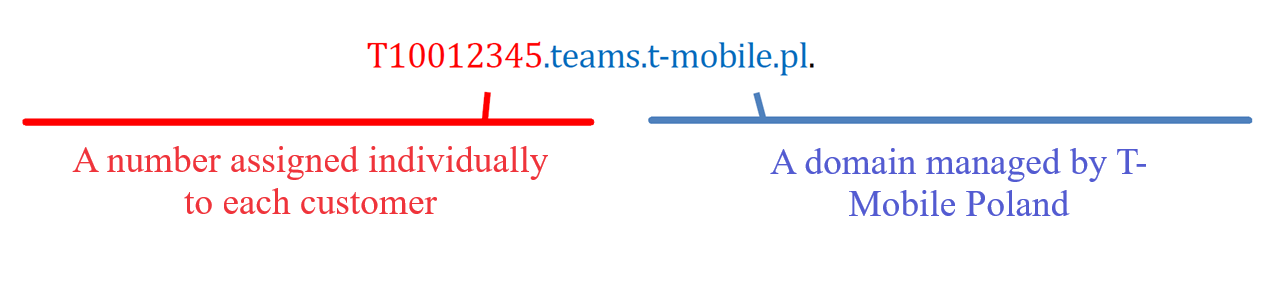
<span class="ui-provider a b c d e f g h i j k l m n o p q r s t u v w x y z ab ac ae af ag ah ai aj ak" dir="ltr">T-Mobile has assigned your company a domain in the following format. You can find your individual number in the Order section of your contract:</span>

<div class="OutlineElement Ltr SCXW114617269 BCX8" id="bkmrk-t10012345.teams.t-mo"><div class="TableContainer Ltr SCXW114617269 BCX8"><div aria-hidden="true" class="WACAltTextDescribedBy SCXW114617269 BCX8" id="bkmrk--2"></div></div></div>[![image.png](https://bookstack.uc.t-mobile.pl/uploads/images/gallery/2024-02/scaled-1680-/image.png)](https://bookstack.uc.t-mobile.pl/uploads/images/gallery/2024-02/image.png)

<span class="ui-provider a b c d e f g h i j k l m n o p q r s t u v w x y z ab ac ae af ag ah ai aj ak" dir="ltr">This domain will be used for voice communication in MS Teams. You need to add this domain to the **<span style="color: rgb(226, 0, 116);">Admin Center</span>** panel of your organization on the <span style="color: rgb(226, 0, 116);">**Microsoft 365 portal**</span>.</span>

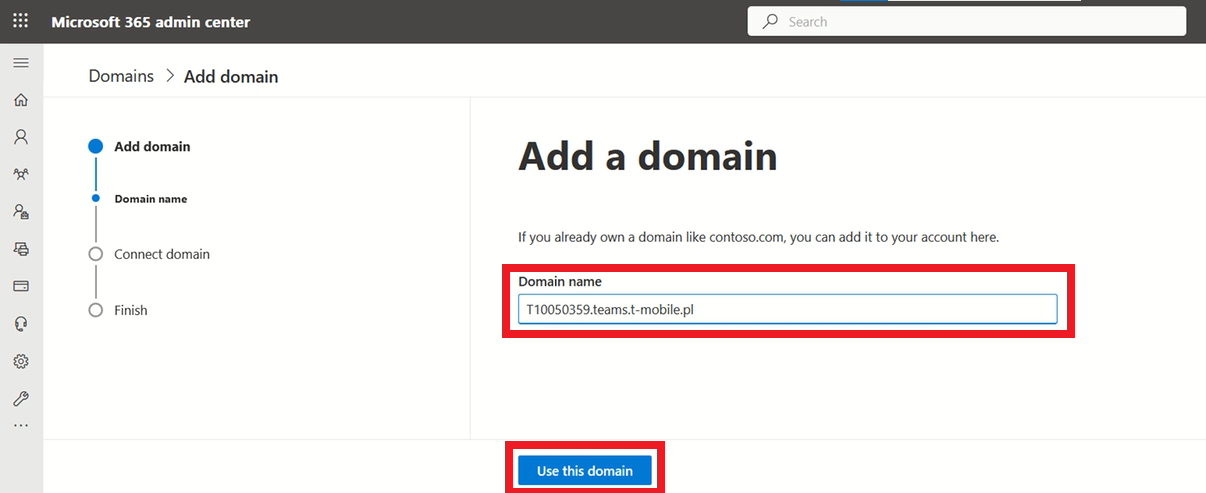
<span class="TextRun SCXW114617269 BCX8" data-contrast="auto" lang="PL-PL" xml:lang="PL-PL"><span class="NormalTextRun SCXW114617269 BCX8"><span style="color: rgb(226, 68, 116);">**1.**</span> <span class="ui-provider a b c d e f g h i j k l m n o p q r s t u v w x y z ab ac ae af ag ah ai aj ak" dir="ltr">Once you have logged in, go to: **Settings** &gt; **Domains** &gt; **Add domain**. Enter the domain assigned to your company by T-Mobile and click **Use this domain**.</span></span></span>

[![image.png](https://bookstack.uc.t-mobile.pl/uploads/images/gallery/2023-11/scaled-1680-/Bn6image.png)](https://bookstack.uc.t-mobile.pl/uploads/images/gallery/2023-11/Bn6image.png)

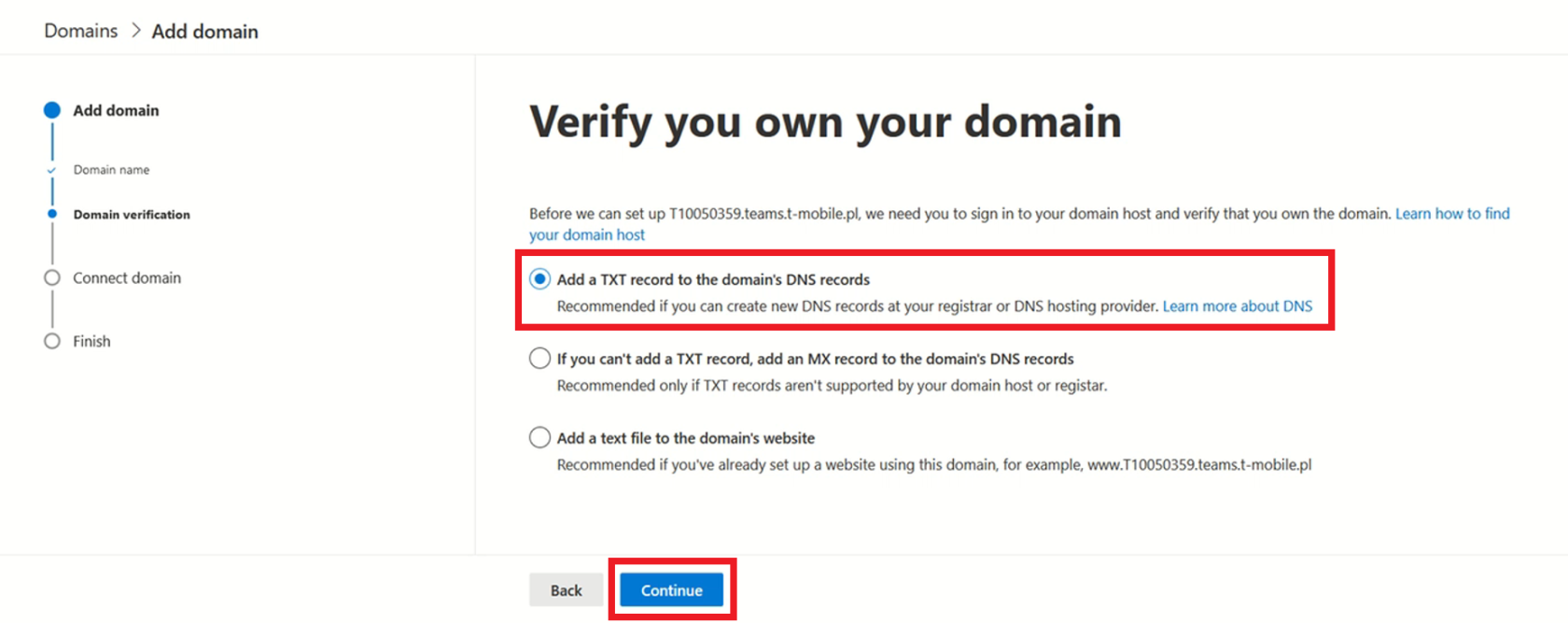
<span class="WACImageContainer NoPadding AttachedToBeginning DragDrop SCXW114617269 BCX8" role="presentation"><span style="color: rgb(226, 68, 116);">**2.**</span> <span class="ui-provider a b c d e f g h i j k l m n o p q r s t u v w x y z ab ac ae af ag ah ai aj ak" dir="ltr">Verify the domain, by selecting: **Add a TXT record to the domain's DNS records**.</span></span>

[![image.png](https://bookstack.uc.t-mobile.pl/uploads/images/gallery/2023-11/scaled-1680-/GXMimage.png)](https://bookstack.uc.t-mobile.pl/uploads/images/gallery/2023-11/GXMimage.png)

<span class="ui-provider a b c d e f g h i j k l m n o p q r s t u v w x y z ab ac ae af ag ah ai aj ak" dir="ltr">Click **Continue** to generate a **TXT record** to verify domain ownership.</span>

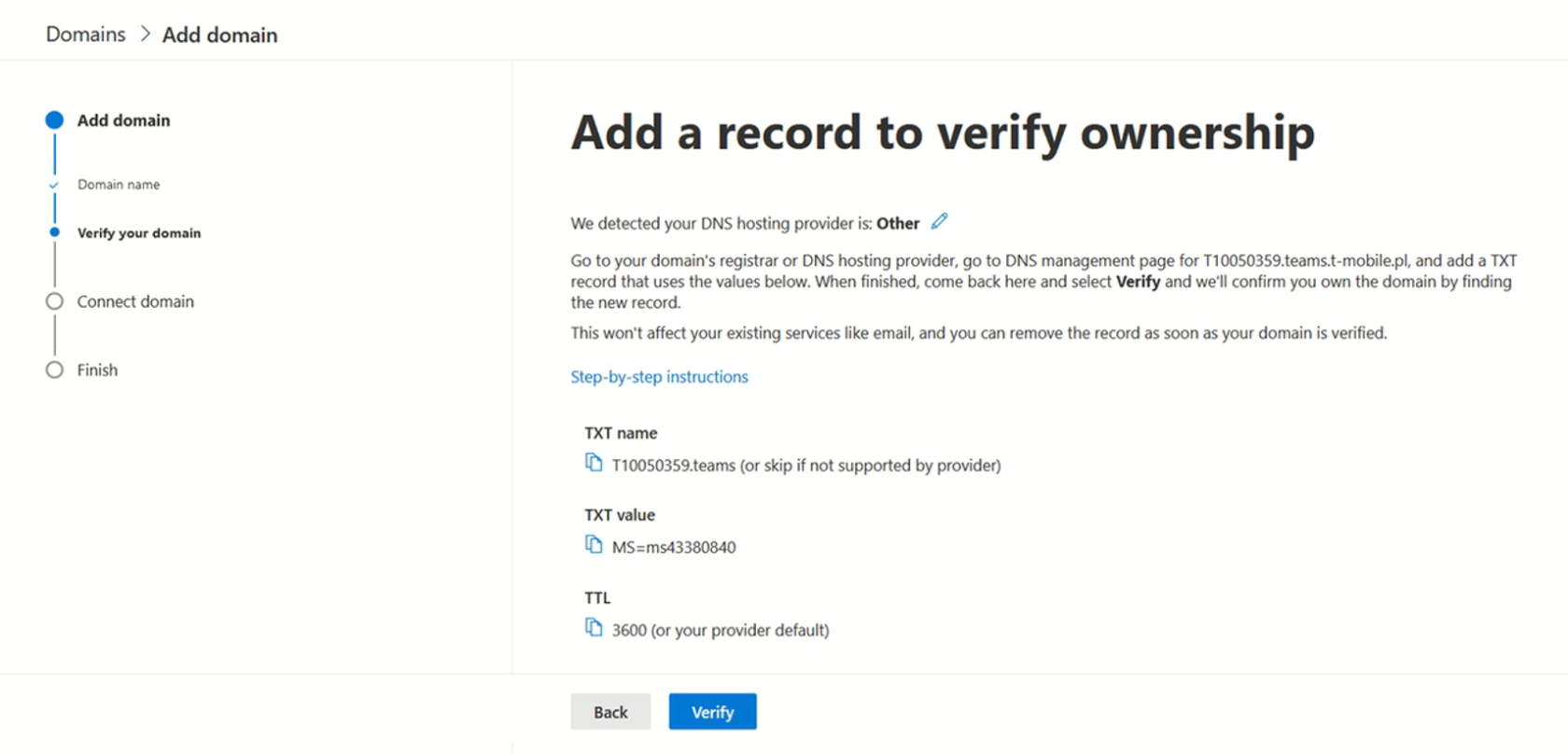
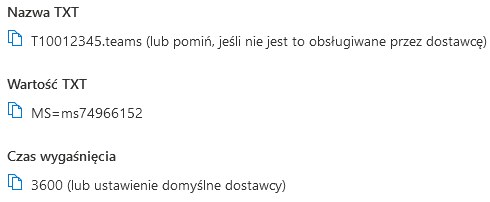
<span class="TextRun SCXW114617269 BCX8" data-contrast="auto" lang="PL-PL" xml:lang="PL-PL"><span class="NormalTextRun SCXW114617269 BCX8" data-ccp-parastyle="Body Text">**<span style="color: rgb(226, 68, 116);">3.</span>** The DNS record information will be displayed.</span></span>
<span class="WACImageGroupContainer SCXW114617269 BCX8"><span class="WACImageContainer NoPadding AttachedToBeginning DragDrop SCXW114617269 BCX8" role="presentation">![](https://bookstack.uc.t-mobile.pl/uploads/images/gallery/2023-11/embedded-image-2fe8h0rd.png)</span></span><span class="EOP SCXW114617269 BCX8" data-ccp-props="{"134245417":false,"201341983":0,"335559685":3018,"335559738":14,"335559740":252}"> </span>

Make sure to leave the **Microsoft Admin Panel** open in your browser and email the following address: **uc@t-mobile.pl**. For the subject line, use "Autoryzacja domeny". In the body of the email, type the value of the **TXT record**, for example, "**MS=ms74966152**".

Once you receive a confirmation message from T-Mobile that the record has been created on the DNS servers, you can move on to the next step.

<span style="color: rgb(226, 68, 116);">**<span class="EOP SCXW114617269 BCX8" data-ccp-props="{"134245417":false,"201341983":0,"335551550":6,"335551620":6,"335559685":3018,"335559738":14,"335559740":252,"469777462":[9781],"469777927":[0],"469777928":[1]}"> 4. </span>**</span><span class="WACImageGroupContainer SCXW114617269 BCX8"><span class="WACImageContainer NoPadding AttachedToBeginning DragDrop SCXW114617269 BCX8" role="presentation"><span class="TextRun SCXW114617269 BCX8" data-contrast="auto" lang="CS-CZ" xml:lang="CS-CZ"><span class="NormalTextRun SpellingErrorV2Themed SCXW114617269 BCX8"><span class="ui-provider a b c d e f g h i j k l m n o p q r s t u v w x y z ab ac ae af ag ah ai aj ak" dir="ltr">Now, return to the **Microsoft Admin Panel** page and verify the domain by clicking the **Verify** button.</span></span></span></span></span>

[![image.png](https://bookstack.uc.t-mobile.pl/uploads/images/gallery/2023-11/scaled-1680-/xyFimage.png)](https://bookstack.uc.t-mobile.pl/uploads/images/gallery/2023-11/xyFimage.png)

<span class="ui-provider a b c d e f g h i j k l m n o p q r s t u v w x y z ab ac ae af ag ah ai aj ak" dir="ltr">If the following message appears after verification, wait about 10 minutes and try again. If the verification fails again, wait an hour and try again.</span>

<span class="EOP SCXW114617269 BCX8" data-ccp-props="{"134245417":false,"335559685":3018}">[![3ddaa319-ca04-4191-9211-14f536b98e03.png](https://bookstack.uc.t-mobile.pl/uploads/images/gallery/2023-11/scaled-1680-/3ddaa319-ca04-4191-9211-14f536b98e03.png)](https://bookstack.uc.t-mobile.pl/uploads/images/gallery/2023-11/3ddaa319-ca04-4191-9211-14f536b98e03.png)</span>

<span class="EOP SCXW114617269 BCX8" data-ccp-props="{"134245417":false,"335559685":3018}"> </span>

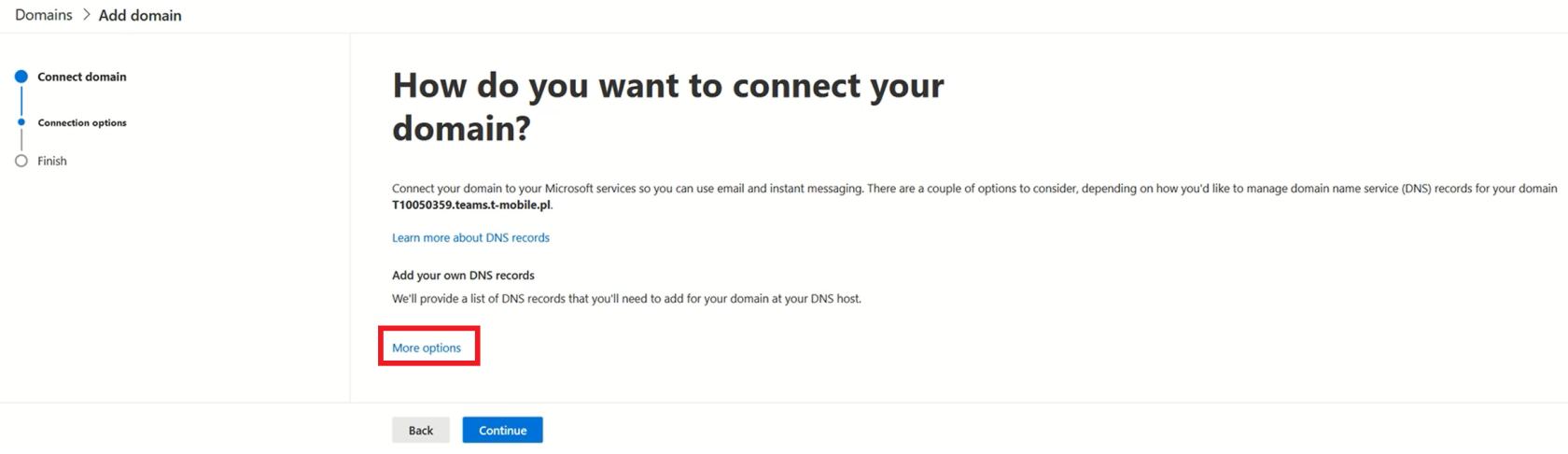
<span class="WACImageContainer NoPadding AttachedToBeginning DragDrop SCXW114617269 BCX8" role="presentation"><span style="color: rgb(226, 68, 116);">**5.** </span></span><span class="TextRun SCXW114617269 BCX8" data-contrast="auto" lang="PL-PL" xml:lang="PL-PL"><span class="NormalTextRun SCXW114617269 BCX8"><span class="ui-provider a b c d e f g h i j k l m n o p q r s t u v w x y z ab ac ae af ag ah ai aj ak" dir="ltr">After verifying the **TXT record**, you will be asked "**How do you want to connect your domain?".** Select **<span style="color: rgb(226, 0, 116);">More options</span>.**</span></span></span>

[![image.png](https://bookstack.uc.t-mobile.pl/uploads/images/gallery/2023-11/scaled-1680-/cUrimage.png)](https://bookstack.uc.t-mobile.pl/uploads/images/gallery/2023-11/cUrimage.png)

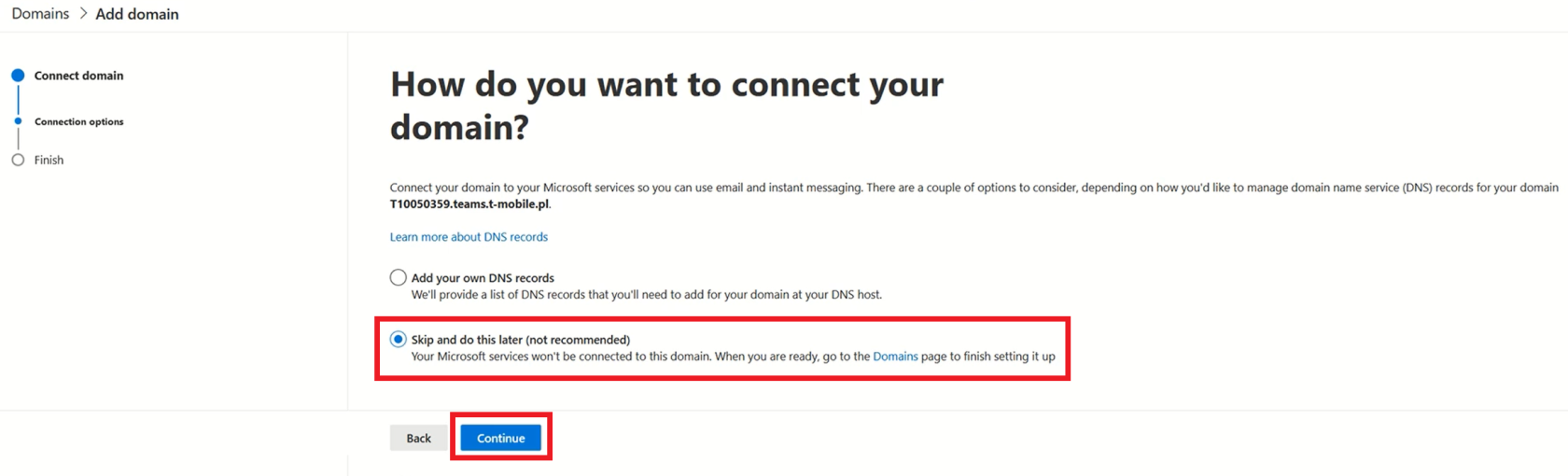
<span class="TextRun SCXW114617269 BCX8" data-contrast="auto" lang="PL-PL" xml:lang="PL-PL"><span class="NormalTextRun SCXW114617269 BCX8">**<span style="color: rgb(226, 68, 116);">6.</span>** <span class="ui-provider a b c d e f g h i j k l m n o p q r s t u v w x y z ab ac ae af ag ah ai aj ak" dir="ltr">Then, select **Skip and do this later (not recommended)** and then click **Continue**</span></span><span class="NormalTextRun SCXW114617269 BCX8">.</span></span><span class="EOP SCXW114617269 BCX8" data-ccp-props="{"134245417":false,"335559685":3018}"> </span>

[![image.png](https://bookstack.uc.t-mobile.pl/uploads/images/gallery/2023-11/scaled-1680-/WC2image.png)](https://bookstack.uc.t-mobile.pl/uploads/images/gallery/2023-11/WC2image.png)

<span class="EOP SCXW114617269 BCX8" data-ccp-props="{"134245417":false,"335559685":3018}"> </span>

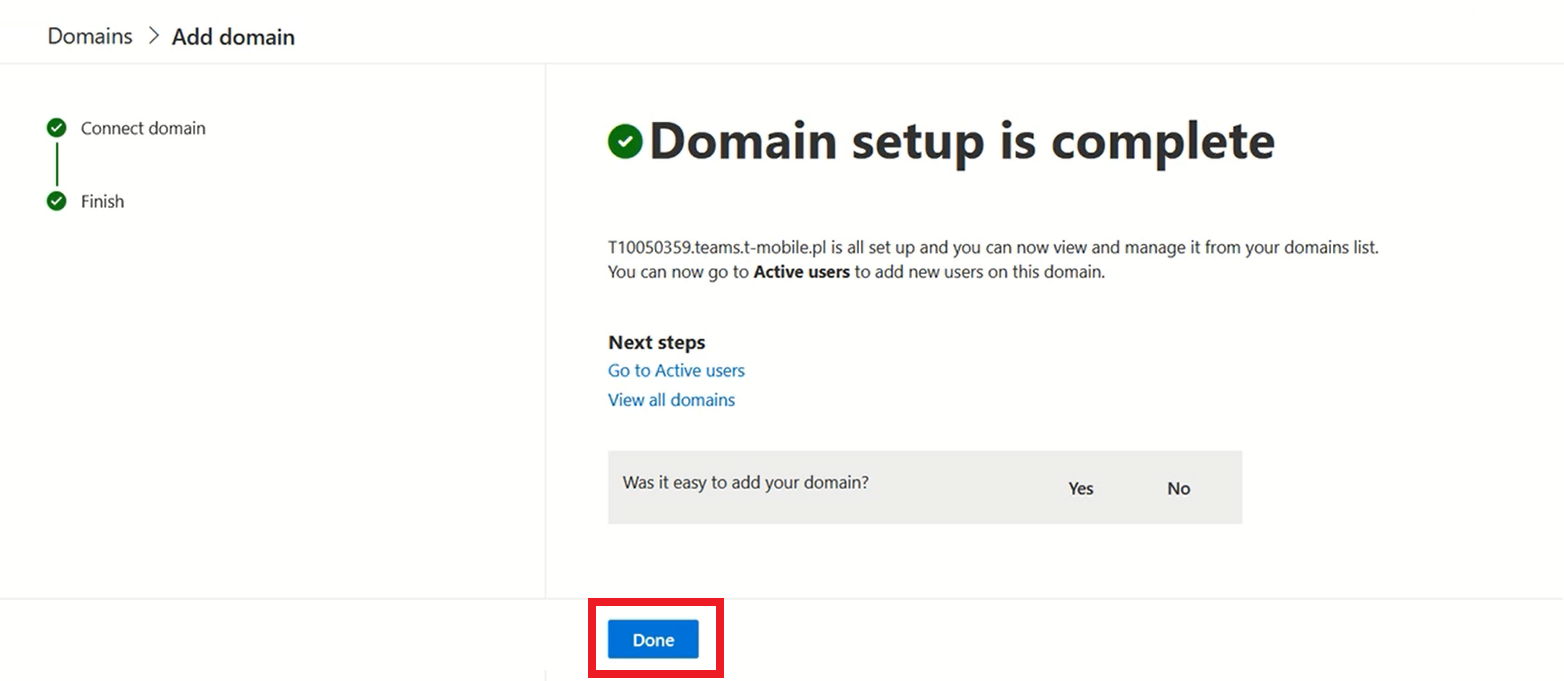
<span class="TextRun SCXW114617269 BCX8" data-contrast="auto" lang="PL-PL" xml:lang="PL-PL"><span class="NormalTextRun SCXW114617269 BCX8">**<span style="color: rgb(226, 68, 116);">7. </span>**<span class="ui-provider a b c d e f g h i j k l m n o p q r s t u v w x y z ab ac ae af ag ah ai aj ak" dir="ltr">When the domain setup is complete, click **Done.**</span></span></span>

[![image.png](https://bookstack.uc.t-mobile.pl/uploads/images/gallery/2023-11/scaled-1680-/5vgimage.png)](https://bookstack.uc.t-mobile.pl/uploads/images/gallery/2023-11/5vgimage.png)

<span class="EOP SCXW114617269 BCX8" data-ccp-props="{"134245417":false,"335559685":3018}"> </span>

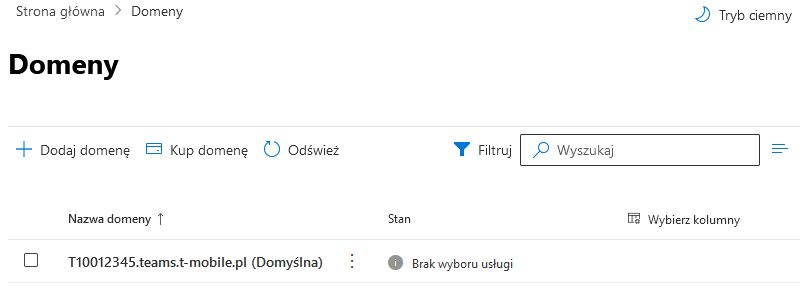
<span style="color: rgb(226, 68, 116);">**<span class="WACImageGroupContainer SCXW114617269 BCX8" style="outline-color: var(--color-primary); font-style: normal; font-variant-ligatures: normal; font-variant-caps: normal; font-size: 14px; font-family: -apple-system, BlinkMacSystemFont, 'Segoe UI', Oxygen, Ubuntu, Roboto, Cantarell, 'Fira Sans', 'Droid Sans', 'Helvetica Neue', sans-serif;"><span class="WACImageContainer NoPadding AttachedToBeginning DragDrop SCXW114617269 BCX8" role="presentation" style="outline-color: var(--color-primary);">8. </span></span>**</span>Once the domain setup is complete, go to **Settings** &gt; **Domains.** The correct value in the **Status** column is "**No service selected**". This means that the domain has been configured correctly.
<span class="WACImageGroupContainer SCXW114617269 BCX8"><span class="WACImageContainer NoPadding AttachedToBeginning DragDrop SCXW114617269 BCX8" role="presentation">![](https://bookstack.uc.t-mobile.pl/uploads/images/gallery/2023-11/embedded-image-pf61i2mb.png)</span></span>

<span class="ui-provider a b c d e f g h i j k l m n o p q r s t u v w x y z ab ac ae af ag ah ai aj ak" dir="ltr">Now you can proceed to the next instruction.</span>

# Creating a user for integration with the telephony network

<span class="TextRun SCXW150732740 BCX8" data-contrast="auto" lang="PL-PL" xml:lang="PL-PL"><span class="NormalTextRun SCXW150732740 BCX8" data-ccp-parastyle="Body Text"><video controls="controls" height="403" style="width: 806px; height: 403px;" width="806"> <source src="https://wpm.uc.t-mobile.pl/attachments/Tworzenie_uzytkownika.mp4" type="video/mp4"></source></video></span></span>

<span class="ui-provider a b c d e f g h i j k l m n o p q r s t u v w x y z ab ac ae af ag ah ai aj ak" dir="ltr">To integrate a tenant with the T-Mobile network, you need to create a user and assign them a license with the Teams Phone add-on. After the integration work is complete, this user can be deleted. This will allow you to recover the license.</span>

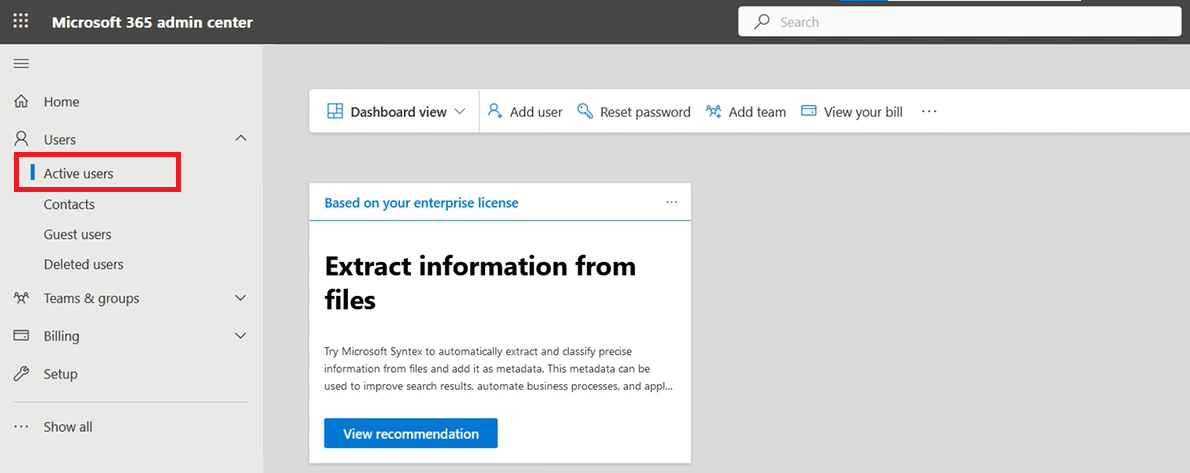
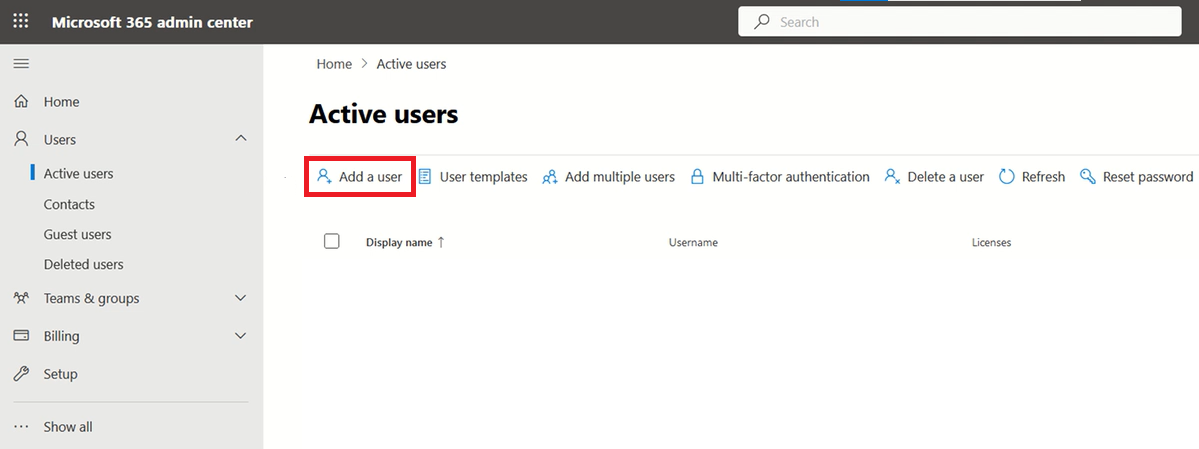
<span style="color: rgb(226, 0, 116);">**<span class="EOP SCXW150732740 BCX8" data-ccp-props="{"134245417":false,"201341983":0,"335551550":6,"335551620":6,"335559685":2040,"335559737":2,"335559738":282,"335559740":252}">1.</span>** <span class="EOP SCXW150732740 BCX8" data-ccp-props="{"134245417":false,"201341983":0,"335551550":6,"335551620":6,"335559685":2040,"335559737":2,"335559738":282,"335559740":252}"><span style="color: rgb(0, 0, 0);"><span class="ui-provider a b c d e f g h i j k l m n o p q r s t u v w x y z ab ac ae af ag ah ai aj ak" dir="ltr">From the menu on the left, select **Users** &gt; **Active Users**.</span></span></span></span>

[![obraz.png](https://bookstack.uc.t-mobile.pl/uploads/images/gallery/2023-11/scaled-1680-/Hi6obraz.png)](https://bookstack.uc.t-mobile.pl/uploads/images/gallery/2023-11/Hi6obraz.png)

<span style="color: rgb(226, 0, 116);">**2.** <span style="color: rgb(0, 0, 0);"><span class="ui-provider a b c d e f g h i j k l m n o p q r s t u v w x y z ab ac ae af ag ah ai aj ak" dir="ltr">Select **Add a user**.</span></span></span>

[![obraz.png](https://bookstack.uc.t-mobile.pl/uploads/images/gallery/2023-11/scaled-1680-/oMyobraz.png)](https://bookstack.uc.t-mobile.pl/uploads/images/gallery/2023-11/oMyobraz.png)

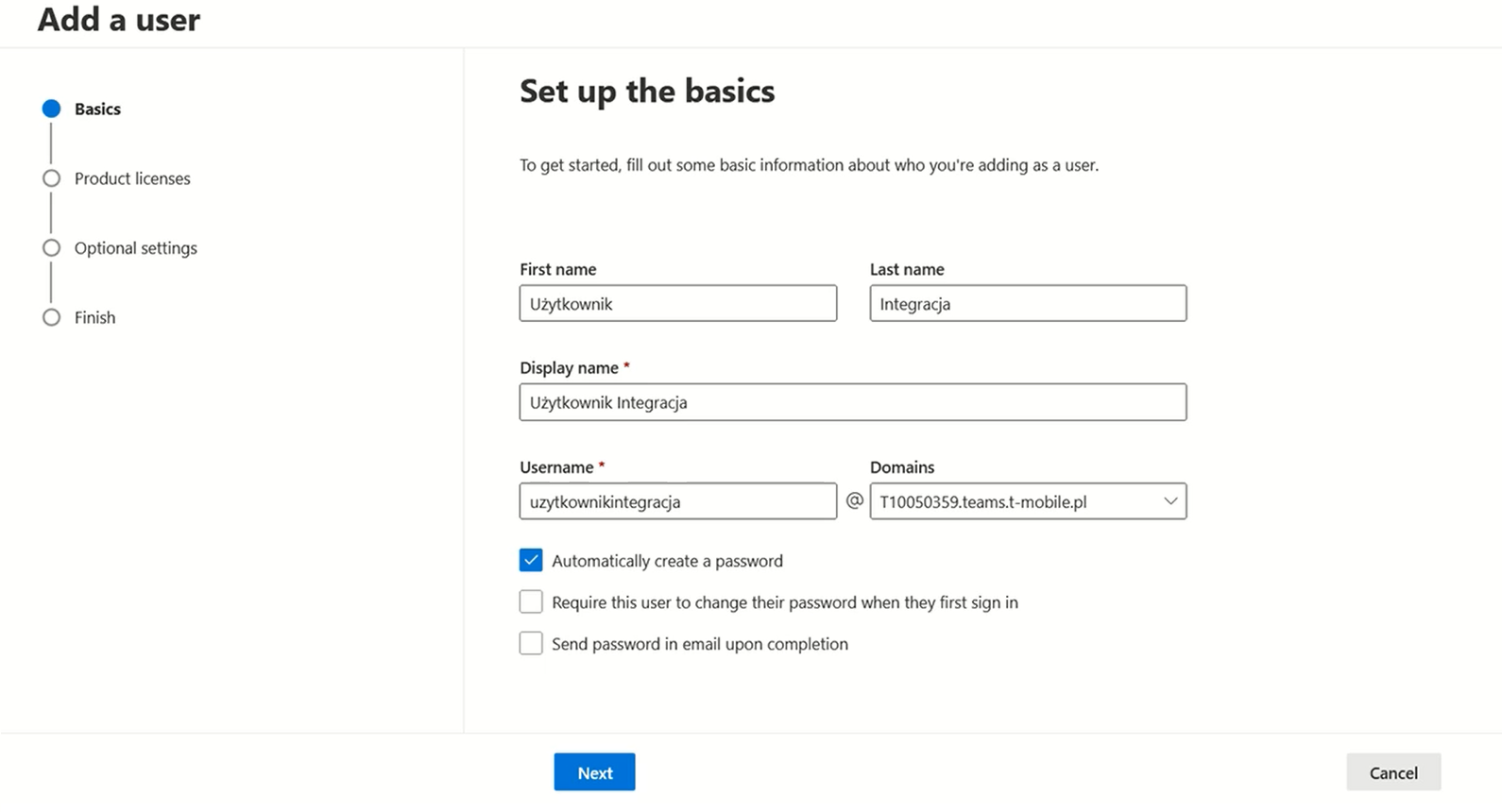
<span class="WACImageContainer NoPadding AttachedToBeginning DragDrop SCXW150732740 BCX8" role="presentation"><span style="color: rgb(226, 68, 116);">**3.** </span></span><span class="TextRun SCXW150732740 BCX8" data-contrast="auto" lang="PL-PL" xml:lang="PL-PL"><span class="NormalTextRun SCXW150732740 BCX8"><span class="ui-provider a b c d e f g h i j k l m n o p q r s t u v w x y z ab ac ae af ag ah ai aj ak" dir="ltr">Fill in the user's information and select the password settings. Enter the domain that was assigned to your company by T-Mobile, for example: **T10012345.teams.t-mobile.pl**.</span></span></span><span class="EOP SCXW150732740 BCX8" data-ccp-props="{"134245417":false,"335559685":3018}"><span class="LineBreakBlob BlobObject DragDrop SCXW150732740 BCX8"><span class="SCXW150732740 BCX8">  
</span></span></span>

[![image.png](https://bookstack.uc.t-mobile.pl/uploads/images/gallery/2023-11/scaled-1680-/oywimage.png)](https://bookstack.uc.t-mobile.pl/uploads/images/gallery/2023-11/oywimage.png)

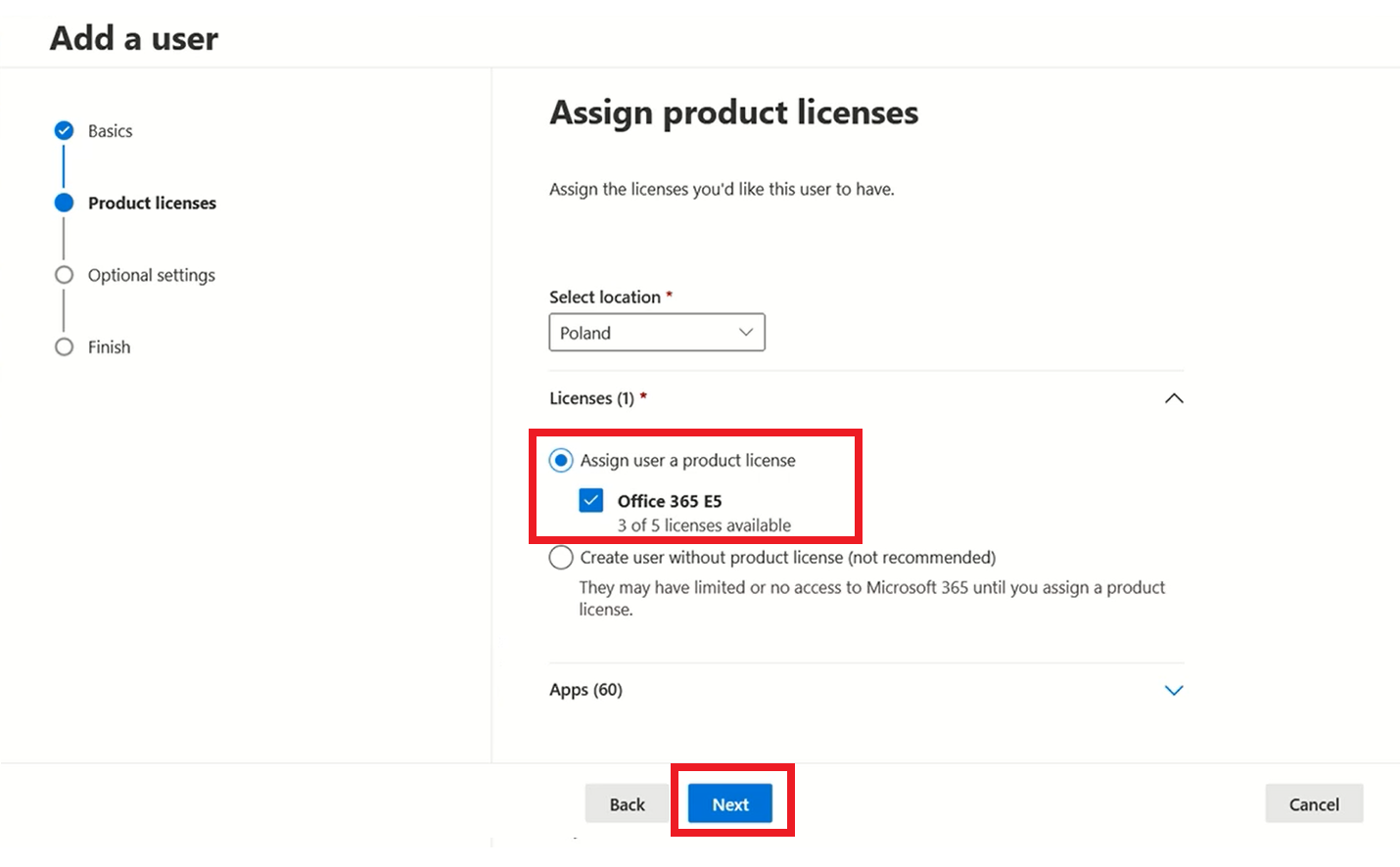
<span class="EOP SCXW150732740 BCX8" data-ccp-props="{"134245417":false,"335559685":3018}">**<span style="color: rgb(226, 68, 116);"> 4.</span>** <span class="ui-provider a b c d e f g h i j k l m n o p q r s t u v w x y z ab ac ae af ag ah ai aj ak" dir="ltr">Assign the user a license that includes **Microsoft Teams.** For example:</span></span>

- <span style="color: rgb(226, 0, 116);"><span style="color: rgb(0, 0, 0);"><span class="TextRun SCXW150732740 BCX8" data-contrast="none" lang="EN-GB" xml:lang="EN-GB"><span class="NormalTextRun SCXW150732740 BCX8">Microsoft </span><span class="NormalTextRun SCXW150732740 BCX8">365 E5</span><span class="NormalTextRun SCXW150732740 BCX8">, </span></span></span></span>
- <span style="color: rgb(226, 0, 116);"><span style="color: rgb(0, 0, 0);"><span class="TextRun SCXW150732740 BCX8" data-contrast="none" lang="EN-GB" xml:lang="EN-GB"><span class="NormalTextRun SCXW150732740 BCX8">M365 Business Basic</span></span><span class="TextRun SCXW150732740 BCX8" data-contrast="auto" lang="EN-GB" xml:lang="EN-GB"><span class="NormalTextRun SCXW150732740 BCX8">, </span></span></span></span>
- <span style="color: rgb(226, 0, 116);"><span style="color: rgb(0, 0, 0);"><span class="TextRun SCXW150732740 BCX8" data-contrast="none" lang="EN-GB" xml:lang="EN-GB"><span class="NormalTextRun SCXW150732740 BCX8">M365 Business Standard.</span></span></span></span>

[![image.png](https://bookstack.uc.t-mobile.pl/uploads/images/gallery/2023-11/scaled-1680-/HZ0image.png)](https://bookstack.uc.t-mobile.pl/uploads/images/gallery/2023-11/HZ0image.png)

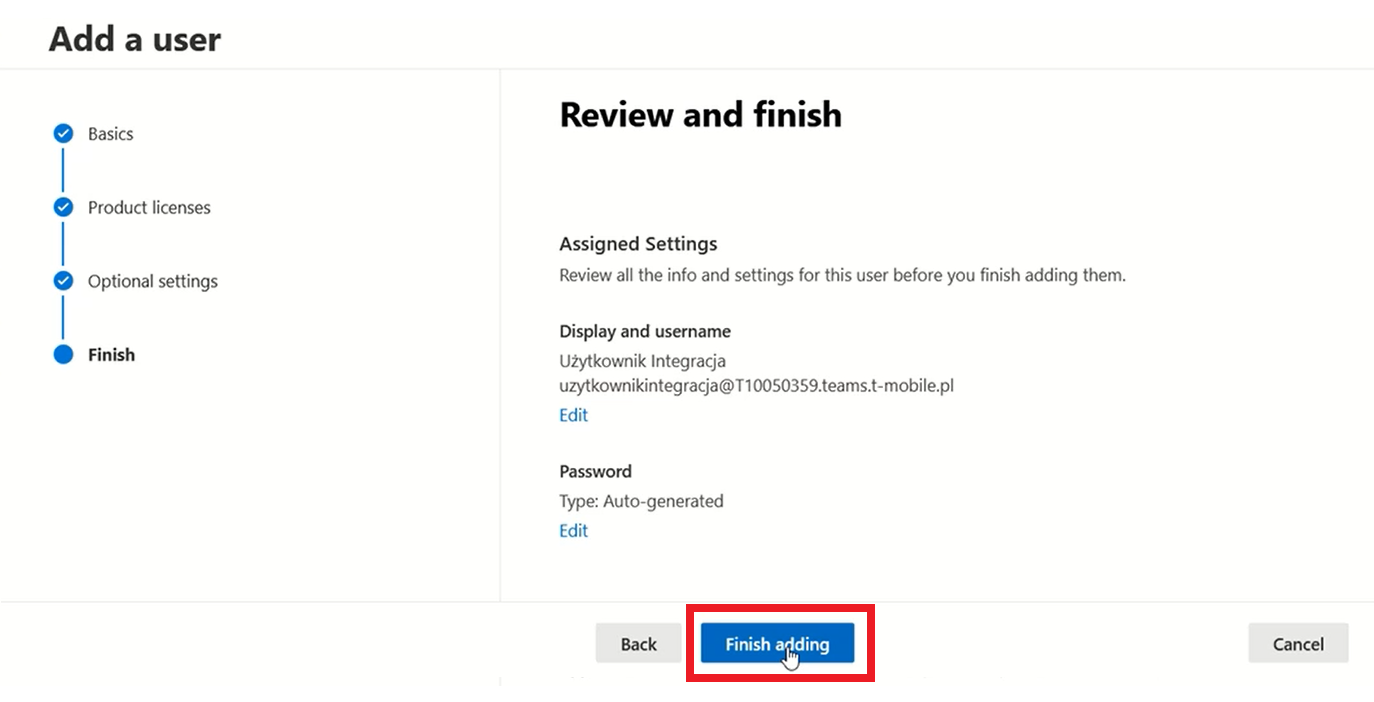
<span class="TextRun SCXW183439634 BCX8" data-contrast="auto" lang="PL-PL" xml:lang="PL-PL"><span class="NormalTextRun SCXW183439634 BCX8"><span style="color: rgb(226, 68, 116);">**5.**</span> <span class="ui-provider a b c d e f g h i j k l m n o p q r s t u v w x y z ab ac ae af ag ah ai aj ak" dir="ltr">Follow the next steps until the user creation is complete.</span></span></span>

[![image.png](https://bookstack.uc.t-mobile.pl/uploads/images/gallery/2023-11/scaled-1680-/Sncimage.png)](https://bookstack.uc.t-mobile.pl/uploads/images/gallery/2023-11/Sncimage.png)

<span class="ui-provider a b c d e f g h i j k l m n o p q r s t u v w x y z ab ac ae af ag ah ai aj ak" dir="ltr">Once you have finished adding the user, you can proceed to the next instruction.</span>

# Teams Voice Services Configuration

<span class="TextRun SCXW136270634 BCX8" data-contrast="auto" lang="PL-PL" xml:lang="PL-PL"><span class="NormalTextRun SCXW136270634 BCX8" data-ccp-parastyle="Body Text"><video controls="controls" height="399" style="width: 798px; height: 399px;" width="798"> <source src="https://wpm.uc.t-mobile.pl/attachments/Konfiguracja_uslug_glosowych.mp4" type="video/mp4"></source></video></span></span>

<span class="ui-provider a b c d e f g h i j k l m n o p q r s t u v w x y z ab ac ae af ag ah ai aj ak" dir="ltr">The configuration will be performed in **Windows PowerShell**.</span>

You should have the **.NET Framework** add-on version **4.7.2** or later installed on your computer. If you don't have it, click the following link and install it: <span style="color: rgb(226, 0, 116);">**https://docs.microsoft.com/en-us/dotnet/framework/install/**</span>

##### **Starting PowerShell**

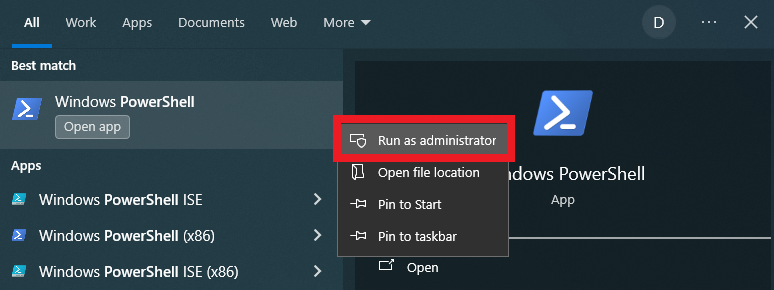
<span class="ui-provider a b c d e f g h i j k l m n o p q r s t u v w x y z ab ac ae af ag ah ai aj ak" dir="ltr">In the Start menu, search for the **PowerShell**, right-click the icon, and select **Run as administrator**.</span>

[![image.png](https://bookstack.uc.t-mobile.pl/uploads/images/gallery/2023-11/scaled-1680-/nJVimage.png)](https://bookstack.uc.t-mobile.pl/uploads/images/gallery/2023-11/nJVimage.png)


#### **Checking the version of PowerShell**

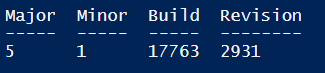
To make sure that you will be able to execute the commands described in the following sections, check the version of the **PowerShell.** <span class="ui-provider a b c d e f g h i j k l m n o p q r s t u v w x y z ab ac ae af ag ah ai aj ak" dir="ltr">Open **PowerShell** and enter the following command:</span>

<p class="callout info">**<span class="TextRun SCXW171973274 BCX8" data-contrast="none" lang="PL-PL" style="color: rgb(226, 68, 116);" xml:lang="PL-PL"><span class="NormalTextRun SCXW171973274 BCX8">$</span><span class="NormalTextRun SpellingErrorV2Themed SCXW171973274 BCX8">PSVersionTable.PSVersion</span></span><span class="EOP SCXW171973274 BCX8" data-ccp-props="{"134245417":false,"335559685":3018}"> </span>**</p>

<span class="WACImageGroupContainer SCXW171973274 BCX8"><span class="WACImageContainer NoPadding AttachedToBeginning DragDrop SCXW171973274 BCX8" role="presentation">![](https://bookstack.uc.t-mobile.pl/uploads/images/gallery/2023-11/embedded-image-vvksqjuz.png)</span></span>

<span class="ui-provider a b c d e f g h i j k l m n o p q r s t u v w x y z ab ac ae af ag ah ai aj ak" dir="ltr">The **PowerShell** application should have version **5.1 (Major:** **5,** **Minor: 1**) or **higher.** If it is lower, update **PowerShell** according to the instructions on the following page:</span>

[<span class="TextRun Underlined SCXW171973274 BCX8" data-contrast="none" lang="PL-PL" xml:lang="PL-PL"><span class="NormalTextRun SCXW171973274 BCX8" data-ccp-charstyle="Hyperlink">https://docs.microsoft.com/en-us/powershell/scripting/windows-powershell/install/installing-windows-powershell#upgrading-existing-windows-powershell</span></span>](https://docs.microsoft.com/en-us/powershell/scripting/windows-powershell/install/installing-windows-powershell#upgrading-existing-windows-powershell)<span class="TextRun SCXW171973274 BCX8" data-contrast="auto" lang="PL-PL" xml:lang="PL-PL"><span class="NormalTextRun SCXW171973274 BCX8"> </span></span><span class="EOP SCXW171973274 BCX8" data-ccp-props="{"134245417":false,"335559685":3018}"> </span>

<span class="ui-provider a b c d e f g h i j k l m n o p q r s t u v w x y z ab ac ae af ag ah ai aj ak" dir="ltr">If the version information does not appear after issuing the **$PSVersionTable.PSVersion** command, use the following command:</span>

<p class="callout info">**<span class="TextRun SCXW171973274 BCX8" data-contrast="none" lang="PL-PL" xml:lang="PL-PL"><span class="NormalTextRun SCXW171973274 BCX8" style="color: rgb(226, 68, 116);">$</span><span class="NormalTextRun SpellingErrorV2Themed SCXW171973274 BCX8"><span style="color: rgb(226, 68, 116);">host.Version</span>.</span></span>**</p>

#### **Installing required modules**

Install the required **modules** to properly configure the service. Individually copy the following commands highlighted in blue, paste them into **PowerShell** and execute by pressing **Enter.**

<p class="callout info"><span style="color: rgb(226, 68, 116);">**<span class="TextRun SCXW30550165 BCX8" data-contrast="none" lang="EN-US" xml:lang="EN-US"><span class="NormalTextRun SCXW30550165 BCX8">\[</span><span class="NormalTextRun SpellingErrorV2Themed SCXW30550165 BCX8">Net.ServicePointManager</span><span class="NormalTextRun ContextualSpellingAndGrammarErrorV2Themed SCXW30550165 BCX8">\]::</span><span class="NormalTextRun SpellingErrorV2Themed SCXW30550165 BCX8">SecurityProtocol</span> <span class="NormalTextRun SCXW30550165 BCX8">= \[</span><span class="NormalTextRun SpellingErrorV2Themed SCXW30550165 BCX8">Net.SecurityProtocolType</span><span class="NormalTextRun ContextualSpellingAndGrammarErrorV2Themed SCXW30550165 BCX8">\]::</span><span class="NormalTextRun SCXW30550165 BCX8">Tls12</span></span>**<span class="EOP SCXW30550165 BCX8" data-ccp-props="{"134245417":false,"335559685":3018}"> </span></span></p>

<p class="callout info"><span style="color: rgb(226, 68, 116);">**<span class="TextRun SCXW30550165 BCX8" data-contrast="none" lang="EN-GB" xml:lang="EN-GB"><span class="NormalTextRun SCXW30550165 BCX8">Register-</span><span class="NormalTextRun SpellingErrorV2Themed SCXW30550165 BCX8">PSRepository</span><span class="NormalTextRun SCXW30550165 BCX8"> -Default</span></span>**<span class="EOP SCXW30550165 BCX8" data-ccp-props="{"134245417":false,"335559685":3018}"> </span></span></p>

<p class="callout info"><span style="color: rgb(226, 68, 116);">**<span class="TextRun SCXW30550165 BCX8" data-contrast="none" lang="EN-GB" xml:lang="EN-GB"><span class="NormalTextRun SCXW30550165 BCX8">Install-Module -Name </span><span class="NormalTextRun SpellingErrorV2Themed SCXW30550165 BCX8">PowerShellGet</span><span class="NormalTextRun SCXW30550165 BCX8"> -Force -</span><span class="NormalTextRun SpellingErrorV2Themed SCXW30550165 BCX8">AllowClobber</span></span>** </span></p>

<p class="callout info"><span style="color: rgb(226, 68, 116);">**<span class="TextRun SCXW30550165 BCX8" data-contrast="none" lang="EN-GB" xml:lang="EN-GB"><span class="NormalTextRun SCXW30550165 BCX8">Install-Module -Name </span><span class="NormalTextRun SpellingErrorV2Themed SCXW30550165 BCX8">MicrosoftTeams</span><span class="NormalTextRun SCXW30550165 BCX8"> -Force -</span><span class="NormalTextRun SpellingErrorV2Themed SCXW30550165 BCX8">AllowClobber</span></span>**<span class="EOP SCXW30550165 BCX8" data-ccp-props="{"134245417":false,"335559685":3018}"> </span></span></p>

<p class="callout info"><span style="color: rgb(226, 68, 116);">**<span class="TextRun SCXW30550165 BCX8" data-contrast="none" lang="EN-US" xml:lang="EN-US"><span class="NormalTextRun SCXW30550165 BCX8">Update-Module </span><span class="NormalTextRun SpellingErrorV2Themed SCXW30550165 BCX8">MicrosoftTeams</span></span>**</span></p>

<p class="callout info">**<span style="color: rgb(226, 68, 116);"><span class="TextRun SCXW30550165 BCX8" data-contrast="none" lang="EN-GB" xml:lang="EN-GB"><span class="NormalTextRun SCXW30550165 BCX8">Set-</span><span class="NormalTextRun SpellingErrorV2Themed SCXW30550165 BCX8">ExecutionPolicy</span> <span class="NormalTextRun SpellingErrorV2Themed SCXW30550165 BCX8">RemoteSigned</span></span></span>**</p>

<p class="callout info">**<span style="color: rgb(226, 68, 116);"><span class="TextRun SCXW30550165 BCX8" data-contrast="none" lang="EN-US" xml:lang="EN-US"><span class="NormalTextRun SCXW30550165 BCX8">Import-Module -Name </span><span class="NormalTextRun SpellingErrorV2Themed SCXW30550165 BCX8">MicrosoftTeams</span></span></span>**</p>

<p class="callout info">**<span style="color: rgb(226, 68, 116);"><span class="TextRun SCXW30550165 BCX8" data-contrast="none" lang="PL-PL" xml:lang="PL-PL"><span class="NormalTextRun SCXW30550165 BCX8">Set-</span><span class="NormalTextRun SpellingErrorV2Themed SCXW30550165 BCX8">ExecutionPolicy</span> <span class="NormalTextRun SpellingErrorV2Themed SCXW30550165 BCX8">Restricted</span></span></span>**</p>

#### **Logging in to the tenant in the MS Teams organization**

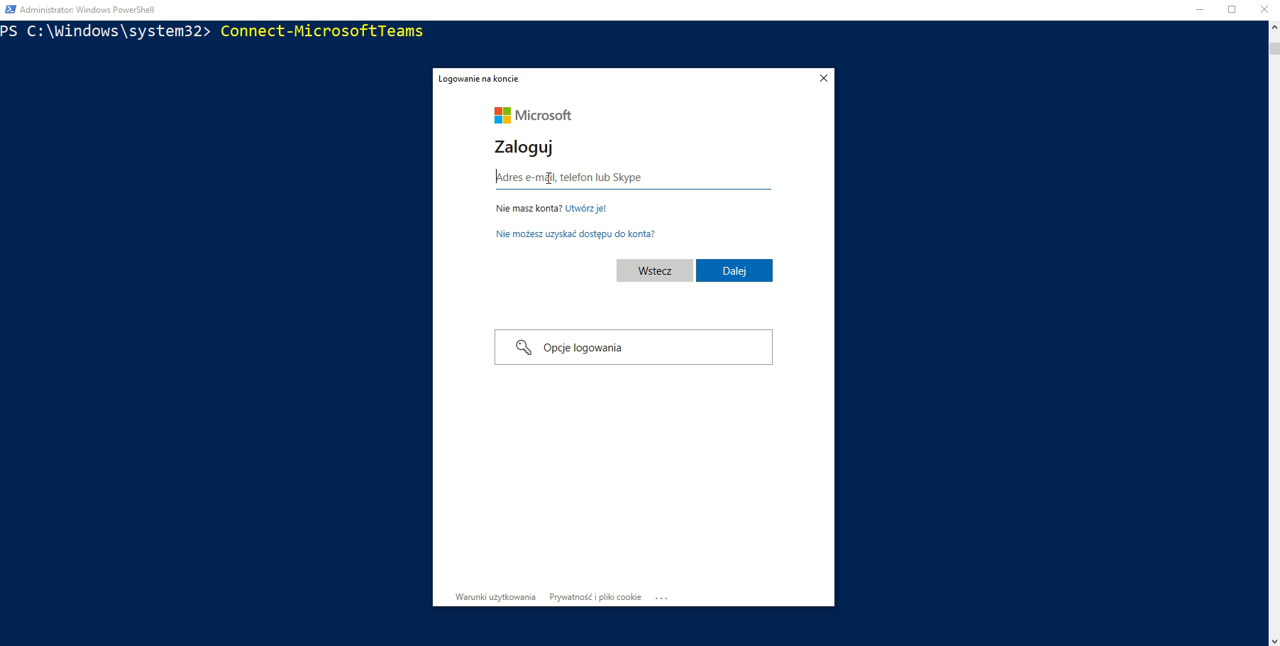
<span class="ui-provider a b c d e f g h i j k l m n o p q r s t u v w x y z ab ac ae af ag ah ai aj ak" dir="ltr">Copy the following command, paste it into the **PowerShell** and execute by pressing **Enter.**</span>

<p class="callout info">**<span style="color: rgb(226, 68, 116);"><span class="TextRun SCXW17773935 BCX8" data-contrast="none" lang="PL-PL" xml:lang="PL-PL"><span class="NormalTextRun SCXW17773935 BCX8">Connect-</span><span class="NormalTextRun SpellingErrorV2Themed SCXW17773935 BCX8">MicrosoftTeams</span></span></span>**</p>

[![image.png](https://bookstack.uc.t-mobile.pl/uploads/images/gallery/2023-11/scaled-1680-/aYVimage.png)](https://bookstack.uc.t-mobile.pl/uploads/images/gallery/2023-11/aYVimage.png)

Log in with a user account with **administrator privileges** in the tenant. The account with administrator privileges is the one used to create the new domain in the **Adding a New Domain to the Microsoft 365 Administration Center** instructions.

#### **Configuring routing for phone calls**

Individually copy the following commands highlighted in blue, paste them into **PowerShell** and execute by pressing **Enter.**

<p class="callout info"><span style="color: rgb(226, 68, 116);">**<span class="TextRun SCXW49396621 BCX8" data-contrast="none" lang="EN-US" xml:lang="EN-US"><span class="NormalTextRun SCXW49396621 BCX8">Set-</span><span class="NormalTextRun SpellingErrorV2Themed SCXW49396621 BCX8">CsOnlinePstnUsage</span><span class="NormalTextRun SCXW49396621 BCX8"> -Identity Global -Usage @{Add="TMobileRouting"}</span></span>** </span></p>

<p class="callout info">**<span style="color: rgb(226, 68, 116);"><span class="TextRun SCXW49396621 BCX8" data-contrast="none" lang="EN-GB" xml:lang="EN-GB"><span class="NormalTextRun SCXW49396621 BCX8">Set-</span><span class="NormalTextRun SpellingErrorV2Themed SCXW49396621 BCX8">CsOnlineVoiceRoutingPolicy</span><span class="NormalTextRun SCXW49396621 BCX8"> -Identity Global -</span><span class="NormalTextRun SpellingErrorV2Themed SCXW49396621 BCX8">OnlinePSTNUsages</span><span class="NormalTextRun SCXW49396621 BCX8"> "</span><span class="NormalTextRun SpellingErrorV2Themed SCXW49396621 BCX8">TMobileRouting</span><span class="NormalTextRun SCXW49396621 BCX8">"</span></span></span>**</p>

<span class="ui-provider a b c d e f g h i j k l m n o p q r s t u v w x y z ab ac ae af ag ah ai aj ak" dir="ltr">In the last command, the domain <span style="color: rgb(226, 0, 116);">**<span style="background-color: rgb(241, 196, 15);">T10012345.teams.t-mobile.pl</span>**</span> should be replaced with the one that was assigned by T-Mobile.</span>

<p class="callout info">**<span style="color: rgb(226, 68, 116);"><span class="TextRun SCXW49396621 BCX8" data-contrast="none" lang="EN-GB" xml:lang="EN-GB"><span class="NormalTextRun SCXW49396621 BCX8">New-</span><span class="NormalTextRun SpellingErrorV2Themed SCXW49396621 BCX8">CsOnlineVoiceRoute</span><span class="NormalTextRun SCXW49396621 BCX8"> -Identity "</span><span class="NormalTextRun SpellingErrorV2Themed SCXW49396621 BCX8">TMobileRouting</span><span class="NormalTextRun SCXW49396621 BCX8">“</span><span class="NormalTextRun SCXW49396621 BCX8"> -</span><span class="NormalTextRun SpellingErrorV2Themed SCXW49396621 BCX8">NumberPattern</span> <span class="NormalTextRun ContextualSpellingAndGrammarErrorV2Themed SCXW49396621 BCX8">".\*</span><span class="NormalTextRun SCXW49396621 BCX8">" -</span><span class="NormalTextRun SpellingErrorV2Themed SCXW49396621 BCX8">OnlinePstnGatewayList</span> </span><span class="TextRun Highlight SCXW49396621 BCX8" data-contrast="none" lang="EN-GB" style="background-color: rgb(241, 196, 15);" xml:lang="EN-GB"><span class="NormalTextRun SCXW49396621 BCX8">T10012345</span><span class="NormalTextRun SCXW49396621 BCX8">.</span><span class="NormalTextRun SCXW49396621 BCX8">teams</span><span class="NormalTextRun SCXW49396621 BCX8">.t-mobile.</span><span class="NormalTextRun SCXW49396621 BCX8">pl</span></span><span class="TextRun SCXW49396621 BCX8" data-contrast="none" lang="EN-GB" xml:lang="EN-GB"><span class="NormalTextRun SCXW49396621 BCX8"> -Priority 1 -</span><span class="NormalTextRun SpellingErrorV2Themed SCXW49396621 BCX8">OnlinePstnUsages</span><span class="NormalTextRun SCXW49396621 BCX8"> "</span><span class="NormalTextRun SpellingErrorV2Themed SCXW49396621 BCX8">TMobileRouting</span><span class="NormalTextRun SCXW49396621 BCX8">"</span></span></span>**</p>

<p class="callout warning">**Do not close PowerShell it will be needed in the next instruction.**</p>

<span class="ui-provider a b c d e f g h i j k l m n o p q r s t u v w x y z ab ac ae af ag ah ai aj ak" dir="ltr">After successfully executing this command, you can proceed to the next instruction.</span>

# Assigning Phone Numbers to User Accounts

<video controls="controls" height="402" style="width: 804px; height: 402px;" width="804"> <source src="https://wpm.uc.t-mobile.pl/attachments/Konfiguracja_uzytkownikow.mp4" type="video/mp4"></source></video>

The final step in configuring Numer w Teams service is connecting users to the phone numbers provided by **T-Mobile**. Assigning numbers to a specific user or multiple users is done using commands executed in PowerShell.

#### **Single User Configuration**

<span class="ui-provider a b c d e f g h i j k l m n o p q r s t u v w x y z ab ac ae af ag ah ai aj ak" dir="ltr">Run the following command, changing <span style="color: rgb(226, 0, 116); background-color: rgb(241, 196, 15);">**uzytkownik@domenafirmowa.pl**</span> to the username of the user who should be assigned the phone number provided by **T-Mobile,** which you should insert in place of <span style="background-color: rgb(241, 196, 15); color: rgb(226, 0, 116);">**+48000000000**</span>.</span>

<p class="callout info">**<span style="color: rgb(226, 68, 116);"><span class="TextRun SCXW104419952 BCX8" data-contrast="none" lang="EN-GB" xml:lang="EN-GB"><span class="NormalTextRun SCXW104419952 BCX8">Set-</span><span class="NormalTextRun SpellingErrorV2Themed SCXW104419952 BCX8">CsPhoneNumberAssignment</span> <span class="NormalTextRun SCXW104419952 BCX8">-Identity</span> </span><span class="TextRun SCXW104419952 BCX8" data-contrast="none" lang="EN-GB" xml:lang="EN-GB"><span style="background-color: rgb(241, 196, 15);"><a class="Hyperlink SCXW104419952 BCX8" rel="noreferrer noopener" style="color: rgb(226, 68, 116); background-color: rgb(241, 196, 15);" target="_blank">uzytkownik@domenafirmowa.pl</a> </span></span></span><span style="color: rgb(226, 0, 116);"><span class="NormalTextRun SCXW104419952 BCX8">-</span><span class="NormalTextRun SpellingErrorV2Themed SCXW104419952 BCX8">PhoneNumber</span> <span class="TextRun Highlight SCXW104419952 BCX8" data-contrast="auto" lang="PL-PL" style="background-color: rgb(241, 196, 15);" xml:lang="PL-PL"><span class="NormalTextRun SCXW104419952 BCX8">+48</span><span class="NormalTextRun SCXW104419952 BCX8">000</span><span class="NormalTextRun SCXW104419952 BCX8">000000</span></span> <span class="TextRun SCXW104419952 BCX8" data-contrast="none" lang="EN-GB" xml:lang="EN-GB"><span class="NormalTextRun SCXW104419952 BCX8">-</span><span class="NormalTextRun SpellingErrorV2Themed SCXW104419952 BCX8">PhoneNumberType</span> <span class="NormalTextRun SpellingErrorV2Themed SCXW104419952 BCX8">DirectRouting</span></span></span>**</p>

#### **<span class="ui-provider a b c d e f g h i j k l m n o p q r s t u v w x y z ab ac ae af ag ah ai aj ak" dir="ltr">Multiple Users Configuration</span>**

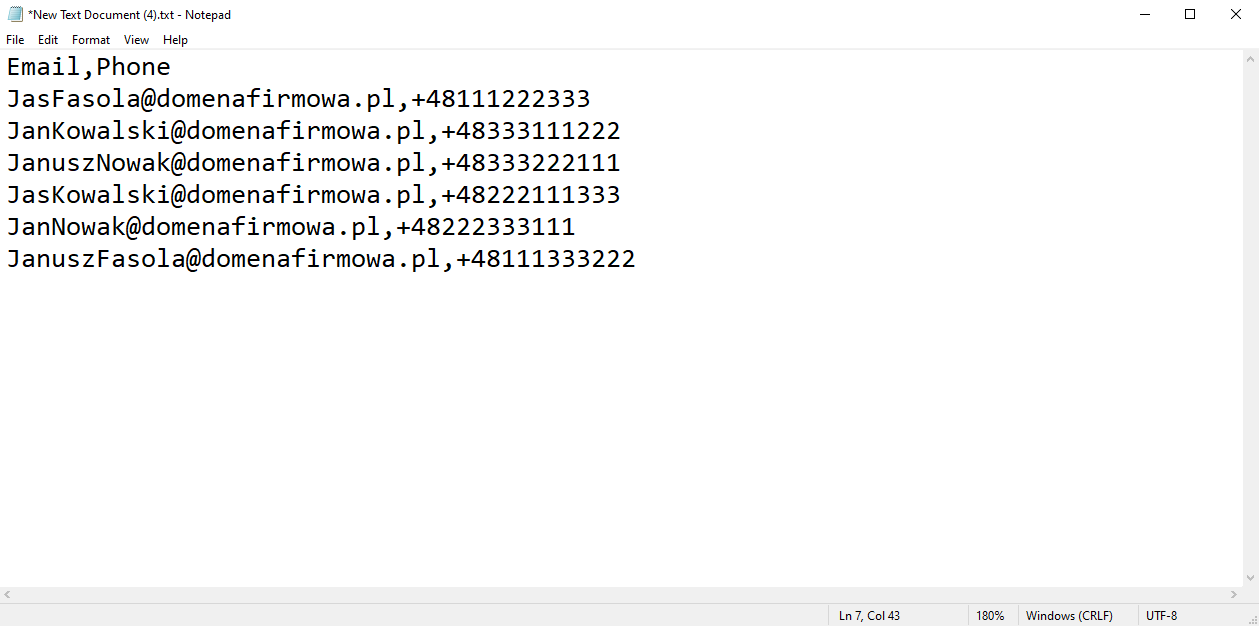
<span style="color: rgb(0, 0, 0);"><span class="TextRun SCXW104419952 BCX8" data-contrast="none" lang="PL-PL" xml:lang="PL-PL"><span class="NormalTextRun SCXW104419952 BCX8" data-ccp-parastyle="heading 2">To configure multiple users at once , prepare a **CSV** file (comma-separated value text file) containing the **user names** and **phone numbers** you want to assign to them. The file should be created according to the format below.</span></span></span>

<p class="callout info">**<span style="color: rgb(226, 68, 116);"><span class="TextRun SCXW104419952 BCX8" data-contrast="none" lang="PL-PL" xml:lang="PL-PL"><span class="NormalTextRun SpellingErrorV2Themed SCXW104419952 BCX8">Email,</span><span class="NormalTextRun SpellingErrorV2Themed SCXW104419952 BCX8">Phone</span></span>   
<span class="TextRun SCXW104419952 BCX8" data-contrast="none" lang="PL-PL" xml:lang="PL-PL"><span class="NormalTextRun ContextualSpellingAndGrammarErrorV2Themed SCXW104419952 BCX8">uzytkownika@domenafirmowa.pl,+</span><span class="NormalTextRun SCXW104419952 BCX8">48</span><span class="NormalTextRun SCXW104419952 BCX8">000</span><span class="NormalTextRun SCXW104419952 BCX8">000000</span></span>   
<span class="TextRun SCXW104419952 BCX8" data-contrast="none" lang="PL-PL" xml:lang="PL-PL"><span class="NormalTextRun ContextualSpellingAndGrammarErrorV2Themed SCXW104419952 BCX8">uzytkownika@domenafirmowa.pl</span><span class="NormalTextRun SCXW104419952 BCX8">,</span><span class="NormalTextRun ContextualSpellingAndGrammarErrorV2Themed SCXW104419952 BCX8">+</span><span class="NormalTextRun SCXW104419952 BCX8">48</span><span class="NormalTextRun SCXW104419952 BCX8">000000000</span></span>   
<span class="TextRun SCXW104419952 BCX8" data-contrast="none" lang="PL-PL" xml:lang="PL-PL"><span class="NormalTextRun ContextualSpellingAndGrammarErrorV2Themed SCXW104419952 BCX8">uzytkownika@domenafirmowa.pl,</span></span><span class="TextRun SCXW104419952 BCX8" data-contrast="none" lang="PL-PL" xml:lang="PL-PL"><span class="NormalTextRun ContextualSpellingAndGrammarErrorV2Themed SCXW104419952 BCX8">+</span><span class="NormalTextRun SCXW104419952 BCX8">48</span><span class="NormalTextRun SCXW104419952 BCX8">000000000</span></span></span>**</p>

<span style="color: rgb(0, 0, 0);"><span class="TextRun SCXW104419952 BCX8" data-contrast="none" lang="PL-PL" xml:lang="PL-PL"><span class="NormalTextRun SCXW104419952 BCX8" data-ccp-parastyle="heading 2"><span class="TextRun SCXW104419952 BCX8" data-contrast="auto" lang="PL-PL" xml:lang="PL-PL"><span class="NormalTextRun SCXW104419952 BCX8"><span class="ui-provider a b c d e f g h i j k l m n o p q r s t u v w x y z ab ac ae af ag ah ai aj ak" dir="ltr">Replace <span style="color: rgb(226, 0, 116);">**uzytkownik@domenafirmowa.pl**</span> with the actual usernames of the users you want to assign phone numbers to.</span> <span class="ui-provider a b c d e f g h i j k l m n o p q r s t u v w x y z ab ac ae af ag ah ai aj ak" dir="ltr">Replace <span style="color: rgb(226, 0, 116);">**+48000000000**</span> with the corresponding T-Mobile phone numbers.</span><span style="color: rgb(226, 0, 116);"> <span class="ui-provider a b c d e f g h i j k l m n o p q r s t u v w x y z ab ac ae af ag ah ai aj ak" dir="ltr" style="color: rgb(0, 0, 0);"><span class="ui-provider a b c d e f g h i j k l m n o p q r s t u v w x y z ab ac ae af ag ah ai aj ak" dir="ltr">Add more rows to the file following the same format for each additional user you want to configure.</span></span></span></span></span></span></span></span>

<span style="color: rgb(0, 0, 0);"><span class="TextRun SCXW104419952 BCX8" data-contrast="none" lang="PL-PL" xml:lang="PL-PL"><span class="NormalTextRun SCXW104419952 BCX8" data-ccp-parastyle="heading 2"><span class="TextRun SCXW104419952 BCX8" data-contrast="auto" lang="PL-PL" xml:lang="PL-PL"><span class="NormalTextRun SCXW104419952 BCX8"><span class="ui-provider a b c d e f g h i j k l m n o p q r s t u v w x y z ab ac ae af ag ah ai aj ak" dir="ltr">Finished file should look like this:</span></span></span></span></span></span>

[![obraz.png](https://bookstack.uc.t-mobile.pl/uploads/images/gallery/2023-12/scaled-1680-/1Z0obraz.png)](https://bookstack.uc.t-mobile.pl/uploads/images/gallery/2023-12/1Z0obraz.png)

<p class="callout warning"><span class="ui-provider a b c d e f g h i j k l m n o p q r s t u v w x y z ab ac ae af ag ah ai aj ak" dir="ltr">Before saving the file, make sure that the phone numbers have the correct format. The number should start with a "+" sign followed by 11 digits, starting with 48. An example number is: +48123456789.</span></p>

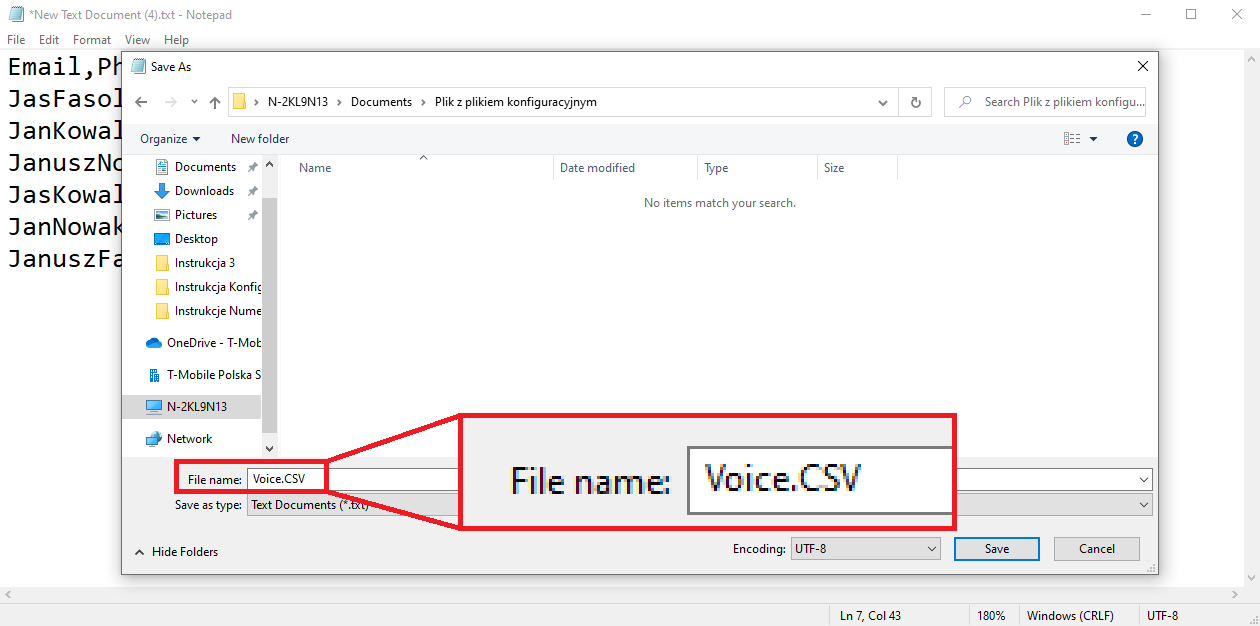
<span class="ui-provider a b c d e f g h i j k l m n o p q r s t u v w x y z ab ac ae af ag ah ai aj ak" dir="ltr">Save the file with the name **Voice.CSV (Voice** is the filename and **CSV** is the file extension).</span>

[![obraz.png](https://bookstack.uc.t-mobile.pl/uploads/images/gallery/2023-12/scaled-1680-/PiFobraz.png)](https://bookstack.uc.t-mobile.pl/uploads/images/gallery/2023-12/PiFobraz.png)

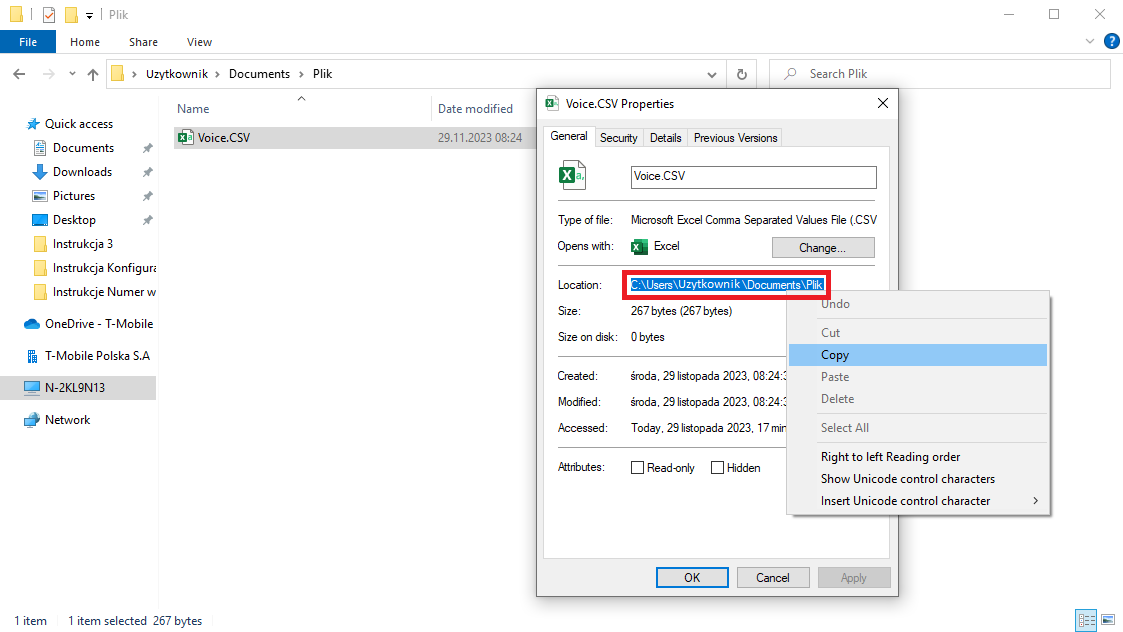
<span class="ui-provider a b c d e f g h i j k l m n o p q r s t u v w x y z ab ac ae af ag ah ai aj ak" dir="ltr">Next, open the file location, **right-click** on the file, select **Properties** and copy the file **location**.</span>

[![obraz.png](https://bookstack.uc.t-mobile.pl/uploads/images/gallery/2023-12/scaled-1680-/dZOobraz.png)](https://bookstack.uc.t-mobile.pl/uploads/images/gallery/2023-12/dZOobraz.png)

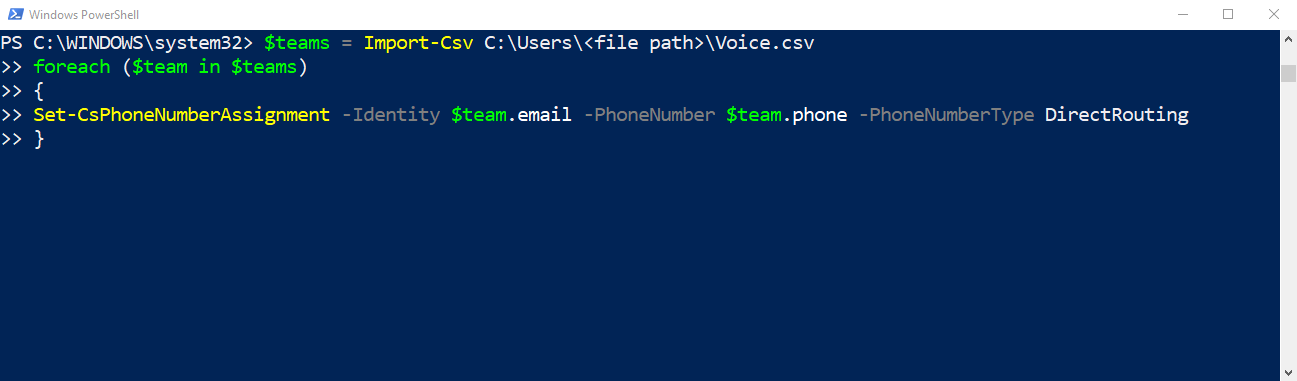
<span class="ui-provider a b c d e f g h i j k l m n o p q r s t u v w x y z ab ac ae af ag ah ai aj ak" dir="ltr">In the following command, replace <span style="color: rgb(226, 0, 116); background-color: rgb(241, 196, 15);">**C:\\Users\\&lt;file path&gt;**</span> with the value you copied earlier. Then, execute it in **PowerShell.**</span>

<p class="callout info">**<span style="color: rgb(226, 68, 116);"><span class="EOP SCXW104419952 BCX8" data-ccp-props="{"134245417":false,"335559685":3018}">$teams = Import-Csv <span style="background-color: rgb(241, 196, 15);">C:\\Users\\&lt;file path&gt;</span>\\Voice.csv  
foreach ($team in $teams)   
{   
Set-CsPhoneNumberAssignment -Identity $team.email -PhoneNumber $team.phone -PhoneNumberType DirectRouting  
} </span></span>**</p>

[![obraz.png](https://bookstack.uc.t-mobile.pl/uploads/images/gallery/2023-12/scaled-1680-/Zyvobraz.png)](https://bookstack.uc.t-mobile.pl/uploads/images/gallery/2023-12/Zyvobraz.png)

Once the configuration is complete, it is possible to make phone calls in the **MS Teams** application. To do this, log into the account of a user to whom you have assigned a phone number and who has a license with the **Teams Phone** add-on.