# Changing the number assigned to a user in the Numer w Teams service

<span class="TextRun SCXW136270634 BCX8" data-contrast="auto" lang="PL-PL" style="color: rgb(0, 0, 0);" xml:lang="PL-PL"><span class="NormalTextRun SCXW136270634 BCX8">Disconnecting a number and assigning it to a new user in the **Numer w Teams** service.</span></span>

<span class="TextRun SCXW136270634 BCX8" data-contrast="auto" lang="PL-PL" xml:lang="PL-PL"><span class="NormalTextRun SCXW136270634 BCX8"><span style="color: rgb(226, 0, 116);">**1.** </span>In the Start menu, search for the **PowerShell**, right-click the icon, and select **Run as administrator**.</span></span>

[![image.png](https://bookstack.uc.t-mobile.pl/uploads/images/gallery/2023-11/scaled-1680-/nJVimage.png)](https://bookstack.uc.t-mobile.pl/uploads/images/gallery/2023-11/nJVimage.png)

<span class="TextRun SCXW171973274 BCX8" data-contrast="auto" lang="PL-PL" xml:lang="PL-PL"><span class="NormalTextRun SCXW171973274 BCX8"><span class="TextRun SCXW136270634 BCX8" data-contrast="auto" lang="PL-PL" xml:lang="PL-PL"><span class="NormalTextRun SCXW136270634 BCX8"><span style="color: rgb(226, 0, 116);">**2.** </span></span></span>To make sure that you will be able to execute the commands described in the following sections, check the version of the **PowerShell.** <span class="ui-provider a b c d e f g h i j k l m n o p q r s t u v w x y z ab ac ae af ag ah ai aj ak" dir="ltr">Open **PowerShell** and enter one of the two following commands.</span></span></span>

<p class="callout info"><span style="color: rgb(226, 0, 116);">**<span class="TextRun SCXW171973274 BCX8" data-contrast="none" lang="PL-PL" xml:lang="PL-PL"><span class="NormalTextRun SCXW171973274 BCX8">$</span><span class="NormalTextRun SpellingErrorV2Themed SCXW171973274 BCX8">PSVersionTable.PSVersion</span></span><span class="EOP SCXW171973274 BCX8" data-ccp-props="{"134245417":false,"335559685":3018}"> </span>**</span></p>

<p class="callout info"><span style="color: rgb(226, 0, 116);">**<span class="EOP SCXW171973274 BCX8" data-ccp-props="{"134245417":false,"335559685":3018}"><span class="TextRun SCXW171973274 BCX8" data-contrast="none" lang="PL-PL" xml:lang="PL-PL"><span class="NormalTextRun SCXW171973274 BCX8">$</span><span class="NormalTextRun SpellingErrorV2Themed SCXW171973274 BCX8">host.Version.</span></span></span>**</span></p>

[![image.png](https://bookstack.uc.t-mobile.pl/uploads/images/gallery/2024-03/scaled-1680-/RFZimage.png)](https://bookstack.uc.t-mobile.pl/uploads/images/gallery/2024-03/RFZimage.png)

<span class="TextRun SCXW171973274 BCX8" data-contrast="auto" lang="CS-CZ" xml:lang="CS-CZ"><span class="NormalTextRun SpellingErrorV2Themed SCXW171973274 BCX8">Aplikacja</span> **<span class="NormalTextRun SpellingErrorV2Themed SCXW171973274 BCX8">Pow</span><span class="NormalTextRun SpellingErrorV2Themed SCXW171973274 BCX8">erShell</span>** <span class="NormalTextRun SpellingErrorV2Themed SCXW171973274 BCX8">powinna</span> <span class="NormalTextRun SpellingErrorV2Themed SCXW171973274 BCX8">mieć</span> **<span class="NormalTextRun SpellingErrorV2Themed SCXW171973274 BCX8">wersję</span>** </span><span class="TextRun SCXW171973274 BCX8" data-contrast="auto" lang="PL-PL" xml:lang="PL-PL"><span class="NormalTextRun SCXW171973274 BCX8">**5.1** </span><span class="NormalTextRun SCXW171973274 BCX8">(Major: 5, Minor: 1) lub wyższą</span><span class="NormalTextRun SCXW171973274 BCX8">.</span></span> <span class="TextRun SCXW171973274 BCX8" data-contrast="auto" lang="PL-PL" xml:lang="PL-PL"><span class="NormalTextRun SCXW171973274 BCX8">Jeżeli </span><span class="NormalTextRun SCXW171973274 BCX8">jest</span> <span class="NormalTextRun SCXW171973274 BCX8">niższa</span><span class="NormalTextRun SCXW171973274 BCX8">, </span><span class="NormalTextRun SCXW171973274 BCX8">zaktualizuj ją</span><span class="NormalTextRun SCXW171973274 BCX8"> zgodnie z instrukcją </span><span class="NormalTextRun SCXW171973274 BCX8">z</span><span class="NormalTextRun SCXW171973274 BCX8"> poniższ</span><span class="NormalTextRun SCXW171973274 BCX8">ej</span> <span class="NormalTextRun SCXW171973274 BCX8">stron</span><span class="NormalTextRun SCXW171973274 BCX8">y</span><span class="NormalTextRun SCXW171973274 BCX8">:</span></span><span class="EOP SCXW171973274 BCX8" data-ccp-props="{"134245417":false,"335559685":3018}"> </span>

<p class="callout info">**[<span class="TextRun Underlined SCXW171973274 BCX8" data-contrast="none" lang="PL-PL" xml:lang="PL-PL"><span class="NormalTextRun SCXW171973274 BCX8" data-ccp-charstyle="Hyperlink">https://docs.microsoft.com/en-us/powershell/scripting/windows-powershell/install/installing-windows-powershell#upgrading-existing-windows-powershell</span></span>](https://docs.microsoft.com/en-us/powershell/scripting/windows-powershell/install/installing-windows-powershell#upgrading-existing-windows-powershell)<span class="TextRun SCXW171973274 BCX8" data-contrast="auto" lang="PL-PL" xml:lang="PL-PL"><span class="NormalTextRun SCXW171973274 BCX8"> </span></span><span class="EOP SCXW171973274 BCX8" data-ccp-props="{"134245417":false,"335559685":3018}"> </span>**</p>

<span class="TextRun SCXW136270634 BCX8" data-contrast="auto" lang="PL-PL" style="color: rgb(226, 0, 116);" xml:lang="PL-PL"><span class="NormalTextRun SCXW136270634 BCX8">**3.** </span></span>Installation of the MicrosoftTeams module is required to correctly configure the service. One by one, copy the following commands highlighted in blue, paste them into PowerShell and execute by pressing Enter.

<p class="callout info">**<span class="TextRun SCXW30550165 BCX8" data-contrast="none" lang="EN-GB" xml:lang="EN-GB"><span class="NormalTextRun SCXW30550165 BCX8">Set-</span><span class="NormalTextRun SpellingErrorV2Themed SCXW30550165 BCX8">ExecutionPolicy</span> <span class="NormalTextRun SpellingErrorV2Themed SCXW30550165 BCX8">RemoteSigned</span></span>**</p>

[![image.png](https://bookstack.uc.t-mobile.pl/uploads/images/gallery/2024-03/scaled-1680-/AXgimage.png)](https://bookstack.uc.t-mobile.pl/uploads/images/gallery/2024-03/AXgimage.png)

Confirm the execution of the above command by selecting Y and pressing enter. Then execute the following commands.

<p class="callout info">**<span class="TextRun SCXW30550165 BCX8" data-contrast="none" lang="EN-US" xml:lang="EN-US"><span class="NormalTextRun SCXW30550165 BCX8">Import-Module -Name </span><span class="NormalTextRun SpellingErrorV2Themed SCXW30550165 BCX8">MicrosoftTeams</span></span>**</p>

[![image.png](https://bookstack.uc.t-mobile.pl/uploads/images/gallery/2024-03/scaled-1680-/8pmimage.png)](https://bookstack.uc.t-mobile.pl/uploads/images/gallery/2024-03/8pmimage.png)

<p class="callout info">**<span class="TextRun SCXW30550165 BCX8" data-contrast="none" lang="PL-PL" xml:lang="PL-PL"><span class="NormalTextRun SCXW30550165 BCX8">Set-</span><span class="NormalTextRun SpellingErrorV2Themed SCXW30550165 BCX8">ExecutionPolicy</span> <span class="NormalTextRun SpellingErrorV2Themed SCXW30550165 BCX8">Restricted</span></span>**</p>

[![image.png](https://bookstack.uc.t-mobile.pl/uploads/images/gallery/2024-03/scaled-1680-/zoNimage.png)](https://bookstack.uc.t-mobile.pl/uploads/images/gallery/2024-03/zoNimage.png)

Confirm the execution of the above command by selecting Y and pressing enter.

<span style="color: rgb(226, 0, 116);">**<span class="TextRun SCXW30550165 BCX8" data-contrast="none" lang="PL-PL" xml:lang="PL-PL"><span class="NormalTextRun SpellingErrorV2Themed SCXW30550165 BCX8"><span class="TextRun SCXW136270634 BCX8" data-contrast="auto" lang="PL-PL" xml:lang="PL-PL"><span class="NormalTextRun SCXW136270634 BCX8">4. </span></span></span></span>**<span class="TextRun SCXW30550165 BCX8" data-contrast="none" lang="PL-PL" style="color: rgb(0, 0, 0);" xml:lang="PL-PL"><span class="NormalTextRun SpellingErrorV2Themed SCXW30550165 BCX8"><span class="TextRun SCXW136270634 BCX8" data-contrast="auto" lang="PL-PL" xml:lang="PL-PL"><span class="NormalTextRun SCXW136270634 BCX8"><span class="WACImageContainer NoPadding AttachedToBeginning DragDrop SCXW17773935 BCX8" role="presentation"><span class="TextRun SCXW48744946 BCX8" data-contrast="auto" lang="PL-PL" xml:lang="PL-PL"><span class="NormalTextRun SCXW48744946 BCX8">Log in with a user account with **administrator privileges** in the tenant. The account with administrator privileges is the one used to create the new domain in the **Adding a New Domain to the Microsoft 365 Administration Center** instructions. Start with following command.</span></span></span></span></span></span></span></span>

<p class="callout info"><span style="color: rgb(226, 0, 116);">**<span class="TextRun SCXW17773935 BCX8" data-contrast="none" lang="PL-PL" xml:lang="PL-PL"><span class="NormalTextRun SCXW17773935 BCX8">Connect-</span><span class="NormalTextRun SpellingErrorV2Themed SCXW17773935 BCX8">MicrosoftTeams</span></span>**</span></p>

Enter **e-mail address** in the login window.

[![image.png](https://bookstack.uc.t-mobile.pl/uploads/images/gallery/2024-03/scaled-1680-/02Gimage.png)](https://bookstack.uc.t-mobile.pl/uploads/images/gallery/2024-03/02Gimage.png)
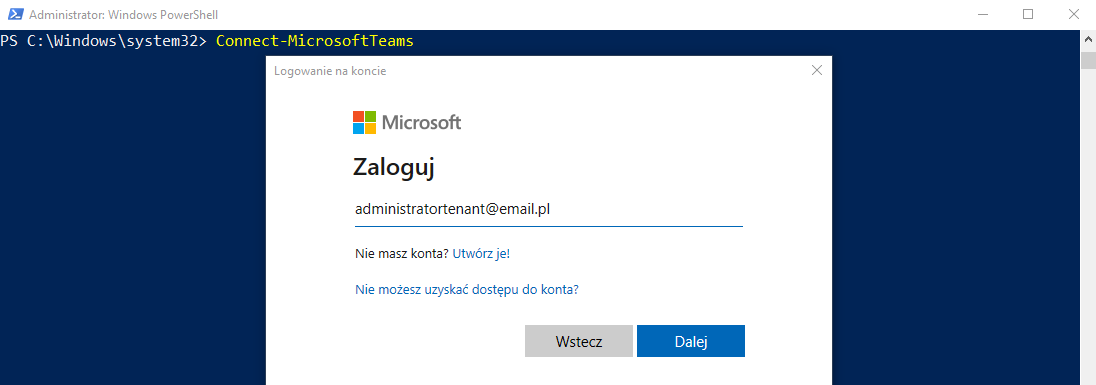
Next, enter your **password.**

[![image.png](https://bookstack.uc.t-mobile.pl/uploads/images/gallery/2024-03/scaled-1680-/UUEimage.png)](https://bookstack.uc.t-mobile.pl/uploads/images/gallery/2024-03/UUEimage.png)
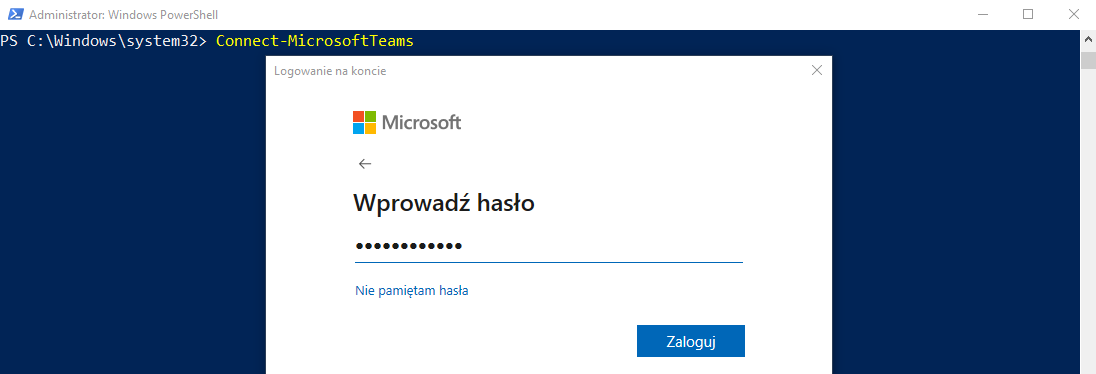
Once you have successfully logged in, you will see your email address and tenant details.

[![image.png](https://bookstack.uc.t-mobile.pl/uploads/images/gallery/2024-03/scaled-1680-/r0iimage.png)](https://bookstack.uc.t-mobile.pl/uploads/images/gallery/2024-03/r0iimage.png)

<span class="TextRun SCXW104419952 BCX8" data-contrast="auto" lang="PL-PL" xml:lang="PL-PL"><span class="NormalTextRun SCXW104419952 BCX8"><span style="color: rgb(226, 0, 116);">**<span class="TextRun SCXW30550165 BCX8" data-contrast="none" lang="PL-PL" xml:lang="PL-PL"><span class="NormalTextRun SpellingErrorV2Themed SCXW30550165 BCX8"><span class="TextRun SCXW136270634 BCX8" data-contrast="auto" lang="PL-PL" xml:lang="PL-PL"><span class="NormalTextRun SCXW136270634 BCX8">5. </span></span></span></span>**<span class="TextRun SCXW30550165 BCX8" data-contrast="none" lang="PL-PL" xml:lang="PL-PL"><span class="NormalTextRun SpellingErrorV2Themed SCXW30550165 BCX8"><span class="TextRun SCXW136270634 BCX8" data-contrast="auto" lang="PL-PL" xml:lang="PL-PL"><span class="NormalTextRun SCXW136270634 BCX8"><span style="color: rgb(0, 0, 0);">Disconnect the number and the user by executing the following command. Change <span style="color: rgb(226, 0, 116);">**<span class="TextRun SCXW104419952 BCX8" data-contrast="none" lang="EN-GB" xml:lang="EN-GB"><span style="background-color: rgb(240, 209, 84);"><a class="Hyperlink SCXW104419952 BCX8" rel="noreferrer noopener" style="color: rgb(226, 0, 116); background-color: rgb(240, 209, 84);" target="_blank">uzytkownik@domenafirmowa.pl</a></span></span>**</span> to the username of the user who should be disconnected from the phone number provided by **T-Mobile,** which you should insert in place of <span style="color: rgb(226, 0, 116);">**<span class="TextRun Highlight SCXW104419952 BCX8" data-contrast="auto" lang="PL-PL" style="background-color: rgb(85, 224, 143);" xml:lang="PL-PL">+48000000000</span>**</span>. </span></span></span></span></span></span></span></span>

<p class="callout info"><span class="TextRun SCXW104419952 BCX8" data-contrast="auto" lang="PL-PL" xml:lang="PL-PL"><span class="NormalTextRun SCXW104419952 BCX8"><span style="color: rgb(226, 0, 116);"><span class="TextRun SCXW30550165 BCX8" data-contrast="none" lang="PL-PL" xml:lang="PL-PL"><span class="NormalTextRun SpellingErrorV2Themed SCXW30550165 BCX8"><span class="TextRun SCXW136270634 BCX8" data-contrast="auto" lang="PL-PL" xml:lang="PL-PL"><span class="NormalTextRun SCXW136270634 BCX8"><span style="color: rgb(0, 0, 0);"><span style="color: rgb(226, 0, 116);">**<span class="TextRun SCXW104419952 BCX8" data-contrast="none" lang="EN-GB" xml:lang="EN-GB">Remove-<span class="NormalTextRun SpellingErrorV2Themed SCXW104419952 BCX8">CsPhoneNumberAssignment</span> -Identity </span><span class="TextRun SCXW104419952 BCX8" data-contrast="none" lang="EN-GB" xml:lang="EN-GB"><span style="background-color: rgb(240, 209, 84);"><a class="Hyperlink SCXW104419952 BCX8" rel="noreferrer noopener" style="color: rgb(226, 0, 116); background-color: rgb(240, 209, 84);" target="_blank">uzytkownik@domenafirmowa.pl</a></span> </span>-<span class="NormalTextRun SpellingErrorV2Themed SCXW104419952 BCX8">PhoneNumber</span> <span class="TextRun Highlight SCXW104419952 BCX8" data-contrast="auto" lang="PL-PL" style="background-color: rgb(85, 224, 143);" xml:lang="PL-PL">+48000000000</span> <span class="TextRun SCXW104419952 BCX8" data-contrast="none" lang="EN-GB" xml:lang="EN-GB">-<span class="NormalTextRun SpellingErrorV2Themed SCXW104419952 BCX8">PhoneNumberType</span> <span class="NormalTextRun SpellingErrorV2Themed SCXW104419952 BCX8">DirectRouting</span></span>**</span></span></span></span></span></span></span></span></span></p>

<span class="TextRun SCXW104419952 BCX8" data-contrast="auto" lang="PL-PL" xml:lang="PL-PL"><span class="NormalTextRun SCXW104419952 BCX8"><span style="color: rgb(226, 0, 116);">**<span class="TextRun SCXW30550165 BCX8" data-contrast="none" lang="PL-PL" xml:lang="PL-PL"><span class="NormalTextRun SpellingErrorV2Themed SCXW30550165 BCX8"><span class="TextRun SCXW136270634 BCX8" data-contrast="auto" lang="PL-PL" xml:lang="PL-PL"><span class="NormalTextRun SCXW136270634 BCX8">6. </span></span></span></span>**<span style="color: rgb(0, 0, 0);"><span class="TextRun SCXW30550165 BCX8" data-contrast="none" lang="PL-PL" xml:lang="PL-PL"><span class="NormalTextRun SpellingErrorV2Themed SCXW30550165 BCX8"><span class="TextRun SCXW136270634 BCX8" data-contrast="auto" lang="PL-PL" xml:lang="PL-PL"><span class="NormalTextRun SCXW136270634 BCX8">The final step in configuring Numer w Teams service is connecting users to the phone numbers provided by **T-Mobile**.</span></span></span></span></span></span></span></span>

Run the following command, changing <span style="color: rgb(226, 0, 116);">**<span class="TextRun SCXW104419952 BCX8" data-contrast="none" lang="EN-GB" xml:lang="EN-GB"><span style="background-color: rgb(240, 209, 84);"><a class="Hyperlink SCXW104419952 BCX8" rel="noreferrer noopener" style="color: rgb(226, 0, 116); background-color: rgb(240, 209, 84);" target="_blank">uzytkownik@domenafirmowa.pl</a></span></span>**</span> to the username of the user who should be assigned the phone number provided by **T-Mobile,** which you should insert in place of <span style="color: rgb(226, 0, 116);">**<span class="TextRun Highlight SCXW104419952 BCX8" data-contrast="auto" lang="PL-PL" style="background-color: rgb(85, 224, 143);" xml:lang="PL-PL"><span class="NormalTextRun SCXW104419952 BCX8">+48</span><span class="NormalTextRun SCXW104419952 BCX8">000</span><span class="NormalTextRun SCXW104419952 BCX8">000000</span></span>**</span>.

<div aria-label="Page Section Options" class="pointer-container" id="bkmrk-%C2%A0-2" refs="pointer@pointer" tabindex="-1"><div class="pointer flex-container-row items-center justify-space-between p-s anim is-page-editable"><div class="flex-container-row items-center gap-s" refs="pointer@mode-section"><button class="text-button icon px-xs" title="Permalink mode, Press to show include tag"><svg class="svg-icon" data-icon="link" role="presentation" viewbox="0 0 24 24" xmlns="http://www.w3.org/2000/svg"></svg></button><div class="input-group"> <button class="button outline icon" title="Copy Link" type="button"><svg class="svg-icon" data-icon="copy" role="presentation" viewbox="0 0 24 24" xmlns="http://www.w3.org/2000/svg"></svg></button></div></div><svg class="svg-icon" data-icon="edit" role="presentation" viewbox="0 0 24 24" xmlns="http://www.w3.org/2000/svg"></svg></div></div><p class="callout info"><span style="color: rgb(226, 0, 116);">**<span class="TextRun SCXW104419952 BCX8" data-contrast="none" lang="EN-GB" xml:lang="EN-GB"><span class="NormalTextRun SCXW104419952 BCX8">Set-</span><span class="NormalTextRun SpellingErrorV2Themed SCXW104419952 BCX8">CsPhoneNumberAssignment</span> <span class="NormalTextRun SCXW104419952 BCX8">-Identity</span> </span><span class="TextRun SCXW104419952 BCX8" data-contrast="none" lang="EN-GB" xml:lang="EN-GB"><span style="background-color: rgb(240, 209, 84);"><a class="Hyperlink SCXW104419952 BCX8" rel="noreferrer noopener" style="color: rgb(226, 0, 116); background-color: rgb(240, 209, 84);" target="_blank">uzytkownik@domenafirmowa.pl</a></span> </span><span class="NormalTextRun SCXW104419952 BCX8">-</span><span class="NormalTextRun SpellingErrorV2Themed SCXW104419952 BCX8">PhoneNumber</span> <span class="TextRun Highlight SCXW104419952 BCX8" data-contrast="auto" lang="PL-PL" style="background-color: rgb(85, 224, 143);" xml:lang="PL-PL"><span class="NormalTextRun SCXW104419952 BCX8">+48</span><span class="NormalTextRun SCXW104419952 BCX8">000</span><span class="NormalTextRun SCXW104419952 BCX8">000000</span></span> <span class="TextRun SCXW104419952 BCX8" data-contrast="none" lang="EN-GB" xml:lang="EN-GB"><span class="NormalTextRun SCXW104419952 BCX8">-</span><span class="NormalTextRun SpellingErrorV2Themed SCXW104419952 BCX8">PhoneNumberType</span> <span class="NormalTextRun SpellingErrorV2Themed SCXW104419952 BCX8">DirectRouting</span></span>**</span></p>

Once the configuration is complete, it is possible to make phone calls in the **MS Teams** application. To do this, log into the account of a user to whom you have assigned a phone number and who has a license with the **Teams Phone** add-on.



