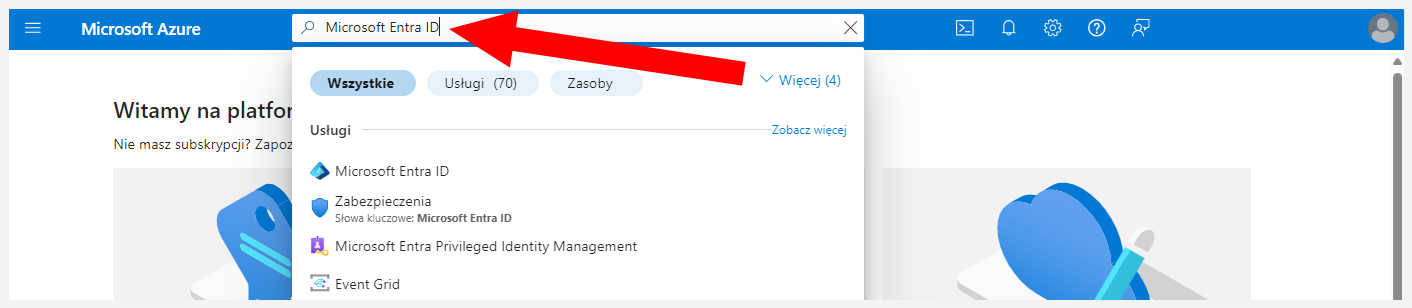
# Numer w Teams - ENG

# Launching the Numer w Teams


# Adding a New Domain to the Microsoft 365 Admin Center

<span style="color: rgb(0, 0, 0);"><span class="TextRun SCXW114617269 BCX8" data-contrast="auto" lang="PL-PL" xml:lang="PL-PL"><span class="NormalTextRun SCXW114617269 BCX8" data-ccp-parastyle="Body Text"><video controls="controls" height="386" style="width: 772px; height: 386px;" width="772"> <source src="https://d-wpm.uc.t-mobile.pl/attachments/Dodanie_domeny.mp4" type="video/mp4"></source></video></span></span></span>

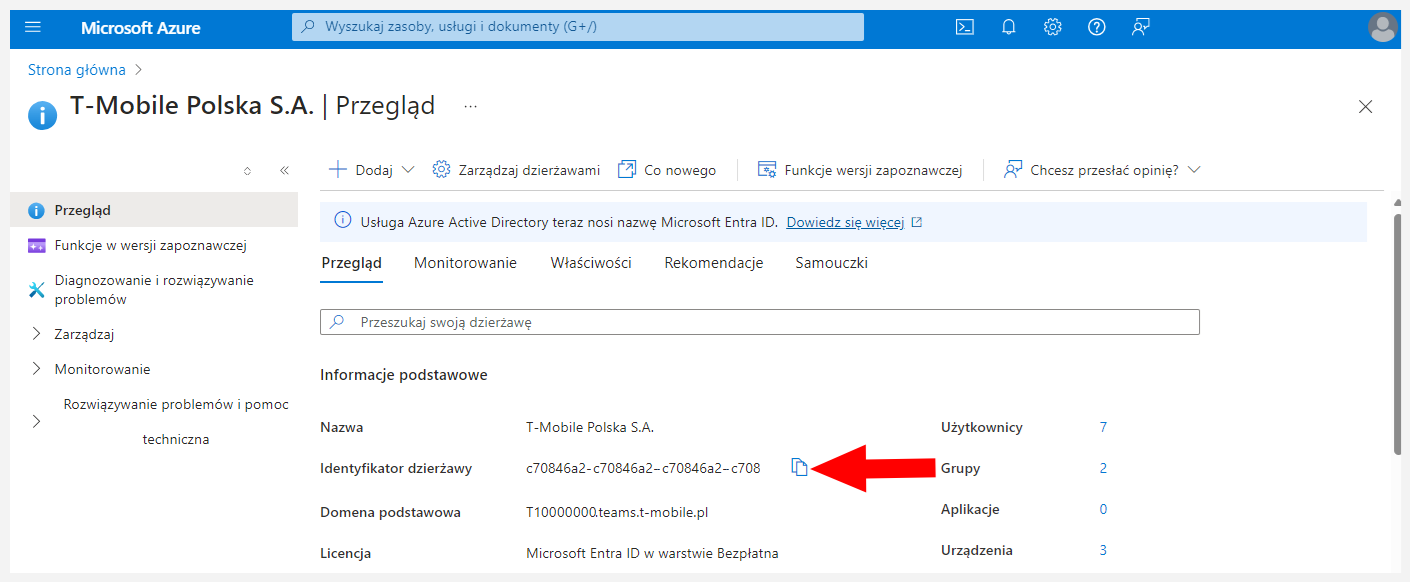
<span class="ui-provider a b c d e f g h i j k l m n o p q r s t u v w x y z ab ac ae af ag ah ai aj ak" dir="ltr">T-Mobile has assigned your company a domain in the following format. You can find your individual number in the Order section of your contract:</span>

<div class="OutlineElement Ltr SCXW114617269 BCX8" id="bkmrk-t10012345.teams.t-mo"><div class="TableContainer Ltr SCXW114617269 BCX8"><div aria-hidden="true" class="WACAltTextDescribedBy SCXW114617269 BCX8" id="bkmrk--2"></div></div></div>[![image.png](https://bookstack.uc.t-mobile.pl/uploads/images/gallery/2024-02/scaled-1680-/image.png)](https://bookstack.uc.t-mobile.pl/uploads/images/gallery/2024-02/image.png)

<span class="ui-provider a b c d e f g h i j k l m n o p q r s t u v w x y z ab ac ae af ag ah ai aj ak" dir="ltr">This domain will be used for voice communication in MS Teams. You need to add this domain to the **<span style="color: rgb(226, 0, 116);">Admin Center</span>** panel of your organization on the <span style="color: rgb(226, 0, 116);">**Microsoft 365 portal**</span>.</span>

<span class="TextRun SCXW114617269 BCX8" data-contrast="auto" lang="PL-PL" xml:lang="PL-PL"><span class="NormalTextRun SCXW114617269 BCX8"><span style="color: rgb(226, 68, 116);">**1.**</span> <span class="ui-provider a b c d e f g h i j k l m n o p q r s t u v w x y z ab ac ae af ag ah ai aj ak" dir="ltr">Once you have logged in, go to: **Settings** &gt; **Domains** &gt; **Add domain**. Enter the domain assigned to your company by T-Mobile and click **Use this domain**.</span></span></span>

[![image.png](https://bookstack.uc.t-mobile.pl/uploads/images/gallery/2023-11/scaled-1680-/Bn6image.png)](https://bookstack.uc.t-mobile.pl/uploads/images/gallery/2023-11/Bn6image.png)

<span class="WACImageContainer NoPadding AttachedToBeginning DragDrop SCXW114617269 BCX8" role="presentation"><span style="color: rgb(226, 68, 116);">**2.**</span> <span class="ui-provider a b c d e f g h i j k l m n o p q r s t u v w x y z ab ac ae af ag ah ai aj ak" dir="ltr">Verify the domain, by selecting: **Add a TXT record to the domain's DNS records**.</span></span>

[![image.png](https://bookstack.uc.t-mobile.pl/uploads/images/gallery/2023-11/scaled-1680-/GXMimage.png)](https://bookstack.uc.t-mobile.pl/uploads/images/gallery/2023-11/GXMimage.png)

<span class="ui-provider a b c d e f g h i j k l m n o p q r s t u v w x y z ab ac ae af ag ah ai aj ak" dir="ltr">Click **Continue** to generate a **TXT record** to verify domain ownership.</span>

<span class="TextRun SCXW114617269 BCX8" data-contrast="auto" lang="PL-PL" xml:lang="PL-PL"><span class="NormalTextRun SCXW114617269 BCX8" data-ccp-parastyle="Body Text">**<span style="color: rgb(226, 68, 116);">3.</span>** The DNS record information will be displayed.</span></span>

<span class="WACImageGroupContainer SCXW114617269 BCX8"><span class="WACImageContainer NoPadding AttachedToBeginning DragDrop SCXW114617269 BCX8" role="presentation">![](https://bookstack.uc.t-mobile.pl/uploads/images/gallery/2023-11/embedded-image-2fe8h0rd.png)</span></span><span class="EOP SCXW114617269 BCX8" data-ccp-props="{"134245417":false,"201341983":0,"335559685":3018,"335559738":14,"335559740":252}"> </span>

Make sure to leave the **Microsoft Admin Panel** open in your browser and email the following address: **uc@t-mobile.pl**. For the subject line, use "Autoryzacja domeny". In the body of the email, type the value of the **TXT record**, for example, "**MS=ms74966152**".

Once you receive a confirmation message from T-Mobile that the record has been created on the DNS servers, you can move on to the next step.

<span style="color: rgb(226, 68, 116);">**<span class="EOP SCXW114617269 BCX8" data-ccp-props="{"134245417":false,"201341983":0,"335551550":6,"335551620":6,"335559685":3018,"335559738":14,"335559740":252,"469777462":[9781],"469777927":[0],"469777928":[1]}"> 4. </span>**</span><span class="WACImageGroupContainer SCXW114617269 BCX8"><span class="WACImageContainer NoPadding AttachedToBeginning DragDrop SCXW114617269 BCX8" role="presentation"><span class="TextRun SCXW114617269 BCX8" data-contrast="auto" lang="CS-CZ" xml:lang="CS-CZ"><span class="NormalTextRun SpellingErrorV2Themed SCXW114617269 BCX8"><span class="ui-provider a b c d e f g h i j k l m n o p q r s t u v w x y z ab ac ae af ag ah ai aj ak" dir="ltr">Now, return to the **Microsoft Admin Panel** page and verify the domain by clicking the **Verify** button.</span></span></span></span></span>

[![image.png](https://bookstack.uc.t-mobile.pl/uploads/images/gallery/2023-11/scaled-1680-/xyFimage.png)](https://bookstack.uc.t-mobile.pl/uploads/images/gallery/2023-11/xyFimage.png)

<span class="ui-provider a b c d e f g h i j k l m n o p q r s t u v w x y z ab ac ae af ag ah ai aj ak" dir="ltr">If the following message appears after verification, wait about 10 minutes and try again. If the verification fails again, wait an hour and try again.</span>

<span class="EOP SCXW114617269 BCX8" data-ccp-props="{"134245417":false,"335559685":3018}">[![3ddaa319-ca04-4191-9211-14f536b98e03.png](https://bookstack.uc.t-mobile.pl/uploads/images/gallery/2023-11/scaled-1680-/3ddaa319-ca04-4191-9211-14f536b98e03.png)](https://bookstack.uc.t-mobile.pl/uploads/images/gallery/2023-11/3ddaa319-ca04-4191-9211-14f536b98e03.png)</span>

<span class="EOP SCXW114617269 BCX8" data-ccp-props="{"134245417":false,"335559685":3018}"> </span>

<span class="WACImageContainer NoPadding AttachedToBeginning DragDrop SCXW114617269 BCX8" role="presentation"><span style="color: rgb(226, 68, 116);">**5.** </span></span><span class="TextRun SCXW114617269 BCX8" data-contrast="auto" lang="PL-PL" xml:lang="PL-PL"><span class="NormalTextRun SCXW114617269 BCX8"><span class="ui-provider a b c d e f g h i j k l m n o p q r s t u v w x y z ab ac ae af ag ah ai aj ak" dir="ltr">After verifying the **TXT record**, you will be asked "**How do you want to connect your domain?".** Select **<span style="color: rgb(226, 0, 116);">More options</span>.**</span></span></span>

[![image.png](https://bookstack.uc.t-mobile.pl/uploads/images/gallery/2023-11/scaled-1680-/cUrimage.png)](https://bookstack.uc.t-mobile.pl/uploads/images/gallery/2023-11/cUrimage.png)

<span class="TextRun SCXW114617269 BCX8" data-contrast="auto" lang="PL-PL" xml:lang="PL-PL"><span class="NormalTextRun SCXW114617269 BCX8">**<span style="color: rgb(226, 68, 116);">6.</span>** <span class="ui-provider a b c d e f g h i j k l m n o p q r s t u v w x y z ab ac ae af ag ah ai aj ak" dir="ltr">Then, select **Skip and do this later (not recommended)** and then click **Continue**</span></span><span class="NormalTextRun SCXW114617269 BCX8">.</span></span><span class="EOP SCXW114617269 BCX8" data-ccp-props="{"134245417":false,"335559685":3018}"> </span>

[![image.png](https://bookstack.uc.t-mobile.pl/uploads/images/gallery/2023-11/scaled-1680-/WC2image.png)](https://bookstack.uc.t-mobile.pl/uploads/images/gallery/2023-11/WC2image.png)

<span class="EOP SCXW114617269 BCX8" data-ccp-props="{"134245417":false,"335559685":3018}"> </span>

<span class="TextRun SCXW114617269 BCX8" data-contrast="auto" lang="PL-PL" xml:lang="PL-PL"><span class="NormalTextRun SCXW114617269 BCX8">**<span style="color: rgb(226, 68, 116);">7. </span>**<span class="ui-provider a b c d e f g h i j k l m n o p q r s t u v w x y z ab ac ae af ag ah ai aj ak" dir="ltr">When the domain setup is complete, click **Done.**</span></span></span>

[![image.png](https://bookstack.uc.t-mobile.pl/uploads/images/gallery/2023-11/scaled-1680-/5vgimage.png)](https://bookstack.uc.t-mobile.pl/uploads/images/gallery/2023-11/5vgimage.png)

<span class="EOP SCXW114617269 BCX8" data-ccp-props="{"134245417":false,"335559685":3018}"> </span>

<span style="color: rgb(226, 68, 116);">**<span class="WACImageGroupContainer SCXW114617269 BCX8" style="outline-color: var(--color-primary); font-style: normal; font-variant-ligatures: normal; font-variant-caps: normal; font-size: 14px; font-family: -apple-system, BlinkMacSystemFont, 'Segoe UI', Oxygen, Ubuntu, Roboto, Cantarell, 'Fira Sans', 'Droid Sans', 'Helvetica Neue', sans-serif;"><span class="WACImageContainer NoPadding AttachedToBeginning DragDrop SCXW114617269 BCX8" role="presentation" style="outline-color: var(--color-primary);">8. </span></span>**</span>Once the domain setup is complete, go to **Settings** &gt; **Domains.** The correct value in the **Status** column is "**No service selected**". This means that the domain has been configured correctly.

<span class="WACImageGroupContainer SCXW114617269 BCX8"><span class="WACImageContainer NoPadding AttachedToBeginning DragDrop SCXW114617269 BCX8" role="presentation">![](https://bookstack.uc.t-mobile.pl/uploads/images/gallery/2023-11/embedded-image-pf61i2mb.png)</span></span>

<span class="ui-provider a b c d e f g h i j k l m n o p q r s t u v w x y z ab ac ae af ag ah ai aj ak" dir="ltr">Now you can proceed to the next instruction.</span>

# Creating a user for integration with the telephony network

<span class="TextRun SCXW150732740 BCX8" data-contrast="auto" lang="PL-PL" xml:lang="PL-PL"><span class="NormalTextRun SCXW150732740 BCX8" data-ccp-parastyle="Body Text"><video controls="controls" height="403" style="width: 806px; height: 403px;" width="806"> <source src="https://d-wpm.uc.t-mobile.pl/attachments/Tworzenie_uzytkownika.mp4" type="video/mp4"></source></video></span></span>

<span class="ui-provider a b c d e f g h i j k l m n o p q r s t u v w x y z ab ac ae af ag ah ai aj ak" dir="ltr">To integrate a tenant with the T-Mobile network, you need to create a user and assign them a license with the Teams Phone add-on. After the integration work is complete, this user can be deleted. This will allow you to recover the license.</span>

<span style="color: rgb(226, 0, 116);">**<span class="EOP SCXW150732740 BCX8" data-ccp-props="{"134245417":false,"201341983":0,"335551550":6,"335551620":6,"335559685":2040,"335559737":2,"335559738":282,"335559740":252}">1.</span>** <span class="EOP SCXW150732740 BCX8" data-ccp-props="{"134245417":false,"201341983":0,"335551550":6,"335551620":6,"335559685":2040,"335559737":2,"335559738":282,"335559740":252}"><span style="color: rgb(0, 0, 0);"><span class="ui-provider a b c d e f g h i j k l m n o p q r s t u v w x y z ab ac ae af ag ah ai aj ak" dir="ltr">From the menu on the left, select **Users** &gt; **Active Users**.</span></span></span></span>

[![obraz.png](https://bookstack.uc.t-mobile.pl/uploads/images/gallery/2023-11/scaled-1680-/Hi6obraz.png)](https://bookstack.uc.t-mobile.pl/uploads/images/gallery/2023-11/Hi6obraz.png)

<span style="color: rgb(226, 0, 116);">**2.** <span style="color: rgb(0, 0, 0);"><span class="ui-provider a b c d e f g h i j k l m n o p q r s t u v w x y z ab ac ae af ag ah ai aj ak" dir="ltr">Select **Add a user**.</span></span></span>

[![obraz.png](https://bookstack.uc.t-mobile.pl/uploads/images/gallery/2023-11/scaled-1680-/oMyobraz.png)](https://bookstack.uc.t-mobile.pl/uploads/images/gallery/2023-11/oMyobraz.png)

<span class="WACImageContainer NoPadding AttachedToBeginning DragDrop SCXW150732740 BCX8" role="presentation"><span style="color: rgb(226, 68, 116);">**3.** </span></span><span class="TextRun SCXW150732740 BCX8" data-contrast="auto" lang="PL-PL" xml:lang="PL-PL"><span class="NormalTextRun SCXW150732740 BCX8"><span class="ui-provider a b c d e f g h i j k l m n o p q r s t u v w x y z ab ac ae af ag ah ai aj ak" dir="ltr">Fill in the user's information and select the password settings. Enter the domain that was assigned to your company by T-Mobile, for example: **T10012345.teams.t-mobile.pl**.</span></span></span><span class="EOP SCXW150732740 BCX8" data-ccp-props="{"134245417":false,"335559685":3018}"><span class="LineBreakBlob BlobObject DragDrop SCXW150732740 BCX8"><span class="SCXW150732740 BCX8">  
</span></span></span>

[![image.png](https://bookstack.uc.t-mobile.pl/uploads/images/gallery/2023-11/scaled-1680-/oywimage.png)](https://bookstack.uc.t-mobile.pl/uploads/images/gallery/2023-11/oywimage.png)

<span class="EOP SCXW150732740 BCX8" data-ccp-props="{"134245417":false,"335559685":3018}">**<span style="color: rgb(226, 68, 116);"> 4.</span>** <span class="ui-provider a b c d e f g h i j k l m n o p q r s t u v w x y z ab ac ae af ag ah ai aj ak" dir="ltr">Assign the user a license that includes **Microsoft Teams.** For example:</span></span>

- <span style="color: rgb(226, 0, 116);"><span style="color: rgb(0, 0, 0);"><span class="TextRun SCXW150732740 BCX8" data-contrast="none" lang="EN-GB" xml:lang="EN-GB"><span class="NormalTextRun SCXW150732740 BCX8">Microsoft </span><span class="NormalTextRun SCXW150732740 BCX8">365 E5</span><span class="NormalTextRun SCXW150732740 BCX8">, </span></span></span></span>
- <span style="color: rgb(226, 0, 116);"><span style="color: rgb(0, 0, 0);"><span class="TextRun SCXW150732740 BCX8" data-contrast="none" lang="EN-GB" xml:lang="EN-GB"><span class="NormalTextRun SCXW150732740 BCX8">M365 Business Basic</span></span><span class="TextRun SCXW150732740 BCX8" data-contrast="auto" lang="EN-GB" xml:lang="EN-GB"><span class="NormalTextRun SCXW150732740 BCX8">, </span></span></span></span>
- <span style="color: rgb(226, 0, 116);"><span style="color: rgb(0, 0, 0);"><span class="TextRun SCXW150732740 BCX8" data-contrast="none" lang="EN-GB" xml:lang="EN-GB"><span class="NormalTextRun SCXW150732740 BCX8">M365 Business Standard.</span></span></span></span>

[![image.png](https://bookstack.uc.t-mobile.pl/uploads/images/gallery/2023-11/scaled-1680-/HZ0image.png)](https://bookstack.uc.t-mobile.pl/uploads/images/gallery/2023-11/HZ0image.png)

<span class="TextRun SCXW183439634 BCX8" data-contrast="auto" lang="PL-PL" xml:lang="PL-PL"><span class="NormalTextRun SCXW183439634 BCX8"><span style="color: rgb(226, 68, 116);">**5.**</span> <span class="ui-provider a b c d e f g h i j k l m n o p q r s t u v w x y z ab ac ae af ag ah ai aj ak" dir="ltr">Follow the next steps until the user creation is complete.</span></span></span>

[![image.png](https://bookstack.uc.t-mobile.pl/uploads/images/gallery/2023-11/scaled-1680-/Sncimage.png)](https://bookstack.uc.t-mobile.pl/uploads/images/gallery/2023-11/Sncimage.png)

<span class="ui-provider a b c d e f g h i j k l m n o p q r s t u v w x y z ab ac ae af ag ah ai aj ak" dir="ltr">Once you have finished adding the user, you can proceed to the next instruction.</span>

# Teams Voice Services Configuration

<span class="TextRun SCXW136270634 BCX8" data-contrast="auto" lang="PL-PL" xml:lang="PL-PL"><span class="NormalTextRun SCXW136270634 BCX8" data-ccp-parastyle="Body Text"><video controls="controls" height="399" style="width: 798px; height: 399px;" width="798"> <source src="https://d-wpm.uc.t-mobile.pl/attachments/Konfiguracja_uslug_glosowych.mp4" type="video/mp4"></source></video></span></span>

<span class="ui-provider a b c d e f g h i j k l m n o p q r s t u v w x y z ab ac ae af ag ah ai aj ak" dir="ltr">The configuration will be performed in **Windows PowerShell**.</span>

You should have the **.NET Framework** add-on version **4.7.2** or later installed on your computer. If you don't have it, click the following link and install it: <span style="color: rgb(226, 0, 116);">**https://docs.microsoft.com/en-us/dotnet/framework/install/**</span>

##### **Starting PowerShell**

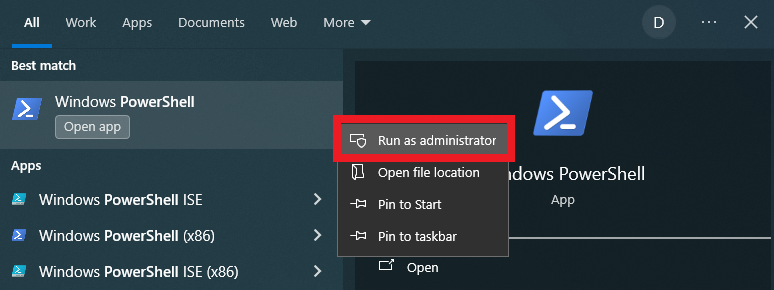
<span class="ui-provider a b c d e f g h i j k l m n o p q r s t u v w x y z ab ac ae af ag ah ai aj ak" dir="ltr">In the Start menu, search for the **PowerShell**, right-click the icon, and select **Run as administrator**.</span>

[![image.png](https://bookstack.uc.t-mobile.pl/uploads/images/gallery/2023-11/scaled-1680-/nJVimage.png)](https://bookstack.uc.t-mobile.pl/uploads/images/gallery/2023-11/nJVimage.png)


#### **Checking the version of PowerShell**

To make sure that you will be able to execute the commands described in the following sections, check the version of the **PowerShell.** <span class="ui-provider a b c d e f g h i j k l m n o p q r s t u v w x y z ab ac ae af ag ah ai aj ak" dir="ltr">Open **PowerShell** and enter the following command:</span>

<p class="callout info">**<span class="TextRun SCXW171973274 BCX8" data-contrast="none" lang="PL-PL" style="color: rgb(226, 68, 116);" xml:lang="PL-PL"><span class="NormalTextRun SCXW171973274 BCX8">$</span><span class="NormalTextRun SpellingErrorV2Themed SCXW171973274 BCX8">PSVersionTable.PSVersion</span></span><span class="EOP SCXW171973274 BCX8" data-ccp-props="{"134245417":false,"335559685":3018}"> </span>**</p>

<span class="WACImageGroupContainer SCXW171973274 BCX8"><span class="WACImageContainer NoPadding AttachedToBeginning DragDrop SCXW171973274 BCX8" role="presentation">![](https://bookstack.uc.t-mobile.pl/uploads/images/gallery/2023-11/embedded-image-vvksqjuz.png)</span></span>

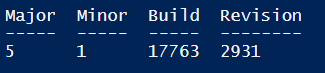
<span class="ui-provider a b c d e f g h i j k l m n o p q r s t u v w x y z ab ac ae af ag ah ai aj ak" dir="ltr">The **PowerShell** application should have version **5.1 (Major:** **5,** **Minor: 1**) or **higher.** If it is lower, update **PowerShell** according to the instructions on the following page:</span>

[<span class="TextRun Underlined SCXW171973274 BCX8" data-contrast="none" lang="PL-PL" xml:lang="PL-PL"><span class="NormalTextRun SCXW171973274 BCX8" data-ccp-charstyle="Hyperlink">https://docs.microsoft.com/en-us/powershell/scripting/windows-powershell/install/installing-windows-powershell#upgrading-existing-windows-powershell</span></span>](https://docs.microsoft.com/en-us/powershell/scripting/windows-powershell/install/installing-windows-powershell#upgrading-existing-windows-powershell)<span class="TextRun SCXW171973274 BCX8" data-contrast="auto" lang="PL-PL" xml:lang="PL-PL"><span class="NormalTextRun SCXW171973274 BCX8"> </span></span><span class="EOP SCXW171973274 BCX8" data-ccp-props="{"134245417":false,"335559685":3018}"> </span>

<span class="ui-provider a b c d e f g h i j k l m n o p q r s t u v w x y z ab ac ae af ag ah ai aj ak" dir="ltr">If the version information does not appear after issuing the **$PSVersionTable.PSVersion** command, use the following command:</span>

<p class="callout info">**<span class="TextRun SCXW171973274 BCX8" data-contrast="none" lang="PL-PL" xml:lang="PL-PL"><span class="NormalTextRun SCXW171973274 BCX8" style="color: rgb(226, 68, 116);">$</span><span class="NormalTextRun SpellingErrorV2Themed SCXW171973274 BCX8"><span style="color: rgb(226, 68, 116);">host.Version</span>.</span></span>**</p>

#### **Installing required modules**

Install the required **modules** to properly configure the service. Individually copy the following commands highlighted in blue, paste them into **PowerShell** and execute by pressing **Enter.**

<p class="callout info"><span style="color: rgb(226, 68, 116);">**<span class="TextRun SCXW30550165 BCX8" data-contrast="none" lang="EN-US" xml:lang="EN-US"><span class="NormalTextRun SCXW30550165 BCX8">\[</span><span class="NormalTextRun SpellingErrorV2Themed SCXW30550165 BCX8">Net.ServicePointManager</span><span class="NormalTextRun ContextualSpellingAndGrammarErrorV2Themed SCXW30550165 BCX8">\]::</span><span class="NormalTextRun SpellingErrorV2Themed SCXW30550165 BCX8">SecurityProtocol</span> <span class="NormalTextRun SCXW30550165 BCX8">= \[</span><span class="NormalTextRun SpellingErrorV2Themed SCXW30550165 BCX8">Net.SecurityProtocolType</span><span class="NormalTextRun ContextualSpellingAndGrammarErrorV2Themed SCXW30550165 BCX8">\]::</span><span class="NormalTextRun SCXW30550165 BCX8">Tls12</span></span>**<span class="EOP SCXW30550165 BCX8" data-ccp-props="{"134245417":false,"335559685":3018}"> </span></span></p>

<p class="callout info"><span style="color: rgb(226, 68, 116);">**<span class="TextRun SCXW30550165 BCX8" data-contrast="none" lang="EN-GB" xml:lang="EN-GB"><span class="NormalTextRun SCXW30550165 BCX8">Register-</span><span class="NormalTextRun SpellingErrorV2Themed SCXW30550165 BCX8">PSRepository</span><span class="NormalTextRun SCXW30550165 BCX8"> -Default</span></span>**<span class="EOP SCXW30550165 BCX8" data-ccp-props="{"134245417":false,"335559685":3018}"> </span></span></p>

<p class="callout info"><span style="color: rgb(226, 68, 116);">**<span class="TextRun SCXW30550165 BCX8" data-contrast="none" lang="EN-GB" xml:lang="EN-GB"><span class="NormalTextRun SCXW30550165 BCX8">Install-Module -Name </span><span class="NormalTextRun SpellingErrorV2Themed SCXW30550165 BCX8">PowerShellGet</span><span class="NormalTextRun SCXW30550165 BCX8"> -Force -</span><span class="NormalTextRun SpellingErrorV2Themed SCXW30550165 BCX8">AllowClobber</span></span>** </span></p>

<p class="callout info"><span style="color: rgb(226, 68, 116);">**<span class="TextRun SCXW30550165 BCX8" data-contrast="none" lang="EN-GB" xml:lang="EN-GB"><span class="NormalTextRun SCXW30550165 BCX8">Install-Module -Name </span><span class="NormalTextRun SpellingErrorV2Themed SCXW30550165 BCX8">MicrosoftTeams</span><span class="NormalTextRun SCXW30550165 BCX8"> -Force -</span><span class="NormalTextRun SpellingErrorV2Themed SCXW30550165 BCX8">AllowClobber</span></span>**<span class="EOP SCXW30550165 BCX8" data-ccp-props="{"134245417":false,"335559685":3018}"> </span></span></p>

<p class="callout info"><span style="color: rgb(226, 68, 116);">**<span class="TextRun SCXW30550165 BCX8" data-contrast="none" lang="EN-US" xml:lang="EN-US"><span class="NormalTextRun SCXW30550165 BCX8">Update-Module </span><span class="NormalTextRun SpellingErrorV2Themed SCXW30550165 BCX8">MicrosoftTeams</span></span>**</span></p>

<p class="callout info">**<span style="color: rgb(226, 68, 116);"><span class="TextRun SCXW30550165 BCX8" data-contrast="none" lang="EN-GB" xml:lang="EN-GB"><span class="NormalTextRun SCXW30550165 BCX8">Set-</span><span class="NormalTextRun SpellingErrorV2Themed SCXW30550165 BCX8">ExecutionPolicy</span> <span class="NormalTextRun SpellingErrorV2Themed SCXW30550165 BCX8">RemoteSigned</span></span></span>**</p>

<p class="callout info">**<span style="color: rgb(226, 68, 116);"><span class="TextRun SCXW30550165 BCX8" data-contrast="none" lang="EN-US" xml:lang="EN-US"><span class="NormalTextRun SCXW30550165 BCX8">Import-Module -Name </span><span class="NormalTextRun SpellingErrorV2Themed SCXW30550165 BCX8">MicrosoftTeams</span></span></span>**</p>

<p class="callout info">**<span style="color: rgb(226, 68, 116);"><span class="TextRun SCXW30550165 BCX8" data-contrast="none" lang="PL-PL" xml:lang="PL-PL"><span class="NormalTextRun SCXW30550165 BCX8">Set-</span><span class="NormalTextRun SpellingErrorV2Themed SCXW30550165 BCX8">ExecutionPolicy</span> <span class="NormalTextRun SpellingErrorV2Themed SCXW30550165 BCX8">Restricted</span></span></span>**</p>

#### **Logging in to the tenant in the MS Teams organization**

<span class="ui-provider a b c d e f g h i j k l m n o p q r s t u v w x y z ab ac ae af ag ah ai aj ak" dir="ltr">Copy the following command, paste it into the **PowerShell** and execute by pressing **Enter.**</span>

<p class="callout info">**<span style="color: rgb(226, 68, 116);"><span class="TextRun SCXW17773935 BCX8" data-contrast="none" lang="PL-PL" xml:lang="PL-PL"><span class="NormalTextRun SCXW17773935 BCX8">Connect-</span><span class="NormalTextRun SpellingErrorV2Themed SCXW17773935 BCX8">MicrosoftTeams</span></span></span>**</p>

[![image.png](https://bookstack.uc.t-mobile.pl/uploads/images/gallery/2023-11/scaled-1680-/aYVimage.png)](https://bookstack.uc.t-mobile.pl/uploads/images/gallery/2023-11/aYVimage.png)

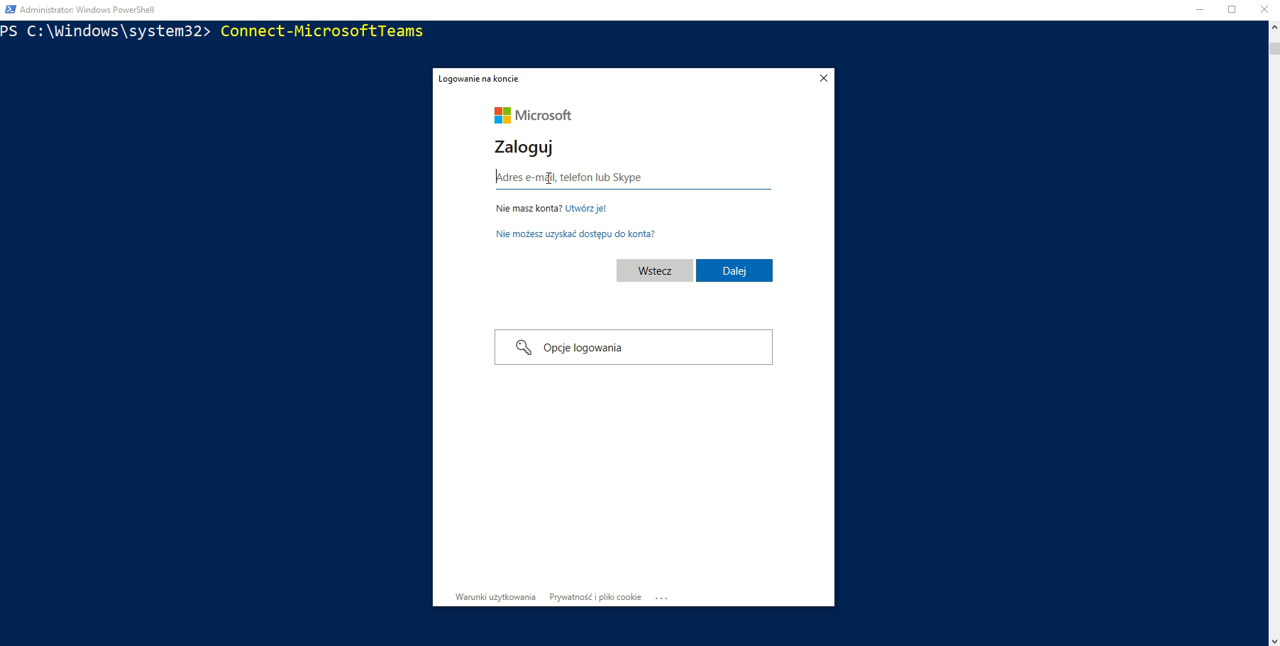
Log in with a user account with **administrator privileges** in the tenant. The account with administrator privileges is the one used to create the new domain in the **Adding a New Domain to the Microsoft 365 Administration Center** instructions.

#### **Configuring routing for phone calls**

Individually copy the following commands highlighted in blue, paste them into **PowerShell** and execute by pressing **Enter.**

<p class="callout info"><span style="color: rgb(226, 68, 116);">**<span class="TextRun SCXW49396621 BCX8" data-contrast="none" lang="EN-US" xml:lang="EN-US"><span class="NormalTextRun SCXW49396621 BCX8">Set-</span><span class="NormalTextRun SpellingErrorV2Themed SCXW49396621 BCX8">CsOnlinePstnUsage</span><span class="NormalTextRun SCXW49396621 BCX8"> -Identity Global -Usage @{Add="TMobileRouting"}</span></span>** </span></p>

<p class="callout info">**<span style="color: rgb(226, 68, 116);"><span class="TextRun SCXW49396621 BCX8" data-contrast="none" lang="EN-GB" xml:lang="EN-GB"><span class="NormalTextRun SCXW49396621 BCX8">Set-</span><span class="NormalTextRun SpellingErrorV2Themed SCXW49396621 BCX8">CsOnlineVoiceRoutingPolicy</span><span class="NormalTextRun SCXW49396621 BCX8"> -Identity Global -</span><span class="NormalTextRun SpellingErrorV2Themed SCXW49396621 BCX8">OnlinePSTNUsages</span><span class="NormalTextRun SCXW49396621 BCX8"> "</span><span class="NormalTextRun SpellingErrorV2Themed SCXW49396621 BCX8">TMobileRouting</span><span class="NormalTextRun SCXW49396621 BCX8">"</span></span></span>**</p>

<span class="ui-provider a b c d e f g h i j k l m n o p q r s t u v w x y z ab ac ae af ag ah ai aj ak" dir="ltr">In the last command, the domain <span style="color: rgb(226, 0, 116);">**<span style="background-color: rgb(241, 196, 15);">T10012345.teams.t-mobile.pl</span>**</span> should be replaced with the one that was assigned by T-Mobile.</span>

<p class="callout info">**<span style="color: rgb(226, 68, 116);"><span class="TextRun SCXW49396621 BCX8" data-contrast="none" lang="EN-GB" xml:lang="EN-GB"><span class="NormalTextRun SCXW49396621 BCX8">New-</span><span class="NormalTextRun SpellingErrorV2Themed SCXW49396621 BCX8">CsOnlineVoiceRoute</span><span class="NormalTextRun SCXW49396621 BCX8"> -Identity "</span><span class="NormalTextRun SpellingErrorV2Themed SCXW49396621 BCX8">TMobileRouting</span><span class="NormalTextRun SCXW49396621 BCX8">“</span><span class="NormalTextRun SCXW49396621 BCX8"> -</span><span class="NormalTextRun SpellingErrorV2Themed SCXW49396621 BCX8">NumberPattern</span> <span class="NormalTextRun ContextualSpellingAndGrammarErrorV2Themed SCXW49396621 BCX8">".\*</span><span class="NormalTextRun SCXW49396621 BCX8">" -</span><span class="NormalTextRun SpellingErrorV2Themed SCXW49396621 BCX8">OnlinePstnGatewayList</span> </span><span class="TextRun Highlight SCXW49396621 BCX8" data-contrast="none" lang="EN-GB" style="background-color: rgb(241, 196, 15);" xml:lang="EN-GB"><span class="NormalTextRun SCXW49396621 BCX8">T10012345</span><span class="NormalTextRun SCXW49396621 BCX8">.</span><span class="NormalTextRun SCXW49396621 BCX8">teams</span><span class="NormalTextRun SCXW49396621 BCX8">.t-mobile.</span><span class="NormalTextRun SCXW49396621 BCX8">pl</span></span><span class="TextRun SCXW49396621 BCX8" data-contrast="none" lang="EN-GB" xml:lang="EN-GB"><span class="NormalTextRun SCXW49396621 BCX8"> -Priority 1 -</span><span class="NormalTextRun SpellingErrorV2Themed SCXW49396621 BCX8">OnlinePstnUsages</span><span class="NormalTextRun SCXW49396621 BCX8"> "</span><span class="NormalTextRun SpellingErrorV2Themed SCXW49396621 BCX8">TMobileRouting</span><span class="NormalTextRun SCXW49396621 BCX8">"</span></span></span>**</p>

<p class="callout warning">**Do not close PowerShell it will be needed in the next instruction.**</p>

<span class="ui-provider a b c d e f g h i j k l m n o p q r s t u v w x y z ab ac ae af ag ah ai aj ak" dir="ltr">After successfully executing this command, you can proceed to the next instruction.</span>

# Assigning Phone Numbers to User Accounts

<video controls="controls" height="402" style="width: 804px; height: 402px;" width="804"> <source src="https://d-wpm.uc.t-mobile.pl/attachments/Konfiguracja_uzytkownikow.mp4" type="video/mp4"></source></video>

The final step in configuring Numer w Teams service is connecting users to the phone numbers provided by **T-Mobile**. Assigning numbers to a specific user or multiple users is done using commands executed in PowerShell.

#### **Single User Configuration**

<span class="ui-provider a b c d e f g h i j k l m n o p q r s t u v w x y z ab ac ae af ag ah ai aj ak" dir="ltr">Run the following command, changing <span style="color: rgb(226, 0, 116); background-color: rgb(241, 196, 15);">**uzytkownik@domenafirmowa.pl**</span> to the username of the user who should be assigned the phone number provided by **T-Mobile,** which you should insert in place of <span style="background-color: rgb(241, 196, 15); color: rgb(226, 0, 116);">**+48000000000**</span>.</span>

<p class="callout info">**<span style="color: rgb(226, 68, 116);"><span class="TextRun SCXW104419952 BCX8" data-contrast="none" lang="EN-GB" xml:lang="EN-GB"><span class="NormalTextRun SCXW104419952 BCX8">Set-</span><span class="NormalTextRun SpellingErrorV2Themed SCXW104419952 BCX8">CsPhoneNumberAssignment</span> <span class="NormalTextRun SCXW104419952 BCX8">-Identity</span> </span><span class="TextRun SCXW104419952 BCX8" data-contrast="none" lang="EN-GB" xml:lang="EN-GB"><span style="background-color: rgb(241, 196, 15);"><a class="Hyperlink SCXW104419952 BCX8" rel="noreferrer noopener" style="color: rgb(226, 68, 116); background-color: rgb(241, 196, 15);" target="_blank">uzytkownik@domenafirmowa.pl</a> </span></span></span><span style="color: rgb(226, 0, 116);"><span class="NormalTextRun SCXW104419952 BCX8">-</span><span class="NormalTextRun SpellingErrorV2Themed SCXW104419952 BCX8">PhoneNumber</span> <span class="TextRun Highlight SCXW104419952 BCX8" data-contrast="auto" lang="PL-PL" style="background-color: rgb(241, 196, 15);" xml:lang="PL-PL"><span class="NormalTextRun SCXW104419952 BCX8">+48</span><span class="NormalTextRun SCXW104419952 BCX8">000</span><span class="NormalTextRun SCXW104419952 BCX8">000000</span></span> <span class="TextRun SCXW104419952 BCX8" data-contrast="none" lang="EN-GB" xml:lang="EN-GB"><span class="NormalTextRun SCXW104419952 BCX8">-</span><span class="NormalTextRun SpellingErrorV2Themed SCXW104419952 BCX8">PhoneNumberType</span> <span class="NormalTextRun SpellingErrorV2Themed SCXW104419952 BCX8">DirectRouting</span></span></span>**</p>

#### **<span class="ui-provider a b c d e f g h i j k l m n o p q r s t u v w x y z ab ac ae af ag ah ai aj ak" dir="ltr">Multiple Users Configuration</span>**

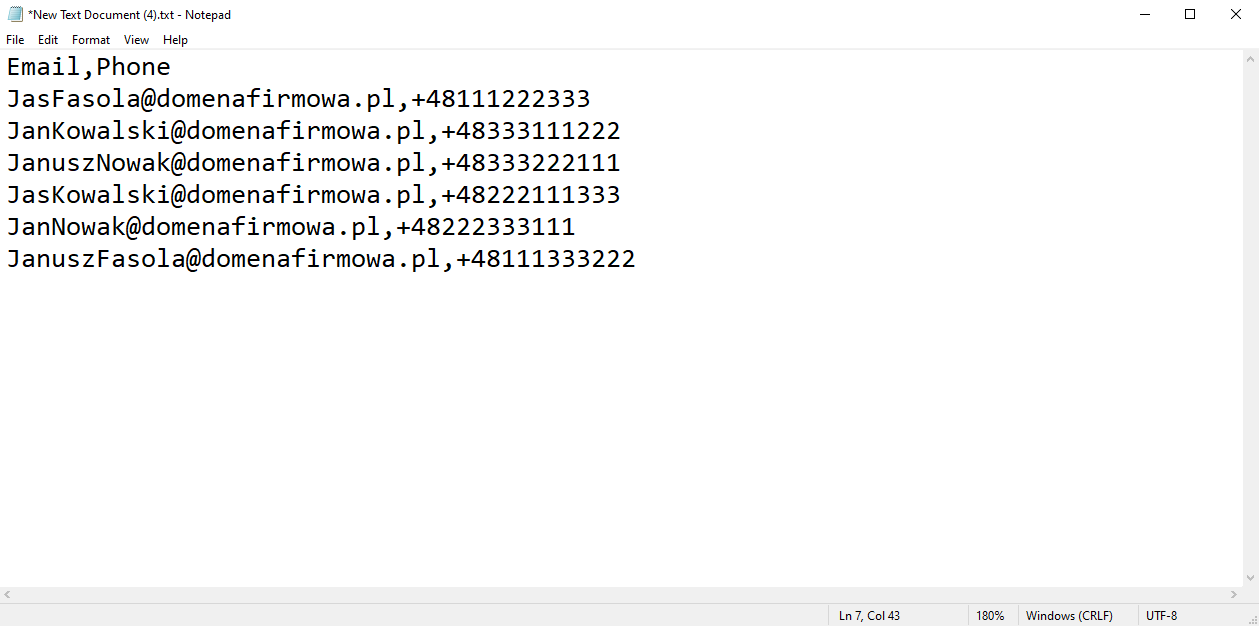
<span style="color: rgb(0, 0, 0);"><span class="TextRun SCXW104419952 BCX8" data-contrast="none" lang="PL-PL" xml:lang="PL-PL"><span class="NormalTextRun SCXW104419952 BCX8" data-ccp-parastyle="heading 2">To configure multiple users at once , prepare a **CSV** file (comma-separated value text file) containing the **user names** and **phone numbers** you want to assign to them. The file should be created according to the format below.</span></span></span>

<p class="callout info">**<span style="color: rgb(226, 68, 116);"><span class="TextRun SCXW104419952 BCX8" data-contrast="none" lang="PL-PL" xml:lang="PL-PL"><span class="NormalTextRun SpellingErrorV2Themed SCXW104419952 BCX8">Email,</span><span class="NormalTextRun SpellingErrorV2Themed SCXW104419952 BCX8">Phone</span></span>   
<span class="TextRun SCXW104419952 BCX8" data-contrast="none" lang="PL-PL" xml:lang="PL-PL"><span class="NormalTextRun ContextualSpellingAndGrammarErrorV2Themed SCXW104419952 BCX8">uzytkownika@domenafirmowa.pl,+</span><span class="NormalTextRun SCXW104419952 BCX8">48</span><span class="NormalTextRun SCXW104419952 BCX8">000</span><span class="NormalTextRun SCXW104419952 BCX8">000000</span></span>   
<span class="TextRun SCXW104419952 BCX8" data-contrast="none" lang="PL-PL" xml:lang="PL-PL"><span class="NormalTextRun ContextualSpellingAndGrammarErrorV2Themed SCXW104419952 BCX8">uzytkownika@domenafirmowa.pl</span><span class="NormalTextRun SCXW104419952 BCX8">,</span><span class="NormalTextRun ContextualSpellingAndGrammarErrorV2Themed SCXW104419952 BCX8">+</span><span class="NormalTextRun SCXW104419952 BCX8">48</span><span class="NormalTextRun SCXW104419952 BCX8">000000000</span></span>   
<span class="TextRun SCXW104419952 BCX8" data-contrast="none" lang="PL-PL" xml:lang="PL-PL"><span class="NormalTextRun ContextualSpellingAndGrammarErrorV2Themed SCXW104419952 BCX8">uzytkownika@domenafirmowa.pl,</span></span><span class="TextRun SCXW104419952 BCX8" data-contrast="none" lang="PL-PL" xml:lang="PL-PL"><span class="NormalTextRun ContextualSpellingAndGrammarErrorV2Themed SCXW104419952 BCX8">+</span><span class="NormalTextRun SCXW104419952 BCX8">48</span><span class="NormalTextRun SCXW104419952 BCX8">000000000</span></span></span>**</p>

<span style="color: rgb(0, 0, 0);"><span class="TextRun SCXW104419952 BCX8" data-contrast="none" lang="PL-PL" xml:lang="PL-PL"><span class="NormalTextRun SCXW104419952 BCX8" data-ccp-parastyle="heading 2"><span class="TextRun SCXW104419952 BCX8" data-contrast="auto" lang="PL-PL" xml:lang="PL-PL"><span class="NormalTextRun SCXW104419952 BCX8"><span class="ui-provider a b c d e f g h i j k l m n o p q r s t u v w x y z ab ac ae af ag ah ai aj ak" dir="ltr">Replace <span style="color: rgb(226, 0, 116);">**uzytkownik@domenafirmowa.pl**</span> with the actual usernames of the users you want to assign phone numbers to.</span> <span class="ui-provider a b c d e f g h i j k l m n o p q r s t u v w x y z ab ac ae af ag ah ai aj ak" dir="ltr">Replace <span style="color: rgb(226, 0, 116);">**+48000000000**</span> with the corresponding T-Mobile phone numbers.</span><span style="color: rgb(226, 0, 116);"> <span class="ui-provider a b c d e f g h i j k l m n o p q r s t u v w x y z ab ac ae af ag ah ai aj ak" dir="ltr" style="color: rgb(0, 0, 0);"><span class="ui-provider a b c d e f g h i j k l m n o p q r s t u v w x y z ab ac ae af ag ah ai aj ak" dir="ltr">Add more rows to the file following the same format for each additional user you want to configure.</span></span></span></span></span></span></span></span>

<span style="color: rgb(0, 0, 0);"><span class="TextRun SCXW104419952 BCX8" data-contrast="none" lang="PL-PL" xml:lang="PL-PL"><span class="NormalTextRun SCXW104419952 BCX8" data-ccp-parastyle="heading 2"><span class="TextRun SCXW104419952 BCX8" data-contrast="auto" lang="PL-PL" xml:lang="PL-PL"><span class="NormalTextRun SCXW104419952 BCX8"><span class="ui-provider a b c d e f g h i j k l m n o p q r s t u v w x y z ab ac ae af ag ah ai aj ak" dir="ltr">Finished file should look like this:</span></span></span></span></span></span>

[![obraz.png](https://bookstack.uc.t-mobile.pl/uploads/images/gallery/2023-12/scaled-1680-/1Z0obraz.png)](https://bookstack.uc.t-mobile.pl/uploads/images/gallery/2023-12/1Z0obraz.png)

<p class="callout warning"><span class="ui-provider a b c d e f g h i j k l m n o p q r s t u v w x y z ab ac ae af ag ah ai aj ak" dir="ltr">Before saving the file, make sure that the phone numbers have the correct format. The number should start with a "+" sign followed by 11 digits, starting with 48. An example number is: +48123456789.</span></p>

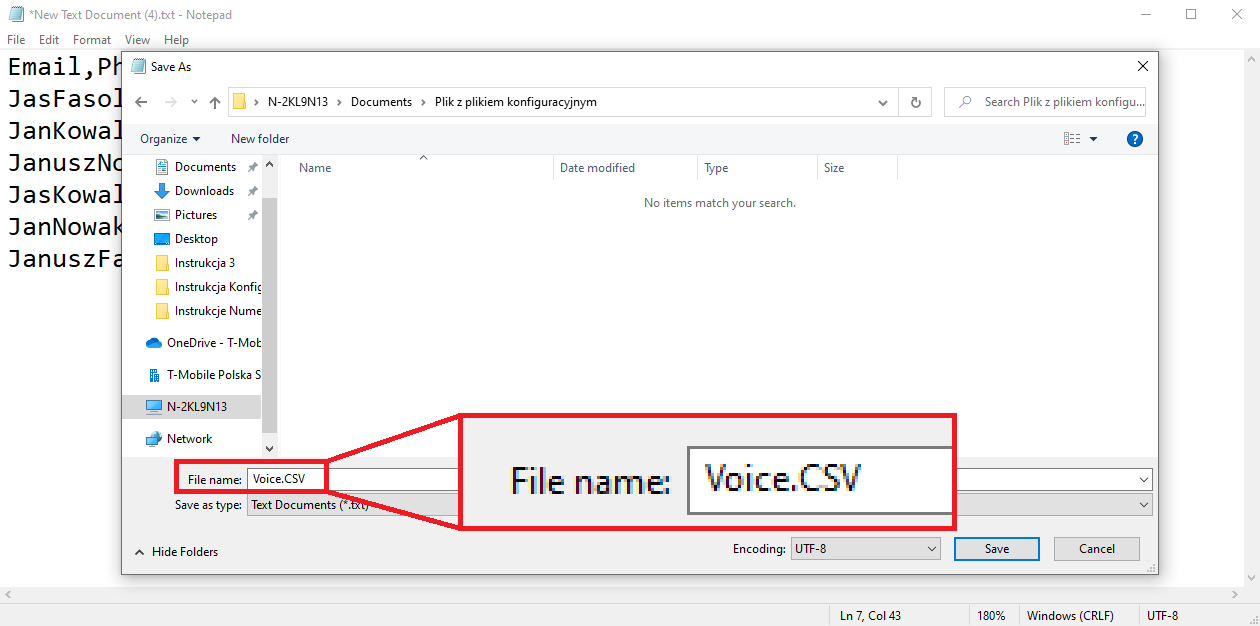
<span class="ui-provider a b c d e f g h i j k l m n o p q r s t u v w x y z ab ac ae af ag ah ai aj ak" dir="ltr">Save the file with the name **Voice.CSV (Voice** is the filename and **CSV** is the file extension).</span>

[![obraz.png](https://bookstack.uc.t-mobile.pl/uploads/images/gallery/2023-12/scaled-1680-/PiFobraz.png)](https://bookstack.uc.t-mobile.pl/uploads/images/gallery/2023-12/PiFobraz.png)

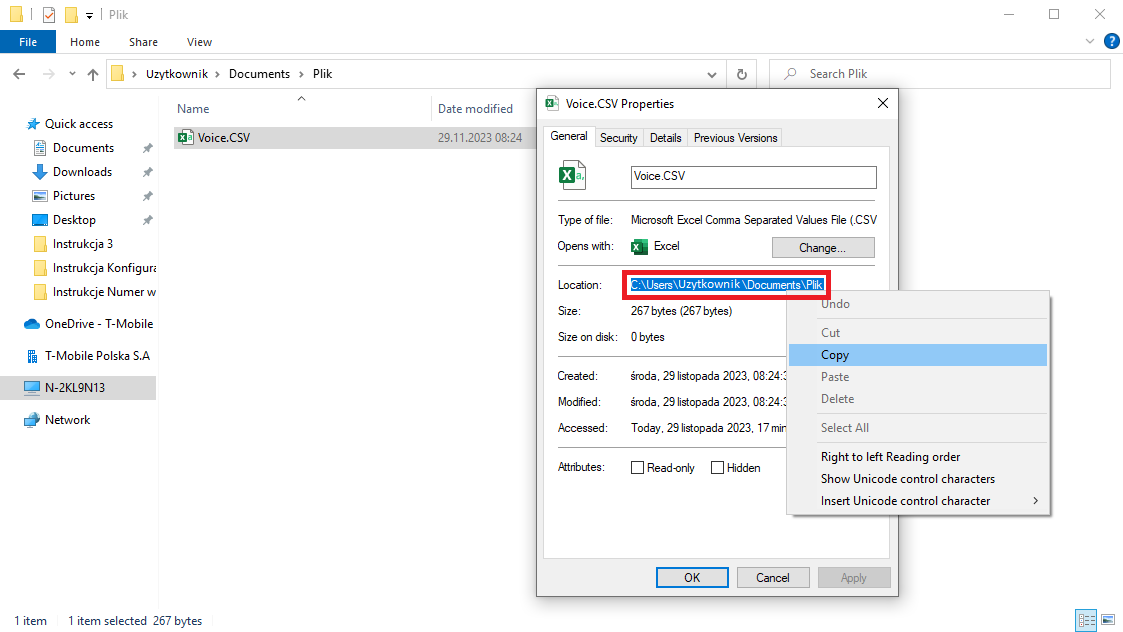
<span class="ui-provider a b c d e f g h i j k l m n o p q r s t u v w x y z ab ac ae af ag ah ai aj ak" dir="ltr">Next, open the file location, **right-click** on the file, select **Properties** and copy the file **location**.</span>

[![obraz.png](https://bookstack.uc.t-mobile.pl/uploads/images/gallery/2023-12/scaled-1680-/dZOobraz.png)](https://bookstack.uc.t-mobile.pl/uploads/images/gallery/2023-12/dZOobraz.png)

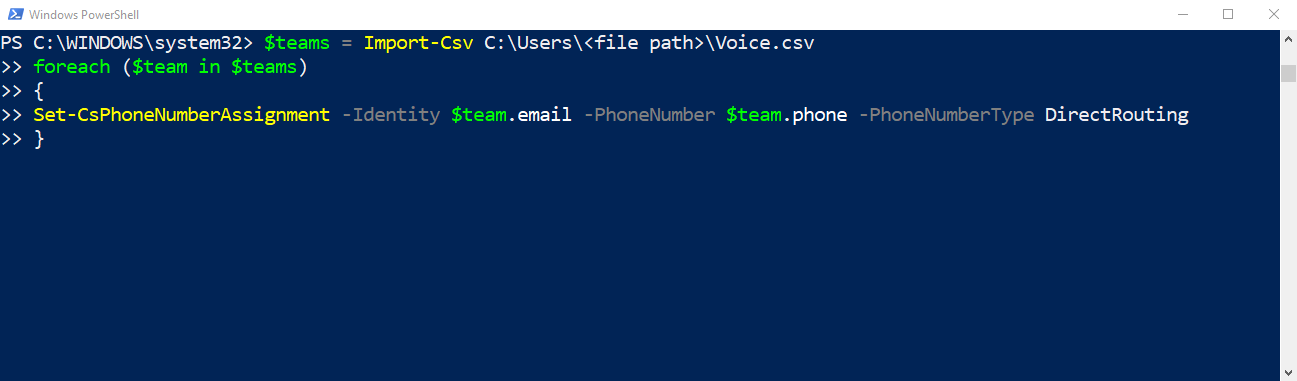
<span class="ui-provider a b c d e f g h i j k l m n o p q r s t u v w x y z ab ac ae af ag ah ai aj ak" dir="ltr">In the following command, replace <span style="color: rgb(226, 0, 116); background-color: rgb(241, 196, 15);">**C:\\Users\\&lt;file path&gt;**</span> with the value you copied earlier. Then, execute it in **PowerShell.**</span>

<p class="callout info">**<span style="color: rgb(226, 68, 116);"><span class="EOP SCXW104419952 BCX8" data-ccp-props="{"134245417":false,"335559685":3018}">$teams = Import-Csv <span style="background-color: rgb(241, 196, 15);">C:\\Users\\&lt;file path&gt;</span>\\Voice.csv  
foreach ($team in $teams)   
{   
Set-CsPhoneNumberAssignment -Identity $team.email -PhoneNumber $team.phone -PhoneNumberType DirectRouting  
} </span></span>**</p>

[![obraz.png](https://bookstack.uc.t-mobile.pl/uploads/images/gallery/2023-12/scaled-1680-/Zyvobraz.png)](https://bookstack.uc.t-mobile.pl/uploads/images/gallery/2023-12/Zyvobraz.png)

Once the configuration is complete, it is possible to make phone calls in the **MS Teams** application. To do this, log into the account of a user to whom you have assigned a phone number and who has a license with the **Teams Phone** add-on.

# Additional configuration of the Numer w Teams service


# Adding numbers to an already configured Numer w Teams service

<span class="TextRun SCXW136270634 BCX8" data-contrast="auto" lang="PL-PL" style="color: rgb(0, 0, 0);" xml:lang="PL-PL"><span class="NormalTextRun SCXW136270634 BCX8">Assigning new numbers to users for an already activated **Numer w Teams** service. </span></span>

<span class="TextRun SCXW136270634 BCX8" data-contrast="auto" lang="PL-PL" xml:lang="PL-PL"><span class="NormalTextRun SCXW136270634 BCX8"><span style="color: rgb(226, 0, 116);">**1.** </span></span></span><span class="ui-provider a b c d e f g h i j k l m n o p q r s t u v w x y z ab ac ae af ag ah ai aj ak" dir="ltr">In the Start menu, search for the **PowerShell**, right-click the icon, and select **Run as administrator**.</span>

[![image.png](https://bookstack.uc.t-mobile.pl/uploads/images/gallery/2023-11/scaled-1680-/nJVimage.png)](https://bookstack.uc.t-mobile.pl/uploads/images/gallery/2023-11/nJVimage.png)

<span class="TextRun SCXW171973274 BCX8" data-contrast="auto" lang="PL-PL" xml:lang="PL-PL"><span class="NormalTextRun SCXW171973274 BCX8"><span class="TextRun SCXW136270634 BCX8" data-contrast="auto" lang="PL-PL" xml:lang="PL-PL"><span class="NormalTextRun SCXW136270634 BCX8"><span style="color: rgb(226, 0, 116);">**2.** </span></span></span>To make sure that you will be able to execute the commands described in the following sections, check the version of the **PowerShell.** <span class="ui-provider a b c d e f g h i j k l m n o p q r s t u v w x y z ab ac ae af ag ah ai aj ak" dir="ltr">Open **PowerShell** and enter one of the two following commands.</span></span></span>

<p class="callout info"><span style="color: rgb(226, 0, 116);">**<span class="TextRun SCXW171973274 BCX8" data-contrast="none" lang="PL-PL" xml:lang="PL-PL"><span class="NormalTextRun SCXW171973274 BCX8">$</span><span class="NormalTextRun SpellingErrorV2Themed SCXW171973274 BCX8">PSVersionTable.PSVersion</span></span><span class="EOP SCXW171973274 BCX8" data-ccp-props="{"134245417":false,"335559685":3018}"> </span>**</span></p>

<p class="callout info"><span style="color: rgb(226, 0, 116);">**<span class="EOP SCXW171973274 BCX8" data-ccp-props="{"134245417":false,"335559685":3018}"><span class="TextRun SCXW171973274 BCX8" data-contrast="none" lang="PL-PL" xml:lang="PL-PL"><span class="NormalTextRun SCXW171973274 BCX8">$</span><span class="NormalTextRun SpellingErrorV2Themed SCXW171973274 BCX8">host.Version.</span></span></span>**</span></p>

[![image.png](https://bookstack.uc.t-mobile.pl/uploads/images/gallery/2024-03/scaled-1680-/RFZimage.png)](https://bookstack.uc.t-mobile.pl/uploads/images/gallery/2024-03/RFZimage.png)

The **PowerShell** application should have version **5.1 (Major:** **5,** **Minor: 1**) or **higher.** If it is lower, update **PowerShell** according to the instructions on the following page:

<p class="callout info"><span style="color: rgb(35, 111, 161);">**[<span class="TextRun Underlined SCXW171973274 BCX8" data-contrast="none" lang="PL-PL" xml:lang="PL-PL"><span class="NormalTextRun SCXW171973274 BCX8" data-ccp-charstyle="Hyperlink">https://docs.microsoft.com/en-us/powershell/scripting/windows-powershell/install/installing-windows-powershell#upgrading-existing-windows-powershell</span></span>](https://docs.microsoft.com/en-us/powershell/scripting/windows-powershell/install/installing-windows-powershell#upgrading-existing-windows-powershell)<span class="TextRun SCXW171973274 BCX8" data-contrast="auto" lang="PL-PL" xml:lang="PL-PL"><span class="NormalTextRun SCXW171973274 BCX8"> </span></span><span class="EOP SCXW171973274 BCX8" data-ccp-props="{"134245417":false,"335559685":3018}"> </span>**</span></p>

<span class="TextRun SCXW136270634 BCX8" data-contrast="auto" lang="PL-PL" xml:lang="PL-PL"><span class="NormalTextRun SCXW136270634 BCX8"><span style="color: rgb(226, 0, 116);">**3.** </span></span></span>Installation of the MicrosoftTeams module is required to correctly configure the service. One by one, copy the following commands highlighted in blue, paste them into PowerShell and execute by pressing Enter.

<div aria-label="Page Section Options" class="pointer-container" id="bkmrk-%C2%A0" refs="pointer@pointer" tabindex="-1"><div class="pointer flex-container-row items-center justify-space-between p-s anim is-page-editable"><div class="flex-container-row items-center gap-s" refs="pointer@mode-section"><button class="text-button icon px-xs" title="Permalink mode, Press to show include tag"><svg class="svg-icon" data-icon="link" role="presentation" viewbox="0 0 24 24" xmlns="http://www.w3.org/2000/svg"></svg></button><div class="input-group"> <button class="button outline icon" title="Copy Link" type="button"><svg class="svg-icon" data-icon="copy" role="presentation" viewbox="0 0 24 24" xmlns="http://www.w3.org/2000/svg"></svg></button></div></div><svg class="svg-icon" data-icon="edit" role="presentation" viewbox="0 0 24 24" xmlns="http://www.w3.org/2000/svg"></svg></div></div><p class="callout info"><span style="color: rgb(226, 0, 116);">**<span class="TextRun SCXW30550165 BCX8" data-contrast="none" lang="EN-GB" xml:lang="EN-GB"><span class="NormalTextRun SCXW30550165 BCX8">Set-</span><span class="NormalTextRun SpellingErrorV2Themed SCXW30550165 BCX8">ExecutionPolicy</span> <span class="NormalTextRun SpellingErrorV2Themed SCXW30550165 BCX8">RemoteSigned</span></span>**</span></p>

[![image.png](https://bookstack.uc.t-mobile.pl/uploads/images/gallery/2024-03/scaled-1680-/AXgimage.png)](https://bookstack.uc.t-mobile.pl/uploads/images/gallery/2024-03/AXgimage.png)

Confirm the execution of the above command by selecting Y and pressing enter. Then execute the following commands.

<p class="callout info"><span style="color: rgb(226, 0, 116);">**<span class="TextRun SCXW30550165 BCX8" data-contrast="none" lang="EN-US" xml:lang="EN-US"><span class="NormalTextRun SCXW30550165 BCX8">Import-Module -Name </span><span class="NormalTextRun SpellingErrorV2Themed SCXW30550165 BCX8">MicrosoftTeams</span></span>**</span></p>

[![image.png](https://bookstack.uc.t-mobile.pl/uploads/images/gallery/2024-03/scaled-1680-/8pmimage.png)](https://bookstack.uc.t-mobile.pl/uploads/images/gallery/2024-03/8pmimage.png)

<div aria-label="Page Section Options" class="pointer-container" id="bkmrk-%C2%A0-1" refs="pointer@pointer" tabindex="-1"><div class="pointer flex-container-row items-center justify-space-between p-s anim is-page-editable"><div class="flex-container-row items-center gap-s" refs="pointer@mode-section"><button class="text-button icon px-xs" title="Permalink mode, Press to show include tag"><svg class="svg-icon" data-icon="link" role="presentation" viewbox="0 0 24 24" xmlns="http://www.w3.org/2000/svg"></svg></button><div class="input-group"><span style="color: rgb(226, 0, 116);"> <button class="button outline icon" title="Copy Link" type="button"><svg class="svg-icon" data-icon="copy" role="presentation" viewbox="0 0 24 24" xmlns="http://www.w3.org/2000/svg"></svg></button></span></div></div><svg class="svg-icon" data-icon="edit" role="presentation" viewbox="0 0 24 24" xmlns="http://www.w3.org/2000/svg"></svg></div></div><p class="callout info"><span style="color: rgb(226, 0, 116);">**<span class="TextRun SCXW30550165 BCX8" data-contrast="none" lang="PL-PL" xml:lang="PL-PL"><span class="NormalTextRun SCXW30550165 BCX8">Set-</span><span class="NormalTextRun SpellingErrorV2Themed SCXW30550165 BCX8">ExecutionPolicy</span> <span class="NormalTextRun SpellingErrorV2Themed SCXW30550165 BCX8">Restricted</span></span>**</span></p>

[![image.png](https://bookstack.uc.t-mobile.pl/uploads/images/gallery/2024-03/scaled-1680-/zoNimage.png)](https://bookstack.uc.t-mobile.pl/uploads/images/gallery/2024-03/zoNimage.png)

Confirm the execution of the above command by selecting Y and pressing enter.

<span style="color: rgb(226, 0, 116);">**<span class="TextRun SCXW30550165 BCX8" data-contrast="none" lang="PL-PL" xml:lang="PL-PL"><span class="NormalTextRun SpellingErrorV2Themed SCXW30550165 BCX8"><span class="TextRun SCXW136270634 BCX8" data-contrast="auto" lang="PL-PL" xml:lang="PL-PL"><span class="NormalTextRun SCXW136270634 BCX8">4. </span></span></span></span>**<span class="TextRun SCXW30550165 BCX8" data-contrast="none" lang="PL-PL" style="color: rgb(0, 0, 0);" xml:lang="PL-PL"><span class="NormalTextRun SpellingErrorV2Themed SCXW30550165 BCX8"><span class="TextRun SCXW136270634 BCX8" data-contrast="auto" lang="PL-PL" xml:lang="PL-PL"><span class="NormalTextRun SCXW136270634 BCX8"><span class="WACImageContainer NoPadding AttachedToBeginning DragDrop SCXW17773935 BCX8" role="presentation"><span class="TextRun SCXW48744946 BCX8" data-contrast="auto" lang="PL-PL" xml:lang="PL-PL"><span class="NormalTextRun SCXW48744946 BCX8">Log in with a user account with **administrator privileges** in the tenant. The account with administrator privileges is the one used to create the new domain in the **Adding a New Domain to the Microsoft 365 Administration Center** instructions. Start with following command.</span></span></span></span></span></span></span></span>

<p class="callout info"><span style="color: rgb(226, 0, 116);">**<span class="TextRun SCXW17773935 BCX8" data-contrast="none" lang="PL-PL" xml:lang="PL-PL"><span class="NormalTextRun SCXW17773935 BCX8">Connect-</span><span class="NormalTextRun SpellingErrorV2Themed SCXW17773935 BCX8">MicrosoftTeams</span></span>**</span></p>

Enter e-mail address in the login window.

[![image.png](https://bookstack.uc.t-mobile.pl/uploads/images/gallery/2024-03/scaled-1680-/02Gimage.png)](https://bookstack.uc.t-mobile.pl/uploads/images/gallery/2024-03/02Gimage.png)
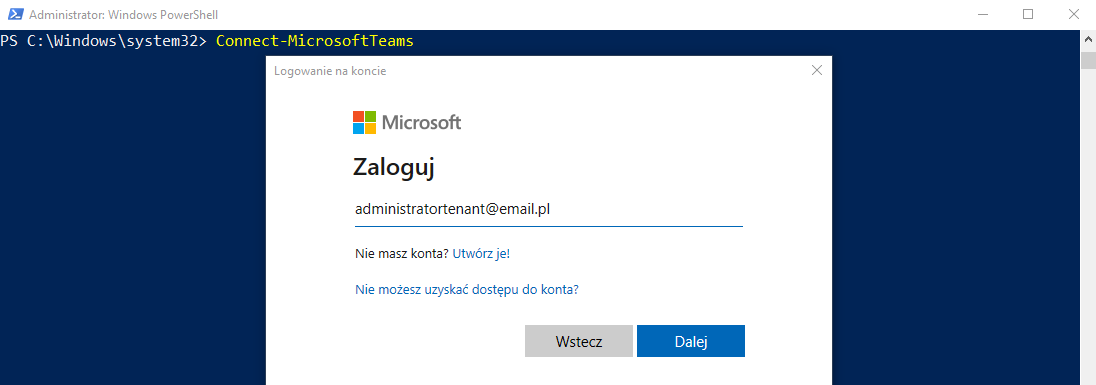
Next, enter your password.

[![image.png](https://bookstack.uc.t-mobile.pl/uploads/images/gallery/2024-03/scaled-1680-/UUEimage.png)](https://bookstack.uc.t-mobile.pl/uploads/images/gallery/2024-03/UUEimage.png)
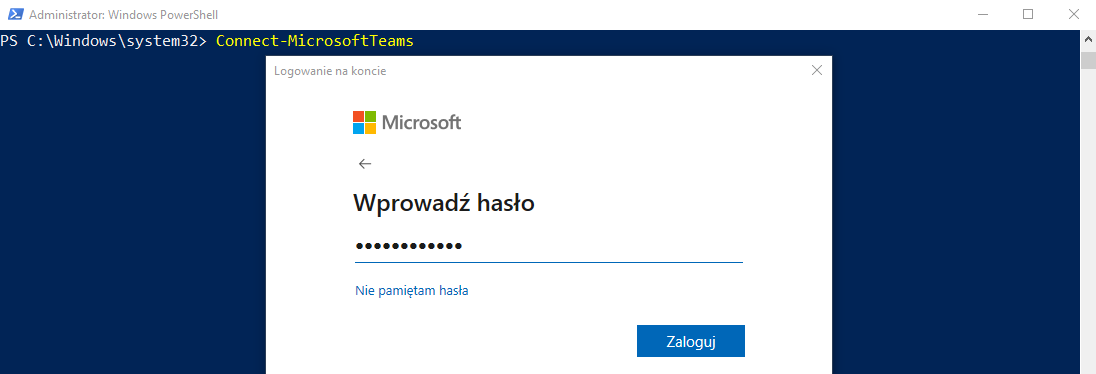
Once you have successfully logged in, you will see your email address and tenant details.

[![image.png](https://bookstack.uc.t-mobile.pl/uploads/images/gallery/2024-03/scaled-1680-/r0iimage.png)](https://bookstack.uc.t-mobile.pl/uploads/images/gallery/2024-03/r0iimage.png)

<span class="TextRun SCXW104419952 BCX8" data-contrast="auto" lang="PL-PL" xml:lang="PL-PL"><span class="NormalTextRun SCXW104419952 BCX8"><span style="color: rgb(226, 0, 116);">**<span class="TextRun SCXW30550165 BCX8" data-contrast="none" lang="PL-PL" xml:lang="PL-PL"><span class="NormalTextRun SpellingErrorV2Themed SCXW30550165 BCX8"><span class="TextRun SCXW136270634 BCX8" data-contrast="auto" lang="PL-PL" xml:lang="PL-PL"><span class="NormalTextRun SCXW136270634 BCX8">5. </span></span></span></span>**<span style="color: rgb(0, 0, 0);"><span class="TextRun SCXW30550165 BCX8" data-contrast="none" lang="PL-PL" xml:lang="PL-PL"><span class="NormalTextRun SpellingErrorV2Themed SCXW30550165 BCX8"><span class="TextRun SCXW136270634 BCX8" data-contrast="auto" lang="PL-PL" xml:lang="PL-PL"><span class="NormalTextRun SCXW136270634 BCX8">The final step in configuring Numer w Teams service is connecting users to the phone numbers provided by **T-Mobile**. Assigning numbers to a specific user or multiple users is done using commands executed in PowerShell.</span></span></span></span></span></span></span></span>

#### **Single User Configuration**

<span class="TextRun SCXW104419952 BCX8" data-contrast="auto" lang="PL-PL" xml:lang="PL-PL"><span class="NormalTextRun SCXW104419952 BCX8">Run the following command, changing <span style="color: rgb(226, 0, 116);">**<span class="TextRun SCXW104419952 BCX8" data-contrast="none" lang="EN-GB" xml:lang="EN-GB"><span style="background-color: rgb(240, 209, 84);"><a class="Hyperlink SCXW104419952 BCX8" rel="noreferrer noopener" style="color: rgb(226, 0, 116); background-color: rgb(240, 209, 84);" target="_blank">uzytkownik@domenafirmowa.pl</a></span></span>**</span> to the username of the user who should be assigned the phone number provided by **T-Mobile,** which you should insert in place of <span style="background-color: rgb(85, 224, 143); color: rgb(226, 0, 116);">**<span class="TextRun Highlight SCXW104419952 BCX8" data-contrast="auto" lang="PL-PL" xml:lang="PL-PL">+48000000000</span>**</span>. </span></span>

<div aria-label="Page Section Options" class="pointer-container" id="bkmrk-%C2%A0-2" refs="pointer@pointer" tabindex="-1"><div class="pointer flex-container-row items-center justify-space-between p-s anim is-page-editable"><div class="flex-container-row items-center gap-s" refs="pointer@mode-section"><button class="text-button icon px-xs" title="Permalink mode, Press to show include tag"><svg class="svg-icon" data-icon="link" role="presentation" viewbox="0 0 24 24" xmlns="http://www.w3.org/2000/svg"></svg></button><div class="input-group"> <button class="button outline icon" title="Copy Link" type="button"><svg class="svg-icon" data-icon="copy" role="presentation" viewbox="0 0 24 24" xmlns="http://www.w3.org/2000/svg"></svg></button></div></div><svg class="svg-icon" data-icon="edit" role="presentation" viewbox="0 0 24 24" xmlns="http://www.w3.org/2000/svg"></svg></div></div><p class="callout info"><span style="color: rgb(226, 0, 116);">**<span class="TextRun SCXW104419952 BCX8" data-contrast="none" lang="EN-GB" xml:lang="EN-GB"><span class="NormalTextRun SCXW104419952 BCX8">Set-</span><span class="NormalTextRun SpellingErrorV2Themed SCXW104419952 BCX8">CsPhoneNumberAssignment</span> <span class="NormalTextRun SCXW104419952 BCX8">-Identity</span> </span><span class="TextRun SCXW104419952 BCX8" data-contrast="none" lang="EN-GB" xml:lang="EN-GB"><span style="background-color: rgb(240, 209, 84);"><a class="Hyperlink SCXW104419952 BCX8" rel="noreferrer noopener" style="color: rgb(226, 0, 116); background-color: rgb(240, 209, 84);" target="_blank">uzytkownik@domenafirmowa.pl</a></span> </span><span class="NormalTextRun SCXW104419952 BCX8">-</span><span class="NormalTextRun SpellingErrorV2Themed SCXW104419952 BCX8">PhoneNumber</span> <span class="TextRun Highlight SCXW104419952 BCX8" data-contrast="auto" lang="PL-PL" style="background-color: rgb(85, 224, 143);" xml:lang="PL-PL"><span class="NormalTextRun SCXW104419952 BCX8">+48</span><span class="NormalTextRun SCXW104419952 BCX8">000</span><span class="NormalTextRun SCXW104419952 BCX8">000000</span></span> <span class="TextRun SCXW104419952 BCX8" data-contrast="none" lang="EN-GB" xml:lang="EN-GB"><span class="NormalTextRun SCXW104419952 BCX8">-</span><span class="NormalTextRun SpellingErrorV2Themed SCXW104419952 BCX8">PhoneNumberType</span> <span class="NormalTextRun SpellingErrorV2Themed SCXW104419952 BCX8">DirectRouting</span></span>**</span></p>

#### **<span class="ui-provider a b c d e f g h i j k l m n o p q r s t u v w x y z ab ac ae af ag ah ai aj ak" dir="ltr">Multiple Users Configuration</span>**

<span class="TextRun SCXW104419952 BCX8" data-contrast="none" lang="PL-PL" xml:lang="PL-PL"><span class="NormalTextRun SCXW104419952 BCX8" data-ccp-parastyle="heading 2">To configure multiple users at once , prepare a **CSV** file (comma-separated value text file) containing the **user names** and **phone numbers** you want to assign to them. The file should be created according to the format below.</span></span>

<p class="callout info">**<span class="TextRun SCXW104419952 BCX8" data-contrast="none" lang="PL-PL" xml:lang="PL-PL"><span class="NormalTextRun SpellingErrorV2Themed SCXW104419952 BCX8">Email,</span><span class="NormalTextRun SpellingErrorV2Themed SCXW104419952 BCX8">Phone</span></span>   
<span class="TextRun SCXW104419952 BCX8" data-contrast="none" lang="PL-PL" xml:lang="PL-PL"><span class="NormalTextRun ContextualSpellingAndGrammarErrorV2Themed SCXW104419952 BCX8">uzytkownika@domenafirmowa.pl,+</span><span class="NormalTextRun SCXW104419952 BCX8">48</span><span class="NormalTextRun SCXW104419952 BCX8">000</span><span class="NormalTextRun SCXW104419952 BCX8">000000</span></span>  
<span class="TextRun SCXW104419952 BCX8" data-contrast="none" lang="PL-PL" xml:lang="PL-PL"><span class="NormalTextRun ContextualSpellingAndGrammarErrorV2Themed SCXW104419952 BCX8">uzytkownika@domenafirmowa.pl</span><span class="NormalTextRun SCXW104419952 BCX8">,</span><span class="NormalTextRun ContextualSpellingAndGrammarErrorV2Themed SCXW104419952 BCX8">+</span><span class="NormalTextRun SCXW104419952 BCX8">48</span><span class="NormalTextRun SCXW104419952 BCX8">000000000</span></span>  
<span class="TextRun SCXW104419952 BCX8" data-contrast="none" lang="PL-PL" xml:lang="PL-PL"><span class="NormalTextRun ContextualSpellingAndGrammarErrorV2Themed SCXW104419952 BCX8">uzytkownika@domenafirmowa.pl,</span></span><span class="TextRun SCXW104419952 BCX8" data-contrast="none" lang="PL-PL" xml:lang="PL-PL"><span class="NormalTextRun ContextualSpellingAndGrammarErrorV2Themed SCXW104419952 BCX8">+</span><span class="NormalTextRun SCXW104419952 BCX8">48</span><span class="NormalTextRun SCXW104419952 BCX8">000000000</span></span>**</p>

<span class="TextRun SCXW104419952 BCX8" data-contrast="none" lang="PL-PL" xml:lang="PL-PL"><span class="NormalTextRun SCXW104419952 BCX8" data-ccp-parastyle="heading 2"><span class="TextRun SCXW104419952 BCX8" data-contrast="auto" lang="PL-PL" xml:lang="PL-PL"><span class="NormalTextRun SCXW104419952 BCX8"><span class="ui-provider a b c d e f g h i j k l m n o p q r s t u v w x y z ab ac ae af ag ah ai aj ak" dir="ltr">Replace **uzytkownik@domenafirmowa.pl** with the actual usernames of the users you want to assign phone numbers to.</span> <span class="ui-provider a b c d e f g h i j k l m n o p q r s t u v w x y z ab ac ae af ag ah ai aj ak" dir="ltr">Replace **+48000000000** with the corresponding T-Mobile phone numbers.</span> <span class="ui-provider a b c d e f g h i j k l m n o p q r s t u v w x y z ab ac ae af ag ah ai aj ak" dir="ltr">Add more rows to the file following the same format for each additional user you want to configure.</span></span></span></span></span>

<span class="TextRun SCXW104419952 BCX8" data-contrast="none" lang="PL-PL" xml:lang="PL-PL"><span class="NormalTextRun SCXW104419952 BCX8" data-ccp-parastyle="heading 2"><span class="TextRun SCXW104419952 BCX8" data-contrast="auto" lang="PL-PL" xml:lang="PL-PL"><span class="NormalTextRun SCXW104419952 BCX8"><span class="ui-provider a b c d e f g h i j k l m n o p q r s t u v w x y z ab ac ae af ag ah ai aj ak" dir="ltr">Finished file should look like this:</span></span></span></span></span>

[![obraz.png](https://bookstack.uc.t-mobile.pl/uploads/images/gallery/2023-12/scaled-1680-/1Z0obraz.png)](https://bookstack.uc.t-mobile.pl/uploads/images/gallery/2023-12/1Z0obraz.png)

<p class="callout warning"><span class="ui-provider a b c d e f g h i j k l m n o p q r s t u v w x y z ab ac ae af ag ah ai aj ak" dir="ltr">Before saving the file, make sure that the phone numbers have the correct format. The number should start with a "+" sign followed by 11 digits, starting with 48. An example number is: +48123456789.</span></p>

<span class="ui-provider a b c d e f g h i j k l m n o p q r s t u v w x y z ab ac ae af ag ah ai aj ak" dir="ltr">Save the file with the name **Voice.CSV (Voice** is the filename and **CSV** is the file extension).</span>

[![obraz.png](https://bookstack.uc.t-mobile.pl/uploads/images/gallery/2023-12/scaled-1680-/PiFobraz.png)](https://bookstack.uc.t-mobile.pl/uploads/images/gallery/2023-12/PiFobraz.png)

<span class="ui-provider a b c d e f g h i j k l m n o p q r s t u v w x y z ab ac ae af ag ah ai aj ak" dir="ltr">Next, open the file location, **right-click** on the file, select **Properties** and copy the file **location**.</span>

[![obraz.png](https://bookstack.uc.t-mobile.pl/uploads/images/gallery/2023-12/scaled-1680-/dZOobraz.png)](https://bookstack.uc.t-mobile.pl/uploads/images/gallery/2023-12/dZOobraz.png)

<span class="ui-provider a b c d e f g h i j k l m n o p q r s t u v w x y z ab ac ae af ag ah ai aj ak" dir="ltr">In the following command, replace **C:\\Users\\&lt;file path&gt;** with the value you copied earlier. Then, execute it in **PowerShell.**</span>

<p class="callout info">**<span class="EOP SCXW104419952 BCX8" data-ccp-props="{"134245417":false,"335559685":3018}">$teams = Import-Csv C:\\Users\\&lt;file path&gt;\\Voice.csv  
foreach ($team in $teams)  
{  
Set-CsPhoneNumberAssignment -Identity $team.email -PhoneNumber $team.phone -PhoneNumberType DirectRouting  
} </span>**</p>

[![obraz.png](https://bookstack.uc.t-mobile.pl/uploads/images/gallery/2023-12/scaled-1680-/Zyvobraz.png)](https://bookstack.uc.t-mobile.pl/uploads/images/gallery/2023-12/Zyvobraz.png)

Once the configuration is complete, it is possible to make phone calls in the **MS Teams** application. To do this, log into the account of a user to whom you have assigned a phone number and who has a license with the **Teams Phone** add-on.

# Changing the number assigned to a user in the Numer w Teams service

<span class="TextRun SCXW136270634 BCX8" data-contrast="auto" lang="PL-PL" style="color: rgb(0, 0, 0);" xml:lang="PL-PL"><span class="NormalTextRun SCXW136270634 BCX8">Disconnecting a number and assigning it to a new user in the **Numer w Teams** service.</span></span>

<span class="TextRun SCXW136270634 BCX8" data-contrast="auto" lang="PL-PL" xml:lang="PL-PL"><span class="NormalTextRun SCXW136270634 BCX8"><span style="color: rgb(226, 0, 116);">**1.** </span>In the Start menu, search for the **PowerShell**, right-click the icon, and select **Run as administrator**.</span></span>

[![image.png](https://bookstack.uc.t-mobile.pl/uploads/images/gallery/2023-11/scaled-1680-/nJVimage.png)](https://bookstack.uc.t-mobile.pl/uploads/images/gallery/2023-11/nJVimage.png)

<span class="TextRun SCXW171973274 BCX8" data-contrast="auto" lang="PL-PL" xml:lang="PL-PL"><span class="NormalTextRun SCXW171973274 BCX8"><span class="TextRun SCXW136270634 BCX8" data-contrast="auto" lang="PL-PL" xml:lang="PL-PL"><span class="NormalTextRun SCXW136270634 BCX8"><span style="color: rgb(226, 0, 116);">**2.** </span></span></span>To make sure that you will be able to execute the commands described in the following sections, check the version of the **PowerShell.** <span class="ui-provider a b c d e f g h i j k l m n o p q r s t u v w x y z ab ac ae af ag ah ai aj ak" dir="ltr">Open **PowerShell** and enter one of the two following commands.</span></span></span>

<p class="callout info"><span style="color: rgb(226, 0, 116);">**<span class="TextRun SCXW171973274 BCX8" data-contrast="none" lang="PL-PL" xml:lang="PL-PL"><span class="NormalTextRun SCXW171973274 BCX8">$</span><span class="NormalTextRun SpellingErrorV2Themed SCXW171973274 BCX8">PSVersionTable.PSVersion</span></span><span class="EOP SCXW171973274 BCX8" data-ccp-props="{"134245417":false,"335559685":3018}"> </span>**</span></p>

<p class="callout info"><span style="color: rgb(226, 0, 116);">**<span class="EOP SCXW171973274 BCX8" data-ccp-props="{"134245417":false,"335559685":3018}"><span class="TextRun SCXW171973274 BCX8" data-contrast="none" lang="PL-PL" xml:lang="PL-PL"><span class="NormalTextRun SCXW171973274 BCX8">$</span><span class="NormalTextRun SpellingErrorV2Themed SCXW171973274 BCX8">host.Version.</span></span></span>**</span></p>

[![image.png](https://bookstack.uc.t-mobile.pl/uploads/images/gallery/2024-03/scaled-1680-/RFZimage.png)](https://bookstack.uc.t-mobile.pl/uploads/images/gallery/2024-03/RFZimage.png)

<span class="TextRun SCXW171973274 BCX8" data-contrast="auto" lang="CS-CZ" xml:lang="CS-CZ"><span class="NormalTextRun SpellingErrorV2Themed SCXW171973274 BCX8">Aplikacja</span> **<span class="NormalTextRun SpellingErrorV2Themed SCXW171973274 BCX8">Pow</span><span class="NormalTextRun SpellingErrorV2Themed SCXW171973274 BCX8">erShell</span>** <span class="NormalTextRun SpellingErrorV2Themed SCXW171973274 BCX8">powinna</span> <span class="NormalTextRun SpellingErrorV2Themed SCXW171973274 BCX8">mieć</span> **<span class="NormalTextRun SpellingErrorV2Themed SCXW171973274 BCX8">wersję</span>** </span><span class="TextRun SCXW171973274 BCX8" data-contrast="auto" lang="PL-PL" xml:lang="PL-PL"><span class="NormalTextRun SCXW171973274 BCX8">**5.1** </span><span class="NormalTextRun SCXW171973274 BCX8">(Major: 5, Minor: 1) lub wyższą</span><span class="NormalTextRun SCXW171973274 BCX8">.</span></span> <span class="TextRun SCXW171973274 BCX8" data-contrast="auto" lang="PL-PL" xml:lang="PL-PL"><span class="NormalTextRun SCXW171973274 BCX8">Jeżeli </span><span class="NormalTextRun SCXW171973274 BCX8">jest</span> <span class="NormalTextRun SCXW171973274 BCX8">niższa</span><span class="NormalTextRun SCXW171973274 BCX8">, </span><span class="NormalTextRun SCXW171973274 BCX8">zaktualizuj ją</span><span class="NormalTextRun SCXW171973274 BCX8"> zgodnie z instrukcją </span><span class="NormalTextRun SCXW171973274 BCX8">z</span><span class="NormalTextRun SCXW171973274 BCX8"> poniższ</span><span class="NormalTextRun SCXW171973274 BCX8">ej</span> <span class="NormalTextRun SCXW171973274 BCX8">stron</span><span class="NormalTextRun SCXW171973274 BCX8">y</span><span class="NormalTextRun SCXW171973274 BCX8">:</span></span><span class="EOP SCXW171973274 BCX8" data-ccp-props="{"134245417":false,"335559685":3018}"> </span>

<p class="callout info">**[<span class="TextRun Underlined SCXW171973274 BCX8" data-contrast="none" lang="PL-PL" xml:lang="PL-PL"><span class="NormalTextRun SCXW171973274 BCX8" data-ccp-charstyle="Hyperlink">https://docs.microsoft.com/en-us/powershell/scripting/windows-powershell/install/installing-windows-powershell#upgrading-existing-windows-powershell</span></span>](https://docs.microsoft.com/en-us/powershell/scripting/windows-powershell/install/installing-windows-powershell#upgrading-existing-windows-powershell)<span class="TextRun SCXW171973274 BCX8" data-contrast="auto" lang="PL-PL" xml:lang="PL-PL"><span class="NormalTextRun SCXW171973274 BCX8"> </span></span><span class="EOP SCXW171973274 BCX8" data-ccp-props="{"134245417":false,"335559685":3018}"> </span>**</p>

<span class="TextRun SCXW136270634 BCX8" data-contrast="auto" lang="PL-PL" style="color: rgb(226, 0, 116);" xml:lang="PL-PL"><span class="NormalTextRun SCXW136270634 BCX8">**3.** </span></span>Installation of the MicrosoftTeams module is required to correctly configure the service. One by one, copy the following commands highlighted in blue, paste them into PowerShell and execute by pressing Enter.

<p class="callout info">**<span class="TextRun SCXW30550165 BCX8" data-contrast="none" lang="EN-GB" xml:lang="EN-GB"><span class="NormalTextRun SCXW30550165 BCX8">Set-</span><span class="NormalTextRun SpellingErrorV2Themed SCXW30550165 BCX8">ExecutionPolicy</span> <span class="NormalTextRun SpellingErrorV2Themed SCXW30550165 BCX8">RemoteSigned</span></span>**</p>

[![image.png](https://bookstack.uc.t-mobile.pl/uploads/images/gallery/2024-03/scaled-1680-/AXgimage.png)](https://bookstack.uc.t-mobile.pl/uploads/images/gallery/2024-03/AXgimage.png)

Confirm the execution of the above command by selecting Y and pressing enter. Then execute the following commands.

<p class="callout info">**<span class="TextRun SCXW30550165 BCX8" data-contrast="none" lang="EN-US" xml:lang="EN-US"><span class="NormalTextRun SCXW30550165 BCX8">Import-Module -Name </span><span class="NormalTextRun SpellingErrorV2Themed SCXW30550165 BCX8">MicrosoftTeams</span></span>**</p>

[![image.png](https://bookstack.uc.t-mobile.pl/uploads/images/gallery/2024-03/scaled-1680-/8pmimage.png)](https://bookstack.uc.t-mobile.pl/uploads/images/gallery/2024-03/8pmimage.png)

<p class="callout info">**<span class="TextRun SCXW30550165 BCX8" data-contrast="none" lang="PL-PL" xml:lang="PL-PL"><span class="NormalTextRun SCXW30550165 BCX8">Set-</span><span class="NormalTextRun SpellingErrorV2Themed SCXW30550165 BCX8">ExecutionPolicy</span> <span class="NormalTextRun SpellingErrorV2Themed SCXW30550165 BCX8">Restricted</span></span>**</p>

[![image.png](https://bookstack.uc.t-mobile.pl/uploads/images/gallery/2024-03/scaled-1680-/zoNimage.png)](https://bookstack.uc.t-mobile.pl/uploads/images/gallery/2024-03/zoNimage.png)

Confirm the execution of the above command by selecting Y and pressing enter.

<span style="color: rgb(226, 0, 116);">**<span class="TextRun SCXW30550165 BCX8" data-contrast="none" lang="PL-PL" xml:lang="PL-PL"><span class="NormalTextRun SpellingErrorV2Themed SCXW30550165 BCX8"><span class="TextRun SCXW136270634 BCX8" data-contrast="auto" lang="PL-PL" xml:lang="PL-PL"><span class="NormalTextRun SCXW136270634 BCX8">4. </span></span></span></span>**<span class="TextRun SCXW30550165 BCX8" data-contrast="none" lang="PL-PL" style="color: rgb(0, 0, 0);" xml:lang="PL-PL"><span class="NormalTextRun SpellingErrorV2Themed SCXW30550165 BCX8"><span class="TextRun SCXW136270634 BCX8" data-contrast="auto" lang="PL-PL" xml:lang="PL-PL"><span class="NormalTextRun SCXW136270634 BCX8"><span class="WACImageContainer NoPadding AttachedToBeginning DragDrop SCXW17773935 BCX8" role="presentation"><span class="TextRun SCXW48744946 BCX8" data-contrast="auto" lang="PL-PL" xml:lang="PL-PL"><span class="NormalTextRun SCXW48744946 BCX8">Log in with a user account with **administrator privileges** in the tenant. The account with administrator privileges is the one used to create the new domain in the **Adding a New Domain to the Microsoft 365 Administration Center** instructions. Start with following command.</span></span></span></span></span></span></span></span>

<p class="callout info"><span style="color: rgb(226, 0, 116);">**<span class="TextRun SCXW17773935 BCX8" data-contrast="none" lang="PL-PL" xml:lang="PL-PL"><span class="NormalTextRun SCXW17773935 BCX8">Connect-</span><span class="NormalTextRun SpellingErrorV2Themed SCXW17773935 BCX8">MicrosoftTeams</span></span>**</span></p>

Enter **e-mail address** in the login window.

[![image.png](https://bookstack.uc.t-mobile.pl/uploads/images/gallery/2024-03/scaled-1680-/02Gimage.png)](https://bookstack.uc.t-mobile.pl/uploads/images/gallery/2024-03/02Gimage.png)

Next, enter your **password.**

[![image.png](https://bookstack.uc.t-mobile.pl/uploads/images/gallery/2024-03/scaled-1680-/UUEimage.png)](https://bookstack.uc.t-mobile.pl/uploads/images/gallery/2024-03/UUEimage.png)

Once you have successfully logged in, you will see your email address and tenant details.

[![image.png](https://bookstack.uc.t-mobile.pl/uploads/images/gallery/2024-03/scaled-1680-/r0iimage.png)](https://bookstack.uc.t-mobile.pl/uploads/images/gallery/2024-03/r0iimage.png)

<span class="TextRun SCXW104419952 BCX8" data-contrast="auto" lang="PL-PL" xml:lang="PL-PL"><span class="NormalTextRun SCXW104419952 BCX8"><span style="color: rgb(226, 0, 116);">**<span class="TextRun SCXW30550165 BCX8" data-contrast="none" lang="PL-PL" xml:lang="PL-PL"><span class="NormalTextRun SpellingErrorV2Themed SCXW30550165 BCX8"><span class="TextRun SCXW136270634 BCX8" data-contrast="auto" lang="PL-PL" xml:lang="PL-PL"><span class="NormalTextRun SCXW136270634 BCX8">5. </span></span></span></span>**<span class="TextRun SCXW30550165 BCX8" data-contrast="none" lang="PL-PL" xml:lang="PL-PL"><span class="NormalTextRun SpellingErrorV2Themed SCXW30550165 BCX8"><span class="TextRun SCXW136270634 BCX8" data-contrast="auto" lang="PL-PL" xml:lang="PL-PL"><span class="NormalTextRun SCXW136270634 BCX8"><span style="color: rgb(0, 0, 0);">Disconnect the number and the user by executing the following command. Change <span style="color: rgb(226, 0, 116);">**<span class="TextRun SCXW104419952 BCX8" data-contrast="none" lang="EN-GB" xml:lang="EN-GB"><span style="background-color: rgb(240, 209, 84);"><a class="Hyperlink SCXW104419952 BCX8" rel="noreferrer noopener" style="color: rgb(226, 0, 116); background-color: rgb(240, 209, 84);" target="_blank">uzytkownik@domenafirmowa.pl</a></span></span>**</span> to the username of the user who should be disconnected from the phone number provided by **T-Mobile,** which you should insert in place of <span style="color: rgb(226, 0, 116);">**<span class="TextRun Highlight SCXW104419952 BCX8" data-contrast="auto" lang="PL-PL" style="background-color: rgb(85, 224, 143);" xml:lang="PL-PL">+48000000000</span>**</span>. </span></span></span></span></span></span></span></span>

<p class="callout info"><span class="TextRun SCXW104419952 BCX8" data-contrast="auto" lang="PL-PL" xml:lang="PL-PL"><span class="NormalTextRun SCXW104419952 BCX8"><span style="color: rgb(226, 0, 116);"><span class="TextRun SCXW30550165 BCX8" data-contrast="none" lang="PL-PL" xml:lang="PL-PL"><span class="NormalTextRun SpellingErrorV2Themed SCXW30550165 BCX8"><span class="TextRun SCXW136270634 BCX8" data-contrast="auto" lang="PL-PL" xml:lang="PL-PL"><span class="NormalTextRun SCXW136270634 BCX8"><span style="color: rgb(0, 0, 0);"><span style="color: rgb(226, 0, 116);">**<span class="TextRun SCXW104419952 BCX8" data-contrast="none" lang="EN-GB" xml:lang="EN-GB">Remove-<span class="NormalTextRun SpellingErrorV2Themed SCXW104419952 BCX8">CsPhoneNumberAssignment</span> -Identity </span><span class="TextRun SCXW104419952 BCX8" data-contrast="none" lang="EN-GB" xml:lang="EN-GB"><span style="background-color: rgb(240, 209, 84);"><a class="Hyperlink SCXW104419952 BCX8" rel="noreferrer noopener" style="color: rgb(226, 0, 116); background-color: rgb(240, 209, 84);" target="_blank">uzytkownik@domenafirmowa.pl</a></span> </span>-<span class="NormalTextRun SpellingErrorV2Themed SCXW104419952 BCX8">PhoneNumber</span> <span class="TextRun Highlight SCXW104419952 BCX8" data-contrast="auto" lang="PL-PL" style="background-color: rgb(85, 224, 143);" xml:lang="PL-PL">+48000000000</span> <span class="TextRun SCXW104419952 BCX8" data-contrast="none" lang="EN-GB" xml:lang="EN-GB">-<span class="NormalTextRun SpellingErrorV2Themed SCXW104419952 BCX8">PhoneNumberType</span> <span class="NormalTextRun SpellingErrorV2Themed SCXW104419952 BCX8">DirectRouting</span></span>**</span></span></span></span></span></span></span></span></span></p>

<span class="TextRun SCXW104419952 BCX8" data-contrast="auto" lang="PL-PL" xml:lang="PL-PL"><span class="NormalTextRun SCXW104419952 BCX8"><span style="color: rgb(226, 0, 116);">**<span class="TextRun SCXW30550165 BCX8" data-contrast="none" lang="PL-PL" xml:lang="PL-PL"><span class="NormalTextRun SpellingErrorV2Themed SCXW30550165 BCX8"><span class="TextRun SCXW136270634 BCX8" data-contrast="auto" lang="PL-PL" xml:lang="PL-PL"><span class="NormalTextRun SCXW136270634 BCX8">6. </span></span></span></span>**<span style="color: rgb(0, 0, 0);"><span class="TextRun SCXW30550165 BCX8" data-contrast="none" lang="PL-PL" xml:lang="PL-PL"><span class="NormalTextRun SpellingErrorV2Themed SCXW30550165 BCX8"><span class="TextRun SCXW136270634 BCX8" data-contrast="auto" lang="PL-PL" xml:lang="PL-PL"><span class="NormalTextRun SCXW136270634 BCX8">The final step in configuring Numer w Teams service is connecting users to the phone numbers provided by **T-Mobile**.</span></span></span></span></span></span></span></span>

Run the following command, changing <span style="color: rgb(226, 0, 116);">**<span class="TextRun SCXW104419952 BCX8" data-contrast="none" lang="EN-GB" xml:lang="EN-GB"><span style="background-color: rgb(240, 209, 84);"><a class="Hyperlink SCXW104419952 BCX8" rel="noreferrer noopener" style="color: rgb(226, 0, 116); background-color: rgb(240, 209, 84);" target="_blank">uzytkownik@domenafirmowa.pl</a></span></span>**</span> to the username of the user who should be assigned the phone number provided by **T-Mobile,** which you should insert in place of <span style="color: rgb(226, 0, 116);">**<span class="TextRun Highlight SCXW104419952 BCX8" data-contrast="auto" lang="PL-PL" style="background-color: rgb(85, 224, 143);" xml:lang="PL-PL"><span class="NormalTextRun SCXW104419952 BCX8">+48</span><span class="NormalTextRun SCXW104419952 BCX8">000</span><span class="NormalTextRun SCXW104419952 BCX8">000000</span></span>**</span>.

<div aria-label="Page Section Options" class="pointer-container" id="bkmrk-%C2%A0-2" refs="pointer@pointer" tabindex="-1"><div class="pointer flex-container-row items-center justify-space-between p-s anim is-page-editable"><div class="flex-container-row items-center gap-s" refs="pointer@mode-section"><button class="text-button icon px-xs" title="Permalink mode, Press to show include tag"><svg class="svg-icon" data-icon="link" role="presentation" viewbox="0 0 24 24" xmlns="http://www.w3.org/2000/svg"></svg></button><div class="input-group"> <button class="button outline icon" title="Copy Link" type="button"><svg class="svg-icon" data-icon="copy" role="presentation" viewbox="0 0 24 24" xmlns="http://www.w3.org/2000/svg"></svg></button></div></div><svg class="svg-icon" data-icon="edit" role="presentation" viewbox="0 0 24 24" xmlns="http://www.w3.org/2000/svg"></svg></div></div><p class="callout info"><span style="color: rgb(226, 0, 116);">**<span class="TextRun SCXW104419952 BCX8" data-contrast="none" lang="EN-GB" xml:lang="EN-GB"><span class="NormalTextRun SCXW104419952 BCX8">Set-</span><span class="NormalTextRun SpellingErrorV2Themed SCXW104419952 BCX8">CsPhoneNumberAssignment</span> <span class="NormalTextRun SCXW104419952 BCX8">-Identity</span> </span><span class="TextRun SCXW104419952 BCX8" data-contrast="none" lang="EN-GB" xml:lang="EN-GB"><span style="background-color: rgb(240, 209, 84);"><a class="Hyperlink SCXW104419952 BCX8" rel="noreferrer noopener" style="color: rgb(226, 0, 116); background-color: rgb(240, 209, 84);" target="_blank">uzytkownik@domenafirmowa.pl</a></span> </span><span class="NormalTextRun SCXW104419952 BCX8">-</span><span class="NormalTextRun SpellingErrorV2Themed SCXW104419952 BCX8">PhoneNumber</span> <span class="TextRun Highlight SCXW104419952 BCX8" data-contrast="auto" lang="PL-PL" style="background-color: rgb(85, 224, 143);" xml:lang="PL-PL"><span class="NormalTextRun SCXW104419952 BCX8">+48</span><span class="NormalTextRun SCXW104419952 BCX8">000</span><span class="NormalTextRun SCXW104419952 BCX8">000000</span></span> <span class="TextRun SCXW104419952 BCX8" data-contrast="none" lang="EN-GB" xml:lang="EN-GB"><span class="NormalTextRun SCXW104419952 BCX8">-</span><span class="NormalTextRun SpellingErrorV2Themed SCXW104419952 BCX8">PhoneNumberType</span> <span class="NormalTextRun SpellingErrorV2Themed SCXW104419952 BCX8">DirectRouting</span></span>**</span></p>

Once the configuration is complete, it is possible to make phone calls in the **MS Teams** application. To do this, log into the account of a user to whom you have assigned a phone number and who has a license with the **Teams Phone** add-on.

# Microsoft Teams Operator Connect


# How to Order Microsoft Teams Operator Connect from T-Mobile

The process for ordering the <span style="color: rgb(226, 0, 116);"><span style="color: rgb(0, 0, 0);"><span style="color: rgb(57, 57, 57);"><span style="color: rgb(226, 0, 116);"><span style="color: rgb(0, 0, 0);"><span style="color: rgb(57, 57, 57);">**Microsoft Teams** </span></span></span>**Operator Connect**</span></span></span> service is described below. You will learn where and how to submit a form to express your interest in purchasing the service and provide us with the required information, when our sales representative will contact you, and how the service will be activated once the order has been finalized.

If you do not have **Microsoft Teams** and **Microsoft Teams Phone Standard**, visit our <span style="color: rgb(226, 0, 116);">*[Microsoft 365 for Business - T-Mobile Business Poland ](https://biznes.t-mobile.pl/pl/produkty-i-uslugi/modern-workplace/microsoft-365)*<span style="color: rgb(54, 54, 54);">website or contact your account manager.</span></span>

To start the process, submit the form through the <span style="color: rgb(57, 57, 57);">**<span class="hpyHhmSe9hmk5gopLr9a5Q==">Microsoft Teams admin center.</span>**</span>

### **Teams admin center**

1. <span style="mso-ansi-language: PL;">Sign in with an administrator account to the </span><span style="color: rgb(57, 57, 57);">**<span class="hpyHhmSe9hmk5gopLr9a5Q==">Microsoft Teams admin center </span>**<span class="hpyHhmSe9hmk5gopLr9a5Q==">(</span></span><span style="mso-ansi-language: PL;">Teams admin center): <span style="color: rgb(226, 0, 116);">*[https://admin.teams.microsoft.com](https://admin.teams.microsoft.com/)*[<span style="color: rgb(0, 0, 0);">.</span>](https://admin.teams.microsoft.com/)</span></span><div class="M3pcB5evSAtYMozck1WU7A==" id="bkmrk--2"></div>
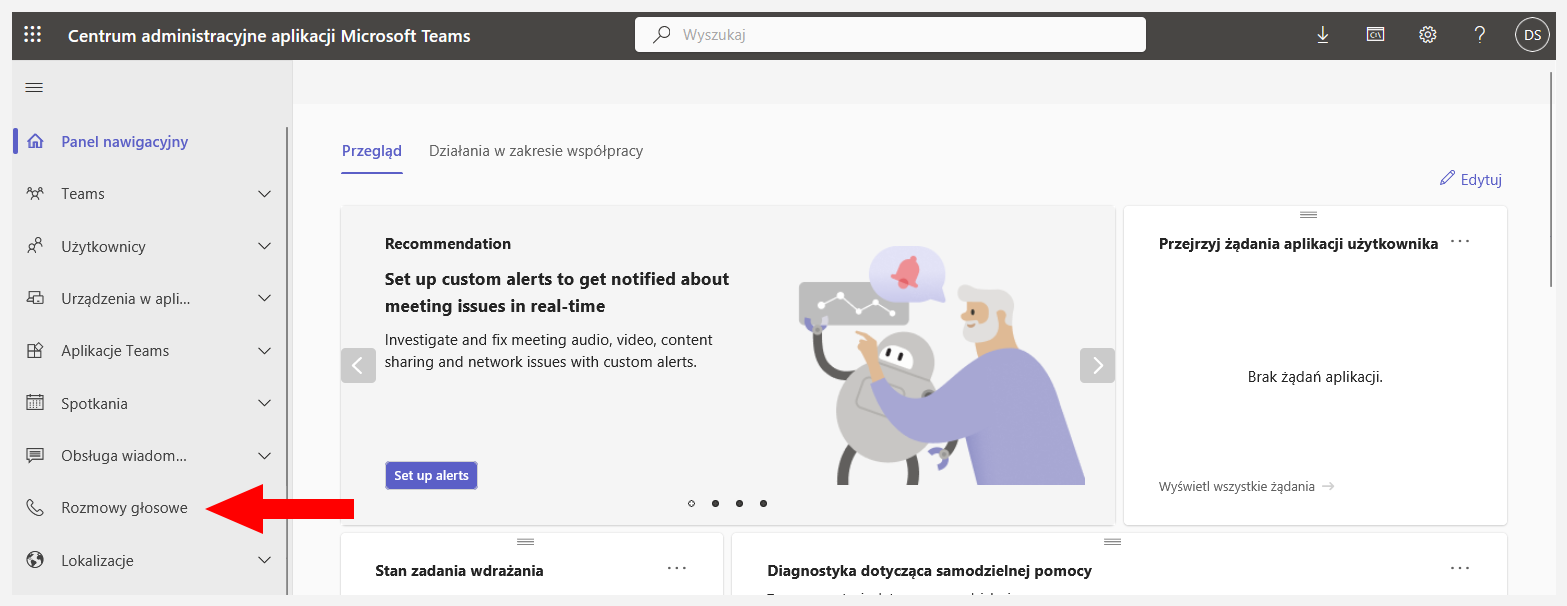
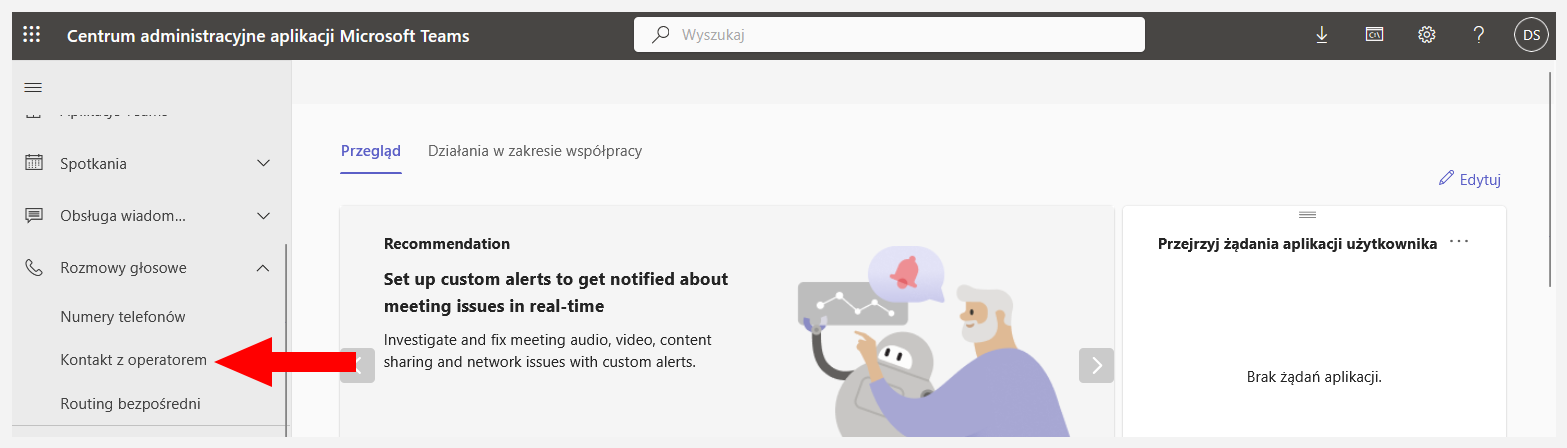
2. <span style="mso-ansi-language: PL;"><span style="color: rgb(226, 0, 116);"><span style="color: rgb(0, 0, 0);">In the left-hand menu, go to **Voice**.</span></span></span><span style="mso-ansi-language: PL;"><span style="color: rgb(226, 0, 116);"><span style="color: rgb(0, 0, 0);">[![SOy14246953-t-business-mailing-dla-uslugi-numer-w-teams-aktualizacja3.png](https://bookstack.uc.t-mobile.pl/uploads/images/gallery/2024-07/scaled-1680-/soy14246953-t-business-mailing-dla-uslugi-numer-w-teams-aktualizacja3.png)](https://bookstack.uc.t-mobile.pl/uploads/images/gallery/2024-07/soy14246953-t-business-mailing-dla-uslugi-numer-w-teams-aktualizacja3.png)</span></span></span>
3. <span style="mso-ansi-language: PL;"><span style="color: rgb(226, 0, 116);"><span style="color: rgb(0, 0, 0);">Then select **Operator Connect**.</span></span></span>[![Micimage.png](https://bookstack.uc.t-mobile.pl/uploads/images/gallery/2024-07/scaled-1680-/owzmicimage.png)](https://bookstack.uc.t-mobile.pl/uploads/images/gallery/2024-07/owzmicimage.png)
4. <span style="mso-ansi-language: PL;"><span style="color: rgb(226, 0, 116);"><span style="color: rgb(0, 0, 0);">Select the **All operators** tab.</span></span></span>[![VZElcLimage.png](https://bookstack.uc.t-mobile.pl/uploads/images/gallery/2024-07/scaled-1680-/74mvzelclimage.png)](https://bookstack.uc.t-mobile.pl/uploads/images/gallery/2024-07/74mvzelclimage.png)
5. <span style="mso-ansi-language: PL;">Display the operators available in </span>**<span style="mso-ansi-language: PL;">Poland.</span>**[![jgTimage.png](https://bookstack.uc.t-mobile.pl/uploads/images/gallery/2024-07/scaled-1680-/XCQjgtimage.png)](https://bookstack.uc.t-mobile.pl/uploads/images/gallery/2024-07/XCQjgtimage.png)
6. <span style="mso-ansi-language: PL;"><span style="color: rgb(226, 0, 116);"><span style="color: rgb(0, 0, 0);">Find **T-Mobile Polska** in the list of operators and select it.</span></span></span>[![obraz.png](https://bookstack.uc.t-mobile.pl/uploads/images/gallery/2025-08/scaled-1680-/0uIobraz.png)](https://bookstack.uc.t-mobile.pl/uploads/images/gallery/2025-08/0uIobraz.png)
7. <span style="mso-ansi-language: PL;">Complete the information on the page:</span>
    - <span style="mso-ansi-language: PL;"><span style="color: rgb(57, 57, 57);"><span class="hpyHhmSe9hmk5gopLr9a5Q==">select the country where the service will be provided,</span></span></span>
    - <span style="mso-ansi-language: PL;"><span style="color: rgb(57, 57, 57);"><span class="hpyHhmSe9hmk5gopLr9a5Q==">select your organization size,</span></span></span>
    - <span style="mso-ansi-language: PL;"><span style="color: rgb(57, 57, 57);"><span class="hpyHhmSe9hmk5gopLr9a5Q==">complete the contact form,</span></span></span>
    - <span style="mso-ansi-language: PL;"><span style="color: rgb(57, 57, 57);"><span class="hpyHhmSe9hmk5gopLr9a5Q==">accept the privacy settings.</span></span></span>
8. <span style="mso-ansi-language: PL;"><span style="color: rgb(226, 0, 116);"><span style="color: rgb(0, 0, 0);"><span style="color: rgb(226, 0, 116);"><span style="color: rgb(0, 0, 0);">Then submit the form by selecting **Add as my operator**.</span></span></span></span></span>[![pNYimage.png](https://bookstack.uc.t-mobile.pl/uploads/images/gallery/2024-07/scaled-1680-/607pnyimage.png)](https://bookstack.uc.t-mobile.pl/uploads/images/gallery/2024-07/607pnyimage.png)<span style="mso-ansi-language: PL;"><span style="color: rgb(226, 0, 116);"><span style="color: rgb(0, 0, 0);"><span style="color: rgb(226, 0, 116);"><span style="color: rgb(0, 0, 0);">After the form has been submitted, you will receive a confirmation email acknowledging receipt of your request. Then wait for **T-Mobile** to contact you. </span></span></span></span></span>

### **Contact with T-Mobile**

After the contact form has been submitted through the <span style="color: rgb(57, 57, 57);">**<span class="hpyHhmSe9hmk5gopLr9a5Q==">Microsoft Teams admin center, </span>**<span class="hpyHhmSe9hmk5gopLr9a5Q==">our sales representative will contact the person specified in the form. You will then receive our offer, after which the details of the agreement and service configuration will be determined. The key elements of this process will include:</span></span>

- <span style="color: rgb(57, 57, 57);"><span class="hpyHhmSe9hmk5gopLr9a5Q=="><span style="mso-ansi-language: PL;">Assigning phone numbers from the T-Mobile number pool or porting them from another service or operator.</span></span></span>
- <span style="color: rgb(57, 57, 57);"><span class="hpyHhmSe9hmk5gopLr9a5Q=="><span style="mso-ansi-language: PL;">Selecting a tariff for phone calls.</span></span></span>
- <span style="color: rgb(57, 57, 57);"><span class="hpyHhmSe9hmk5gopLr9a5Q=="><span style="mso-ansi-language: PL;">Determining the service activation date, which depends on the number of phone numbers and whether they are being ported from another operator.</span></span></span>

### **Service configuration**

The service is activated automatically. The customer only needs to assign phone numbers to user accounts in **Microsoft Teams**. This process is completed in the <span style="color: rgb(57, 57, 57);">**<span class="hpyHhmSe9hmk5gopLr9a5Q==">Microsoft Teams admin center </span>**<span class="hpyHhmSe9hmk5gopLr9a5Q==">(</span></span><span style="mso-ansi-language: PL;">Teams admin center)</span> and is described in the following guide: <span style="color: rgb(226, 0, 116);">*[Assigning phone numbers to Microsoft Teams user accounts](https://info.biznes.t-mobile.pl/books/numer-w-teams/page/przypisanie-numerow-telefonicznych-do-kont-uzytkownikow-microsoft-teams)*<span style="color: rgb(0, 0, 0);">. </span></span>

# Znalezienie Tenant ID swojej organizacji w usłudze Microsoft

Jak znaleźć **<span style="color: rgb(226, 0, 116);">Tenant ID </span>**<span style="color: rgb(54, 54, 54);">(pol. **Identyfikator dzierżawczy**)</span> swojej usługi **Microsoft,** potrzebny do konfiguracji usługi **Teams Operators Connect.** Poniżej znajdują się instrukcje znalezienia **Tenant ID** poprzez:  
<span style="color: rgb(226, 0, 116);">◼</span> **Microsoft Entra admin center  
<span style="color: rgb(226, 0, 116);">◼</span> Portal Azure**

#### **Microsoft Entra admin center**

<span style="color: rgb(226, 0, 116);">**1.** <span style="color: rgb(54, 54, 54);">Zaloguj się do **Microsft Entra admin center** (<span style="color: rgb(226, 0, 116);">*[Microsoft Entra admin center](https://entra.microsoft.com/)*</span>) kontem, które przynajmniej ma uprawnienia **Czytelnika globalnego** (<span style="color: rgb(226, 0, 116);">*[Global Reader](https://learn.microsoft.com/en-us/entra/identity/role-based-access-control/permissions-reference#global-reader)*</span>). </span></span>

<span style="color: rgb(226, 0, 116);"><span style="color: rgb(0, 0, 0);"><span style="color: rgb(226, 0, 116);">**2.** <span style="color: rgb(54, 54, 54);">W menu po lewej stronie</span> <span style="color: rgb(54, 54, 54);">rozwiń sekcję **Tożsamość** (Identity).</span></span></span></span>

[![3o5image.png](https://bookstack.uc.t-mobile.pl/uploads/images/gallery/2024-07/scaled-1680-/3o5image.png)](https://bookstack.uc.t-mobile.pl/uploads/images/gallery/2024-07/3o5image.png)

<span style="color: rgb(226, 0, 116);"><span style="color: rgb(0, 0, 0);"><span style="color: rgb(226, 0, 116);"><span style="color: rgb(54, 54, 54);"><span style="color: rgb(226, 0, 116);"><span style="color: rgb(0, 0, 0);"><span style="color: rgb(226, 0, 116);">**3.** <span style="color: rgb(54, 54, 54);">Wybierz opcję **Przegląd** (Overview).</span></span></span></span></span></span></span></span>

[![Sm1image.png](https://bookstack.uc.t-mobile.pl/uploads/images/gallery/2024-07/scaled-1680-/sm1image.png)](https://bookstack.uc.t-mobile.pl/uploads/images/gallery/2024-07/sm1image.png)

<span style="color: rgb(226, 0, 116);"><span style="color: rgb(0, 0, 0);"><span style="color: rgb(226, 0, 116);"><span style="color: rgb(54, 54, 54);"><span style="color: rgb(226, 0, 116);"><span style="color: rgb(0, 0, 0);"><span style="color: rgb(226, 0, 116);"><span style="color: rgb(54, 54, 54);"><span style="color: rgb(226, 0, 116);"><span style="color: rgb(0, 0, 0);"><span style="color: rgb(226, 0, 116);"><span style="color: rgb(54, 54, 54);"><label class="ms-Label propertyItemLabelStyle-163" for="PropertyItem73">**<span style="color: rgb(226, 0, 116);">4. <span style="color: rgb(0, 0, 0);"><span style="color: rgb(226, 0, 116);"><span style="color: rgb(54, 54, 54);"><span style="color: rgb(226, 0, 116);"><span style="color: rgb(0, 0, 0);"><span style="color: rgb(226, 0, 116);"><span style="color: rgb(54, 54, 54);">Tenant ID</span></span></span></span></span></span></span></span>**<span style="color: rgb(226, 0, 116);"><span style="color: rgb(0, 0, 0);"><span style="color: rgb(226, 0, 116);"><span style="color: rgb(54, 54, 54);"><span style="color: rgb(226, 0, 116);"><span style="color: rgb(0, 0, 0);"><span style="color: rgb(226, 0, 116);"><span style="color: rgb(54, 54, 54);"> (</span></span></span></span></span></span></span><span style="color: rgb(56, 55, 56);">pol. Identyfikator dzierżawczy</span><span style="color: rgb(0, 0, 0);"><span style="color: rgb(226, 0, 116);"><span style="color: rgb(54, 54, 54);"><span style="color: rgb(226, 0, 116);"><span style="color: rgb(0, 0, 0);"><span style="color: rgb(226, 0, 116);"><span style="color: rgb(54, 54, 54);">) </span></span></span></span></span></span></span></span><span style="color: rgb(226, 0, 116);"><span style="color: rgb(0, 0, 0);"><span style="color: rgb(226, 0, 116);"><span style="color: rgb(54, 54, 54);"><span style="color: rgb(226, 0, 116);"><span style="color: rgb(0, 0, 0);"><span style="color: rgb(226, 0, 116);"><span style="color: rgb(54, 54, 54);">znajduje się w zakładce **Informacje podstawowe.**</span></span></span></span></span></span></span></span></label></span></span></span></span></span></span></span></span></span></span></span></span>

[![ys3image.png](https://bookstack.uc.t-mobile.pl/uploads/images/gallery/2024-07/scaled-1680-/ys3image.png)](https://bookstack.uc.t-mobile.pl/uploads/images/gallery/2024-07/ys3image.png)

#### **Portal Azure**

<span style="color: rgb(226, 0, 116);">**1.** <span style="color: rgb(54, 54, 54);">Zaloguj się do **Microsoft Entra admin center** (*<span style="color: rgb(226, 0, 116);">[Azure portal](https://portal.azure.com/)</span>*).</span></span>

<span style="color: rgb(226, 0, 116);"><span style="color: rgb(0, 0, 0);"><span style="color: rgb(226, 0, 116);">**2.** <span style="color: rgb(54, 54, 54);">Wyszukaj i przejdź do usługi</span>**<span style="color: rgb(54, 54, 54);"> Microsoft Entra ID</span>**<span style="color: rgb(54, 54, 54);">.</span></span></span></span>

[![uAQimage.png](https://bookstack.uc.t-mobile.pl/uploads/images/gallery/2024-07/scaled-1680-/uaqimage.png)](https://bookstack.uc.t-mobile.pl/uploads/images/gallery/2024-07/uaqimage.png)

<span style="color: rgb(226, 0, 116);"><span style="color: rgb(0, 0, 0);"><span style="color: rgb(226, 0, 116);"><span style="color: rgb(54, 54, 54);"><span style="color: rgb(226, 0, 116);"><span style="color: rgb(0, 0, 0);"><span style="color: rgb(226, 0, 116);"><span style="color: rgb(54, 54, 54);"><span style="color: rgb(226, 0, 116);"><span style="color: rgb(0, 0, 0);"><span style="color: rgb(226, 0, 116);"><span style="color: rgb(54, 54, 54);">**<span style="color: rgb(226, 0, 116);"><span style="color: rgb(0, 0, 0);"><span style="color: rgb(226, 0, 116);"><span style="color: rgb(54, 54, 54);"><span style="color: rgb(226, 0, 116);"><span style="color: rgb(0, 0, 0);"><span style="color: rgb(226, 0, 116);"><span style="color: rgb(54, 54, 54);"><span style="color: rgb(226, 0, 116);"><span style="color: rgb(0, 0, 0);"><span style="color: rgb(226, 0, 116);"><span style="color: rgb(54, 54, 54);"><span style="color: rgb(226, 0, 116);">3. </span>Tenant ID </span></span></span></span></span></span></span></span></span></span></span></span>**<span style="color: rgb(226, 0, 116);"><span style="color: rgb(0, 0, 0);"><span style="color: rgb(226, 0, 116);"><span style="color: rgb(54, 54, 54);"><span style="color: rgb(226, 0, 116);"><span style="color: rgb(0, 0, 0);"><span style="color: rgb(226, 0, 116);"><span style="color: rgb(54, 54, 54);"><span style="color: rgb(226, 0, 116);"><span style="color: rgb(0, 0, 0);"><span style="color: rgb(226, 0, 116);"><span style="color: rgb(54, 54, 54);">(pol. Identyfikator dzierżawczy) znajduje się w zakładce </span></span></span></span></span></span></span></span></span></span></span></span>**<span style="color: rgb(226, 0, 116);"><span style="color: rgb(0, 0, 0);"><span style="color: rgb(226, 0, 116);"><span style="color: rgb(54, 54, 54);"><span style="color: rgb(226, 0, 116);"><span style="color: rgb(0, 0, 0);"><span style="color: rgb(226, 0, 116);"><span style="color: rgb(54, 54, 54);"><span style="color: rgb(226, 0, 116);"><span style="color: rgb(0, 0, 0);"><span style="color: rgb(226, 0, 116);"><span style="color: rgb(54, 54, 54);">Informacje podstawowe.</span></span></span></span></span></span></span></span></span></span></span></span>**</span></span></span></span></span></span></span></span></span></span></span></span>

[![fAEimage.png](https://bookstack.uc.t-mobile.pl/uploads/images/gallery/2024-07/scaled-1680-/faeimage.png)](https://bookstack.uc.t-mobile.pl/uploads/images/gallery/2024-07/faeimage.png)

<div class="ms-Shimmer-container shimmerContainerStyle-165" elementtiming="530" id="bkmrk--6"><div class="ms-Shimmer-dataWrapper dataWrapper-234" elementtiming="529">  
</div></div>

# Przypisanie numerów telefonicznych do kont użytkowników Microsoft Teams

Instrukcja przypisania **Numerów telefonicznych** do użytkowników **Microsoft Teams** w usłudze **Microsoft Teams Operator Connect**. Cały proces odbywa się z poziomu **<span class="hpyHhmSe9hmk5gopLr9a5Q==">Centrum administracyjnym aplikacji Microsoft Teams </span>**<span class="hpyHhmSe9hmk5gopLr9a5Q==">(</span>Teams Admin Center).

### **Przypisanie numerów do kont użytkowników**

<span style="color: rgb(226, 0, 116);">**1.** </span>Otwórz <span style="color: rgb(57, 57, 57);">**<span class="hpyHhmSe9hmk5gopLr9a5Q==">Centrum administracyjne aplikacji Microsoft Teams </span>**<span class="hpyHhmSe9hmk5gopLr9a5Q==">(</span></span>Teams Admin Center): <span style="color: rgb(226, 0, 116);"><span style="color: rgb(0, 0, 0);"><span style="color: rgb(226, 0, 116);">*[https://admin.teams.microsoft.com](https://admin.teams.microsoft.com)*</span></span></span> i zaloguj się przy użyciu użytkownika, który jest administratorem globalnym. Zazwyczaj jest to konto użyte do utworzenia konta w usłudze Microsoft 365.

<span style="color: rgb(226, 0, 116);">**2.** </span>Na pasku nawigacyjnym po lewej stronie kliknij **Rozmowy głosowe** (Voice).

**<span style="color: rgb(226, 0, 116);">3. </span>**Następnie **Numery telefonów** (Phone numbers).

<span style="color: rgb(226, 0, 116);">**4.** </span>Wybierz numer z listy, a następnie kliknij **przycisk Edytuj**.

<span style="color: rgb(226, 0, 116);">**5.** </span>W obszarze **Przypisano do** wyszukaj użytkownika według nazwy wyświetlanej lub nazwy użytkownika, a następnie kliknij **przycisk Przypisz**.

<span style="color: rgb(226, 0, 116);">**6.** </span>W zależności od tego, czy chcesz wysłać wiadomość e-mail do użytkownika z informacjami o numerze telefonu, wyłącz lub włącz **opcję Wyślij wiadomość e-mail do użytkownika z informacjami o numerze telefonu**. Domyślnie ta opcja jest włączona.

<span style="color: rgb(226, 0, 116);">**7.** </span>Kliknij **Zapisz**.

# T-Mobile Operator Connect for Microsoft Teams: Ordering and Activation

This article explains how to select **T-Mobile Polska** as your operator in the **Microsoft Teams admin center** and start the process of ordering T-Mobile telephony services through **Operator Connect**.

You will learn how to:

- find T-Mobile Polska in the list of available operators,
- submit your contact information,
- complete the commercial ordering process with T-Mobile,

## Before you begin

Before starting the ordering process, make sure that:

- the users who will receive phone numbers have the required **Microsoft Teams Phone** licences,
- you have the appropriate administrator permissions in the **Microsoft Teams admin center**,
- **T-Mobile Polska** provides **Operator Connect** services in the country or region where the phone numbers will be used.

If your organization does not have Microsoft Teams or the required Microsoft Teams Phone licences, visit the *[Microsoft 365 for Business – T-Mobile Business Poland](https://biznes.t-mobile.pl/pl/produkty-i-uslugi/modern-workplace/microsoft-365)* website or contact your T-Mobile account manager.

## Select T-Mobile Polska in the Teams admin center

1. Sign in with an administrator account to the **Microsoft Teams admin center**: *[https://admin.teams.microsoft.com](https://admin.teams.microsoft.com/)*.
2. In the left-hand navigation menu, go to **Voice**.   
    [![Voice section in the Microsoft Teams admin center](https://bookstack.uc.t-mobile.pl/uploads/images/gallery/2024-07/scaled-1680-/soy14246953-t-business-mailing-dla-uslugi-numer-w-teams-aktualizacja3.png)](https://bookstack.uc.t-mobile.pl/uploads/images/gallery/2024-07/soy14246953-t-business-mailing-dla-uslugi-numer-w-teams-aktualizacja3.png)
3. Select **Operator Connect**.   
    [![Operator Connect in the Microsoft Teams admin center](https://bookstack.uc.t-mobile.pl/uploads/images/gallery/2024-07/scaled-1680-/owzmicimage.png)](https://bookstack.uc.t-mobile.pl/uploads/images/gallery/2024-07/owzmicimage.png)
4. Select the **All operators** tab.   
    [![All operators tab in Operator Connect](https://bookstack.uc.t-mobile.pl/uploads/images/gallery/2024-07/scaled-1680-/74mvzelclimage.png)](https://bookstack.uc.t-mobile.pl/uploads/images/gallery/2024-07/74mvzelclimage.png)
5. Filter the list to display operators available in **Poland**.   
    [![Country and region filter showing Poland](https://bookstack.uc.t-mobile.pl/uploads/images/gallery/2024-07/scaled-1680-/XCQjgtimage.png)](https://bookstack.uc.t-mobile.pl/uploads/images/gallery/2024-07/XCQjgtimage.png)
6. Find **T-Mobile Polska** in the list of available operators and select it.   
    [![T-Mobile Polska in the list of available Operator Connect operators](https://bookstack.uc.t-mobile.pl/uploads/images/gallery/2025-08/scaled-1680-/0uIobraz.png)](https://bookstack.uc.t-mobile.pl/uploads/images/gallery/2025-08/0uIobraz.png)
7. Complete the operator request form: 
    - select the country or region where you want to use the service,
    - enter or verify your contact information,
    - select your organization size,
    - provide your phone number, if required,
    - accept the data transfer notice.
8. Select **Add as my operator** to save T-Mobile Polska as your operator and share the information provided in the form with T-Mobile.   
    [![Add as my operator button for T-Mobile Polska](https://bookstack.uc.t-mobile.pl/uploads/images/gallery/2024-07/scaled-1680-/607pnyimage.png)](https://bookstack.uc.t-mobile.pl/uploads/images/gallery/2024-07/607pnyimage.png)   
    You will receive an email confirming that your request has been submitted. A T-Mobile sales representative will then contact the person specified in the form.

## What happens after submitting the form

Adding T-Mobile Polska as your operator in the Microsoft Teams admin center starts the contact process. It does not complete the commercial order or automatically assign phone numbers to users.

A T-Mobile sales representative will contact the person specified in the form to present the offer and agree on the details of the order and service configuration.

The main elements of this process include:

- **Phone number allocation or porting** – new phone numbers can be allocated from the T-Mobile number pool, or existing phone numbers can be ported from another service or telecommunications operator.
- **Calling tariff** – the appropriate tariff for telephone calls will be selected.
- **Commercial terms** – the details of the agreement and the services included in the order will be confirmed.
- **Activation date** – the planned service activation date will be agreed. The date may depend on the number of phone numbers and whether existing phone numbers are being ported from another operator.

## Service activation

Once the order has been completed and the phone numbers have been provided by T-Mobile, the numbers will become available in the **Microsoft Teams admin center**.

The customer must then assign the available phone numbers to the appropriate Microsoft Teams users.

This process is completed in the **Microsoft Teams admin center** and is described in the following instruction:

*[Assigning phone numbers to Microsoft Teams user accounts](https://info.biznes.t-mobile.pl/books/numer-w-teams/page/przypisanie-numerow-telefonicznych-do-kont-uzytkownikow-microsoft-teams)*.

# Microsoft Teams Operator Connect


# How to Order Microsoft Teams Operator Connect from T-Mobile

This guide explains how to order the **Microsoft Teams Operator Connect** service from T-Mobile. It describes how to submit the required form in the Microsoft Teams admin center, when a T-Mobile sales representative will contact you, and what happens after the order has been finalized.

### Before you begin

Before ordering the service, make sure that your organization meets the following requirements:

- Users who will use the service have the required **Microsoft Teams** and **Microsoft Teams Phone Standard** licenses.
- The person completing the configuration has the appropriate administrator permissions to manage Teams Phone services.

If your organization does not yet use **Microsoft Teams** or does not have the required **Microsoft Teams Phone Standard** licenses, visit [Microsoft 365 for business – T-Mobile Business Poland](https://biznes.t-mobile.pl/pl/produkty-i-uslugi/modern-workplace/microsoft-365) or contact your T-Mobile account manager.

## Submit the request in the Microsoft Teams admin center

To start the ordering process, enable T-Mobile Polska as your Operator Connect provider in the **Microsoft Teams admin center**.

1. Sign in to the **Microsoft Teams admin center** using an account with the required administrator permissions:
    
    [https://admin.teams.microsoft.com](https://admin.teams.microsoft.com/)
2. In the left-hand navigation menu, go to **Voice**.
    
    [ ![Voice section in the Microsoft Teams admin center](https://bookstack.uc.t-mobile.pl/uploads/images/gallery/2024-07/scaled-1680-/soy14246953-t-business-mailing-dla-uslugi-numer-w-teams-aktualizacja3.png) ](https://bookstack.uc.t-mobile.pl/uploads/images/gallery/2024-07/soy14246953-t-business-mailing-dla-uslugi-numer-w-teams-aktualizacja3.png)
3. Select **Operator Connect**.
    
    [ ![Operator Connect option in the Microsoft Teams admin center](https://bookstack.uc.t-mobile.pl/uploads/images/gallery/2024-07/scaled-1680-/owzmicimage.png) ](https://bookstack.uc.t-mobile.pl/uploads/images/gallery/2024-07/owzmicimage.png)
4. Open the **All operators** tab.
    
    [ ![All operators tab](https://bookstack.uc.t-mobile.pl/uploads/images/gallery/2024-07/scaled-1680-/74mvzelclimage.png) ](https://bookstack.uc.t-mobile.pl/uploads/images/gallery/2024-07/74mvzelclimage.png)
5. Filter the list to display operators available in **Poland**.
    
    [ ![Filtering operators available in Poland](https://bookstack.uc.t-mobile.pl/uploads/images/gallery/2024-07/scaled-1680-/XCQjgtimage.png) ](https://bookstack.uc.t-mobile.pl/uploads/images/gallery/2024-07/XCQjgtimage.png)
6. Find **T-Mobile Polska** on the list and select it.
    
    [ ![T-Mobile Polska on the list of Operator Connect providers](https://bookstack.uc.t-mobile.pl/uploads/images/gallery/2025-08/scaled-1680-/0uIobraz.png) ](https://bookstack.uc.t-mobile.pl/uploads/images/gallery/2025-08/0uIobraz.png)
7. Complete the operator settings and contact details:
    
    
    - Select the country or region where the service will be provided.
    - Select your company size.
    - Review and complete the contact details that will be shared with T-Mobile Polska.
    - Accept the data transfer and privacy notice.
    
    The contact details provided in the form will be used by T-Mobile Polska to contact your organization about the Operator Connect service.
8. Select **Add as my operator** to submit the information and enable T-Mobile Polska as your Operator Connect provider.
    
    [ ![Add as my operator button](https://bookstack.uc.t-mobile.pl/uploads/images/gallery/2024-07/scaled-1680-/607pnyimage.png) ](https://bookstack.uc.t-mobile.pl/uploads/images/gallery/2024-07/607pnyimage.png)
    
    After the form has been submitted, you will receive an email confirming that your request has been accepted. A T-Mobile representative will then contact the person whose details were provided in the form.

## Contact from T-Mobile

After T-Mobile Polska has been added as your operator in the Microsoft Teams admin center, a T-Mobile sales representative will contact the person identified in the form.

During the contact, the representative will present the available offer and agree with you on the contract and service configuration. The main arrangements include:

- **Telephone numbers** – allocation of new telephone numbers from the T-Mobile number range, transfer of numbers from another T-Mobile service, or porting of numbers from another operator.
- **Calling tariff** – selection of the tariff that will apply to telephone calls.
- **Service activation date** – agreement on the expected activation date. The date depends on the number of telephone numbers and whether they are being ported from another operator.

## Service activation and configuration

The connection between T-Mobile Polska and your Microsoft 365 organization is activated as part of the service implementation process. Once the telephone numbers have been made available by the operator, your administrator must assign them to the appropriate user accounts in the **Microsoft Teams admin center**.

Instructions for assigning telephone numbers are available on the following page:

[Assigning telephone numbers to Microsoft Teams user accounts](https://info.biznes.t-mobile.pl/books/numer-w-teams/page/przypisanie-numerow-telefonicznych-do-kont-uzytkownikow-microsoft-teams)

Users must have the required Teams Phone licenses before telephone numbers can be assigned to them. Depending on your organization's configuration, additional settings, such as emergency addresses and calling policies, may also be required.